
 DiffuseLinux
vs
Beyond CompareWindows
DiffuseLinux
vs
Beyond CompareWindows
Diffuse als Linux-Alternative zu Beyond Compare
Aktualisiert am
Unser Fazit
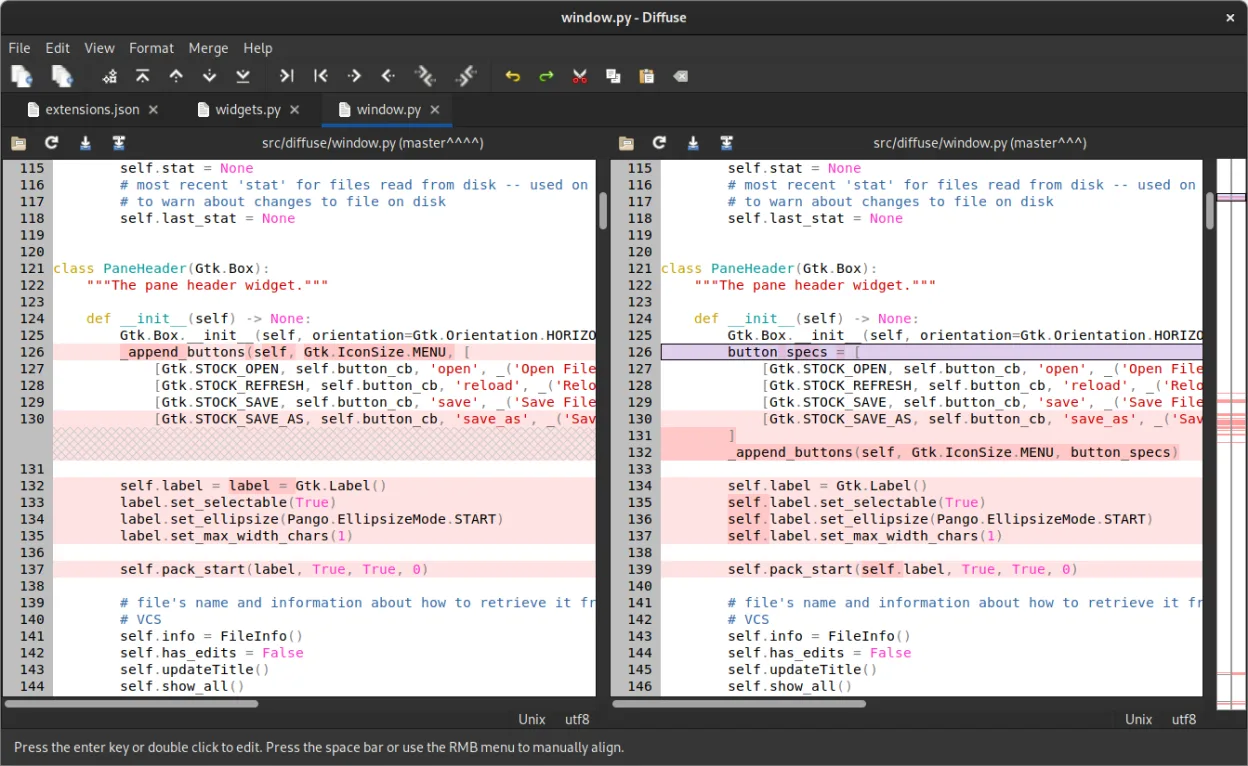
Diffuse can replace Beyond Compare for users who only need text file comparison and basic merge support, especially those working with Git or other VCS. It offers a clean two‑pane diff view, line‑by‑line highlighting, and a merge editor with conflict resolution. However, it lacks directory tree comparison, archive unpacking, and advanced binary diffing, so power users who rely on those features will find it insufficient.
Funktionsabdeckung
- Lizenz
- GPL-2.0-or-later
- Preis
- Kostenlos
- Aktuelle Version
- 0.11.0 (12. März 2026)
- Bewertung
- —
Was gleich funktioniert
- Two‑pane diff view with line highlighting
- Merge editor with conflict resolution
- Keyboard shortcuts for navigation
- Customizable color scheme
- Command‑line interface for scripting
Was anders ist
- No directory tree comparison or sync
- No archive (zip, tar) content comparison
- No binary file comparison
- Limited visual highlighting (no side‑by‑side folder view)
- No built‑in file synchronization
- No support for batch processing of large datasets
Ihre Beyond Compare-Dateien öffnen
Diffuse cannot open Beyond Compare project files (.bcmp) or export its comparison results directly. Users will need to re‑create comparisons manually or export Beyond Compare output to plain text and then load that into Diffuse.
Von Beyond Compare zu Diffuse wechseln – Schritt für Schritt
- Install Diffuse from your distro’s package manager or Flathub.
- Open the two text files you want to compare via File → Open or drag‑and‑drop.
- Use the merge editor to resolve conflicts if you’re working with a VCS branch.
- Save the merged file with File → Save or use the command‑line tool for scripting.
Wichtige Funktionen von Diffuse
- Zwei-Panellen-Diff-Ansicht mit zeilenweiser Hervorhebung
- Merge-Editor mit Konfliktauflösungssteuerungen
- Unterstützt Bazaar, CVS, Darcs, Git, Mercurial, Monotone, RCS, SVN
- Tastenkürzel für Navigation und Zusammenführung
- Anpassbares Farbschema
- Befehlszeilenschnittstelle für Skripting
Diffuse unter Linux installieren
Flatpak (Flathub)
flatpak install flathub io.github.mightycreak.DiffuseUbuntu / Mint
sudo apt install diffuseDebian
sudo apt install diffuseFedora
sudo dnf install diffuseArch / Manjaro
sudo pacman -S diffuse2 weitere Alternativen zu Beyond Compare
 MeldMeld ist ein kostenloses visuelles Diff‑ und Merge‑Tool zum Vergleichen von Dateien, Verzeichnissen und…Open SourceKostenlosFlatpakMeld vs. Beyond Compare
 KDiff3KDiff3 ist ein kostenloses, quelloffenes Tool zum Vergleichen und Zusammenführen von Textdateien und Ordnern…Open SourceKostenlosFlatpakKDiff3 vs. Beyond Compare
Diffuse bewerten
Als Erste(r) bewerten
Guter Ersatz für Beyond Compare?
8