
 KonversationLinux
vs
KonversationLinux
vs
 mIRCWindows
Konversation als Linux-Alternative zu mIRC
Aktualisiert am
Unser Fazit
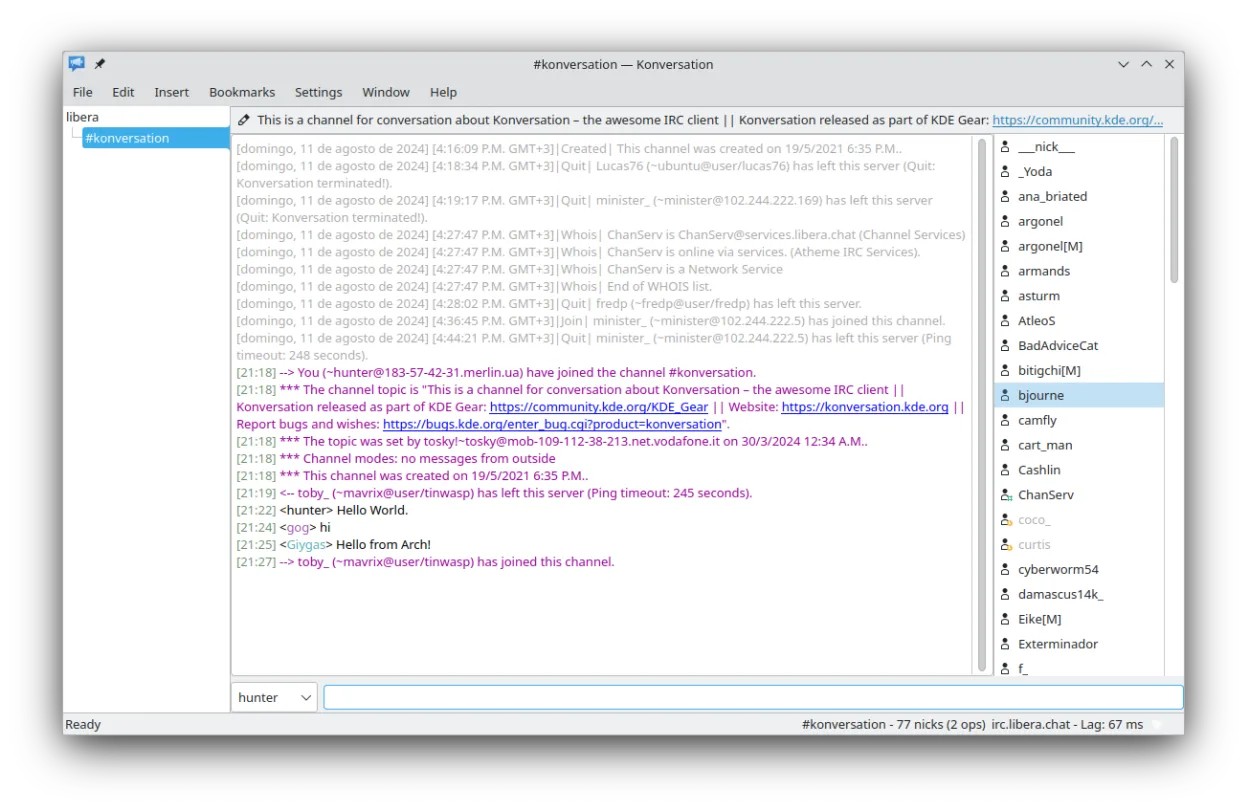
Konversation can serve as a solid replacement for mIRC for users who want a native Linux IRC client that covers most everyday IRC tasks. It handles multiple servers, channels, DCC file transfer, and scripting via its alias system, though its scripting language is simpler than mIRC’s. It is best suited for users who prefer a KDE‑style interface and don’t rely on advanced mIRC scripts or plugins. For power users who depend on complex mIRC scripts, Konversation may feel limited, but for general chat and file transfer it works well.
- Lizenz
- GPL-2.0+
- Preis
- Kostenlos
- Aktuelle Version
- 1.10.26043 (2. Juli 2026)
- Bewertung
- —
Was gleich funktioniert
- Both support multiple servers and channels in a single window
- Both provide DCC file transfer
- Both allow per‑channel text decorations and themes
- Both support SSL for secure connections
- Both have configurable user lists and topic handling
Was anders ist
- Konversation’s scripting is limited to aliases and simple macros, lacking mIRC’s full scripting engine and plugin ecosystem
- mIRC offers extensive plug‑in support and a large community of scripts; Konversation does not
- Konversation does not support the same level of advanced channel management commands (e.g., channel modes) that mIRC users often employ
- mIRC has a long history of custom key bindings and macros that are not directly transferable to Konversation
- Konversation’s UI is KDE‑centric; users on non‑KDE desktops may prefer a more generic look
Ihre mIRC-Dateien öffnen
Konversation does not natively import mIRC script files (.mrc) or configuration files. Users will need to manually recreate scripts and settings. For DCC transfers, mIRC’s log files can be opened as plain text, but there is no direct export/import feature between the two clients.
Von mIRC zu Konversation wechseln – Schritt für Schritt
- Export your mIRC settings by copying the .mrc script file and any custom aliases to a safe location
- Open Konversation and go to Settings → Configure Konversation → Scripts to create new aliases that mimic your mIRC macros
- Add your preferred IRC networks under Settings → Configure Konversation → Networks, then create nicknames for each server
- Use the DCC settings in Konversation (Settings → Configure Konversation → DCC) to set download directories and enable file transfer
- Import any custom themes or color schemes by copying the relevant files into Konversation’s theme directory
- Test the connection to each server and verify that channel lists, user lists, and notifications work as expected
Wichtige Funktionen von Konversation
- Unterstützung für mehrere Server und Kanäle in einem einzigen Fenster
- SSL-Serverunterstützung für sichere Verbindungen
- DCC-Dateiübertragungsfunktion
- Mehrere Identitäten für verschiedene Server
- Textdekorationen, Farben und Theme-Unterstützung für Nick-Icons
- On-Screen-Display für Benachrichtigungen
- Automatische UTF-8-Erkennung und pro Kanal Encoding-Unterstützung
- Bookmarking-Unterstützung für schnellen Zugriff auf Kanäle
Konversation unter Linux installieren
flatpak install flathub org.kde.konversationsudo apt install konversationsudo apt install konversationsudo dnf install konversationsudo pacman -S konversationsudo zypper install konversationHäufige Fragen
Can I use my old mIRC scripts in Konversation?
Konversation’s scripting system is different; you’ll need to rewrite scripts as aliases or use the built‑in macro system. There is no direct import of .mrc files.
Does Konversation support plugins like mIRC?
No, Konversation does not have a plugin framework. It relies on its own alias and macro system for extensibility.
Will Konversation work on non‑KDE desktops?
Yes. Konversation is a standalone KDE application but can run on any desktop environment that supports Qt and the required libraries.
3 weitere Alternativen zu mIRC
 IrssiIrssi ist ein leichtgewichtiger, terminalbasierter IRC-Client für Linux.Open SourceKostenlosIrssi vs. mIRC
 Quassel IRCQuassel IRC is a distributed IRC client that keeps you connected via a central core you can attach to from…Open SourceKostenlosQuassel IRC vs. mIRC
 XChatXChat is a lightweight, scriptable IRC client for Linux and Windows, popular for its simplicity and plugin…Open SourceKostenlosEingestelltXChat vs. mIRC