
 OpenOffice.org BaseLinux
vs
OpenOffice.org BaseLinux
vs
 Microsoft Office AccessWindows
OpenOffice.org Base als Linux-Alternative zu Microsoft Office Access
Aktualisiert am
Unser Fazit
OpenOffice.org Base can replace Microsoft Access for users who need a free, cross‑platform desktop database solution. It offers visual table, query, form and report designers, an embedded HSQLDB engine, and basic macro support. It works well for small‑scale projects, simple data entry, and learning database concepts, but it lacks the advanced reporting, VBA compatibility, and enterprise‑grade features of Access.
- Lizenz
- Apache-2.0
- Preis
- Kostenlos
- Aktuelle Version
- —
- Bewertung
- —
Was gleich funktioniert
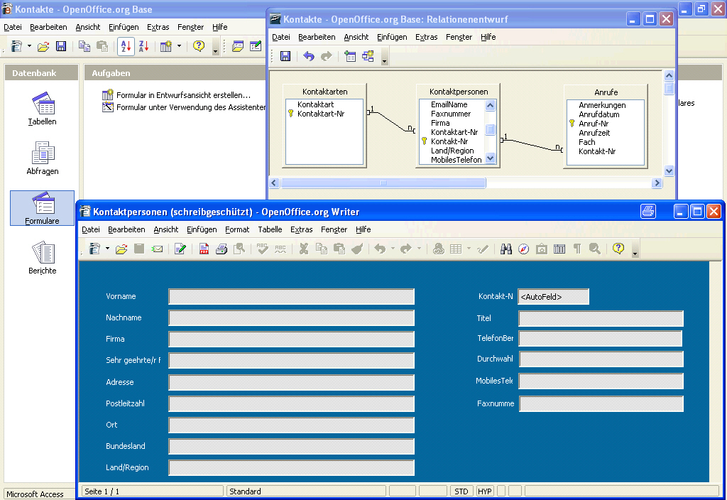
- Visual database design tools for tables, queries, forms, and reports
- Embedded local database engine (HSQLDB vs. Jet/ACE)
- SQL editor with syntax highlighting
- Import/export of common data formats
- Cross‑platform availability
Was anders ist
- No native support for .accdb/.mdb files – requires conversion or third‑party tools
- Limited macro language (OpenOffice Basic) and no VBA compatibility
- Fewer advanced reporting options and data validation rules
- No built‑in support for multi‑user concurrency or replication
- Smaller user community and fewer third‑party extensions
Ihre Microsoft Office Access-Dateien öffnen
OpenOffice.org Base cannot open .accdb or .mdb files directly. Users must export Access data to CSV or use a third‑party conversion tool before importing into Base. Exporting from Base to Access formats is not supported; data can be exported to CSV and then imported into Access if needed.
Von Microsoft Office Access zu OpenOffice.org Base wechseln – Schritt für Schritt
- Export Access tables to CSV or SQL scripts using Access export wizard.
- Open Base, create a new database, and use the import wizard to bring in the CSV files or execute the SQL scripts.
- Recreate forms and reports in Base using its visual designer; adjust layouts manually.
- Set up any required macros in OpenOffice Basic; rewrite VBA code if necessary.
- Test queries and relationships to ensure data integrity.
- Document any differences in behavior for future reference.
Wichtige Funktionen von OpenOffice.org Base
- Tabellen, Abfragen, Formulare und Berichte über einen visuellen Designer erstellen
- Eingebettete HSQLDB‑Engine für lokale Datenbanken
- SQL‑Editor mit Syntax‑Highlighting
- Import/Export von CSV, dBase und anderen gängigen Formaten
- Verknüpfung zu externen Datenquellen (MySQL, PostgreSQL usw.)
- Grundlegende Makro‑Unterstützung mit OpenOffice Basic
- Integration mit anderen OpenOffice‑Komponenten (Writer, Calc)
- Plattformübergreifend: funktioniert unter Linux, Windows und macOS
Häufige Fragen
Does Base support VBA macros from Access?
No. Base uses OpenOffice Basic, which is different from VBA. VBA code will need to be rewritten or replaced with Basic macros.
Can I use Base with a MySQL backend?
Yes. Base can connect to external databases like MySQL or PostgreSQL via JDBC drivers, allowing you to use a server‑side engine instead of the embedded HSQLDB.
Is Base suitable for multi‑user environments?
Base’s embedded HSQLDB supports single‑user or small‑team use, but it is not designed for heavy multi‑user concurrency. For larger deployments, consider a dedicated database server.
2 weitere Alternativen zu Microsoft Office Access
 KexiKexi ist ein visuelles Werkzeug zur Datenbankgestaltung und -verwaltung, mit dem Sie Datenbanken ohne…Open SourceKostenlosKexi vs. Microsoft Office Access
 LibreOffice BaseLibreOffice Base ist ein Desktop‑Datenbank‑Management‑Tool zum Erstellen und Verwalten von Datenbanken und…Open SourceKostenlosFlatpakLibreOffice Base vs. Microsoft Office Access