
 PostmanLinux
vs
InsomniaWindows
Postman als Linux-Alternative zu Insomnia
Aktualisiert am
Unser Fazit
Postman is a solid replacement for Insomnia if you're okay with a proprietary tool and don't mind creating an account for full functionality. It covers all core API testing needs: sending HTTP requests, managing environments, and supporting REST, GraphQL, and authentication methods. The interface is polished and feature-rich, especially for team collaboration and documentation. However, offline use requires local collections, and the free tier pushes cloud sync. For solo developers wanting simplicity and full offline access without accounts, Insomnia may still be preferable.
- Lizenz
- LicenseRef-proprietary=https://www.postm…
- Preis
- freemium
- Aktuelle Version
- 12.37.3 (19. November 2026)
- Bewertung
- —
Was gleich funktioniert
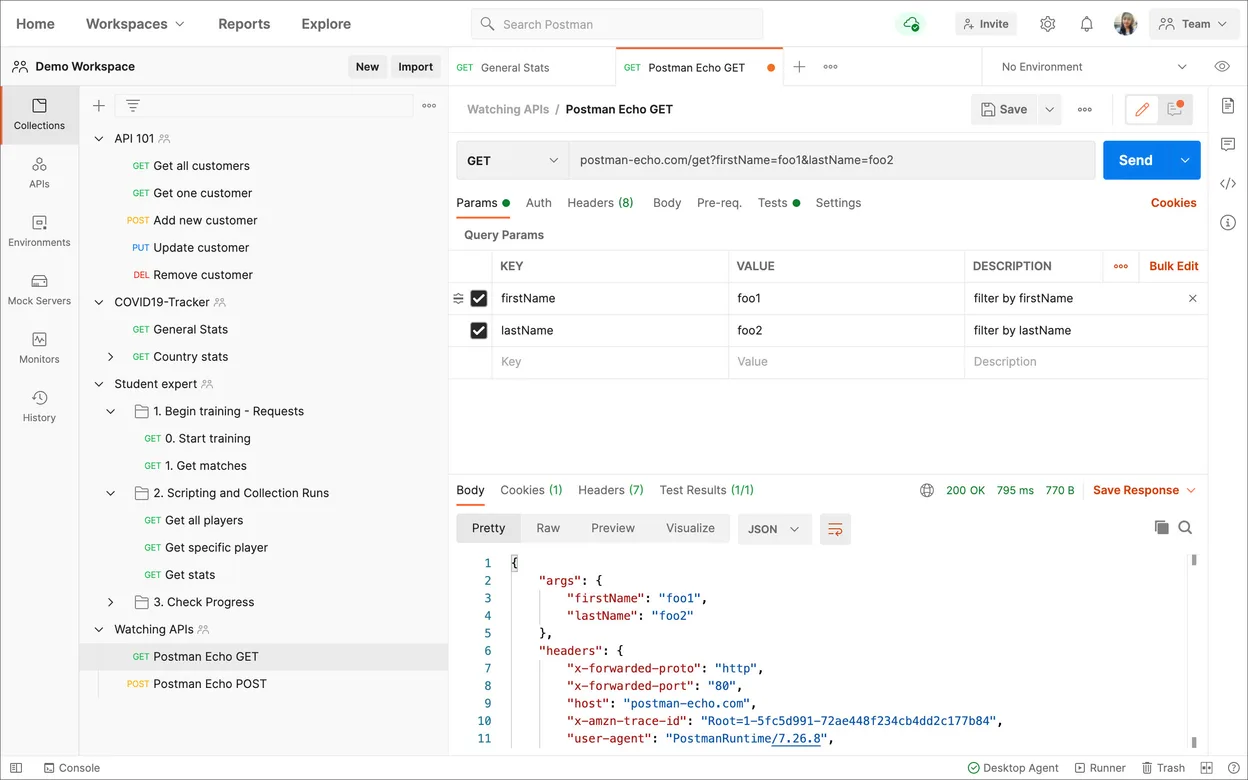
- Send and save HTTP requests (GET, POST, etc.) with full method support
- Support for REST, GraphQL, and authentication (API keys, OAuth 2.0)
- Environment variables and structured request organization
- Request history and detailed response inspection tools
- Cross-platform availability including native Linux support
Was anders ist
- Postman requires an account for syncing and full cloud features; Insomnia does not
- Postman's free tier limits offline-only usage compared to Insomnia's fully offline open-source core
- Postman has stronger team collaboration and API monitoring tools
- Insomnia is open-source; Postman is proprietary despite offering a free tier
- Postman includes built-in API documentation generation and CI/CD integrations
Ihre Insomnia-Dateien öffnen
Postman can import collections from Insomnia via JSON export. Insomnia supports exporting to OpenAPI, Postman Collection v2.1, and cURL formats, making it straightforward to move collections into Postman. However, environment variables and folder structure may need manual adjustments after import. There's no direct sync between the two tools, but the shared format support ensures basic interoperability for requests and endpoints.
Von Insomnia zu Postman wechseln – Schritt für Schritt
- In Insomnia, go to the collection you want to migrate and export it as a Postman v2.1 collection
- Open Postman and select 'Import' from the top-left menu
- Choose 'Upload Files' and select the exported JSON file
- Map or recreate environment variables manually in Postman's environment manager
- Verify requests, authentication settings, and folder organization
- Optionally, create a local workspace in Postman if you prefer to work offline
Wichtige Funktionen von Postman
- Erstellen und Senden von HTTP-Anfragen mit verschiedenen Methoden
- Automatisierung von API-Tests mithilfe von JavaScript-basierten Testskripten
- Verwaltung von Umgebungen und Variablen für unterschiedliche Konfigurationen
- Generierung von API-Dokumentation aus Ihren Sammlungen
- Zusammenarbeit über gemeinsame Arbeitsbereiche und Teamkonten
- Überwachung der API-Leistung und -Verfügbarkeit
- Unterstützung der Protokolle GraphQL, SOAP und gRPC
- Integration in CI/CD-Tools wie Jenkins und GitLab CI
Postman unter Linux installieren
flatpak install flathub com.getpostman.PostmanHäufige Fragen
Do I need an account to use Postman on Linux?
Yes, you need a Postman account to sign in, even for local development. You can use it offline after logging in, but initial setup requires internet access and account creation.
Can Postman handle GraphQL requests like Insomnia?
Yes, Postman supports GraphQL with a dedicated request builder. You can set query variables, headers, and view structured responses, just like in Insomnia.
Is Postman truly available for Linux?
Yes, Postman offers a native Linux app via .deb, .rpm, and Flatpak (Flathub), with regular updates and full feature parity with other platforms.
3 weitere Alternativen zu Insomnia
 BrunoA fast, offline-first API client that stores collections as plain text files in your filesystem for easy Git…FlatpakBruno vs. InsomniacURLcURL ist ein Befehlszeilentool, das Daten mit URL-Syntax überträgt und viele Protokolle unterstützt.Open SourceKostenloscURL vs. Insomnia
 HTTPieHTTPie Desktop ist ein plattformübergreifender grafischer API‑Client, der das httpie‑CLI‑Erlebnis…KostenlosFlatpakHTTPie vs. Insomnia