
 QDirStatLinux
vs
TreeSize FreeWindows
QDirStatLinux
vs
TreeSize FreeWindows
QDirStat als Linux-Alternative zu TreeSize Free
Aktualisiert am
Unser Fazit
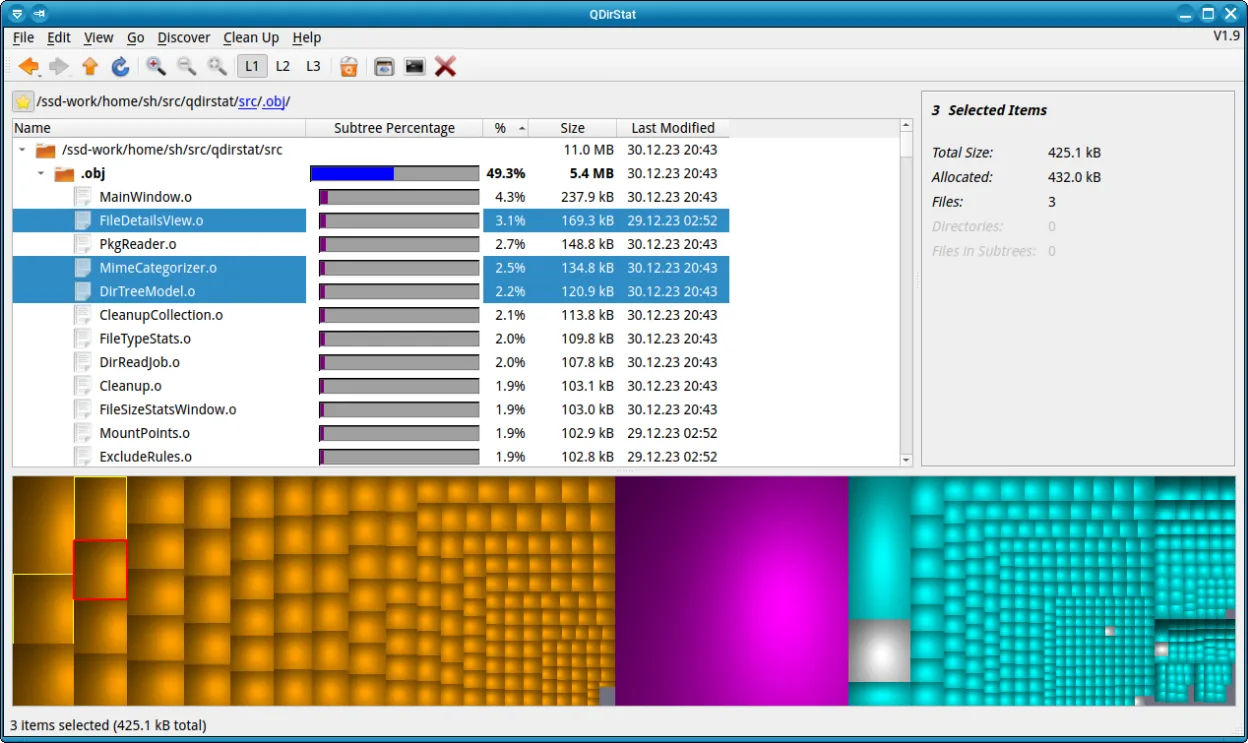
QDirStat is a solid Linux alternative to TreeSize Free for users who need a graphical overview of disk usage and occasional cleanup. It offers a tree view and a treemap, lets you delete files to trash, and can export data, which covers most everyday tasks. Power users who rely on extensive scripting or need deep command‑line integration may still prefer a CLI‑only tool, but for typical desktop users the feature set is more than adequate.
- Lizenz
- GPL-2.0-only
- Preis
- Kostenlos
- Aktuelle Version
- 2.0 (18. Januar 2026)
- Bewertung
- —
Was gleich funktioniert
- Tree view of directories with size information
- Ability to sort or filter by size
- Export of statistics to text/CSV
- Graphical interface for quick inspection
Was anders ist
- QDirStat includes a treemap visualization, TreeSize Free does not
- QDirStat can delete files to trash directly from the UI, TreeSize Free only marks for deletion
- TreeSize Free offers a command‑line mode for scripting; QDirStat lacks a native CLI interface
- Export formats may differ; TreeSize Free can copy results to clipboard more directly
Ihre TreeSize Free-Dateien öffnen
QDirStat does not understand TreeSize Free's proprietary report files. You can manually copy or re‑export data from TreeSize Free as plain text or CSV and then import that into QDirStat if needed, but there is no automated conversion. If you only need the exported CSV, QDirStat can read similar CSV structures, so re‑creating the report is straightforward.
Von TreeSize Free zu QDirStat wechseln – Schritt für Schritt
- Install QDirStat from your distribution’s repository or via Flathub
- Run QDirStat and let it scan the desired partitions
- Compare the tree view with your TreeSize Free output to verify sizes
- If you need exported data, use QDirStat’s Export to CSV feature
- Delete or move unwanted files using the built‑in trash function
- Optionally, create a script that calls QDirStat’s command‑line options for automated scans
Wichtige Funktionen von QDirStat
- Baumansicht von Verzeichnissen und Dateien
- Treemap-Grafik mit Farbcodierung
- Klick zum Navigieren und Löschen in den Papierkorb
- Such- und Filteroptionen
- Anpassbare Farbschemata
- Export von Statistiken als Text oder CSV
- Tastenkürzel für die Navigation
- Plattformübergreifend (Debian, Fedora, openSUSE, Ubuntu)
QDirStat unter Linux installieren
flatpak install flathub io.github.shundhammer.qdirstatsudo apt install qdirstatsudo apt install qdirstatsudo dnf install qdirstatsudo zypper install qdirstatHäufige Fragen
Can QDirStat be used in scripts?
It has limited command‑line support; you can launch a scan and export results, but it lacks the full scripting capabilities of TreeSize Free.
Does QDirStat run on all Linux distributions?
Yes, it is packaged for Debian, Fedora, openSUSE, Ubuntu and available as a Flathub flatpak, so it works on most modern distros.
Is there a way to open TreeSize Free export files directly in QDirStat?
No native importer exists; you would need to convert the data to a supported format like CSV manually.
4 weitere Alternativen zu TreeSize Free
 FilelightFilelight visualisiert die Festplattennutzung mit konzentrischen Ringen, sodass Sie große Dateien leicht…Open SourceKostenlosFlatpakFilelight vs. TreeSize FreencduEin schnelles, interaktives Befehlszeilentool zur Analyse der Festplattenauslastung mit einer baumartigen…Open SourceKostenlosncdu vs. TreeSize Freexduxdu ist ein Befehlszeilen-Tool zur Analyse der Festplattenauslastung unter Linux, ähnlich wie Windows…Open SourceKostenlosxdu vs. TreeSize Free