
 SpyderLinux
vs
PyCharmWindows
SpyderLinux
vs
PyCharmWindows
Spyder als Linux-Alternative zu PyCharm
Aktualisiert am
Unser Fazit
Spyder is a solid replacement for PyCharm if your work centers on scientific computing, data analysis, or interactive exploration. It excels at inspecting NumPy arrays and Pandas DataFrames, which PyCharm handles poorly without plugins. However, it is not a drop-in swap for general web development. If you build Django or Flask applications, PyCharm’s framework-specific tooling is superior. Spyder is best for scientists and data engineers who need a powerful debugger and interactive console, but less suitable for full-stack developers requiring deep web framework integration.
- Lizenz
- MIT
- Preis
- Kostenlos
- Aktuelle Version
- v6.1.6 (28. Juli 2026)
- Bewertung
- —
Was gleich funktioniert
- Integrated debugger with breakpoint management and step-through execution
- Python syntax highlighting and code completion capabilities
- Version control integration, primarily focusing on Git
- Project management tools for organizing files and configurations
- Code analysis and linting via Pylint and PEP8
Was anders ist
- Lacks dedicated, deep integration for web frameworks like Django and Flask
- No built-in database tools comparable to PyCharm’s data tools
- Focused on scientific libraries (NumPy, Pandas) rather than general enterprise Python
- Interactive IPython console is central, whereas PyCharm uses a standard Python console
- Plugin architecture is less extensive than JetBrains’ marketplace
Ihre PyCharm-Dateien öffnen
Spyder does not natively open PyCharm project files (.idea). You will need to open the source code directories directly in Spyder. Configuration files for linters or debuggers may need to be recreated or adjusted to match Spyder’s settings, as the two IDEs store metadata differently. Code files themselves are standard Python and will open without issue.
Von PyCharm zu Spyder wechseln – Schritt für Schritt
- Install Spyder via your distribution’s package manager or Flathub
- Open your existing Python project directory in Spyder
- Configure Git integration in Spyder’s preferences to match your repository settings
- Set up your preferred linter (Pylint or PEP8) in the code analysis settings
- Recreate any specific debug configurations or run scripts in Spyder’s run configuration
- Test your workflow, especially if you rely on interactive console features
Wichtige Funktionen von Spyder
- Interaktive IPython‑Konsole mit umfangreicher Ausgabe‑Darstellung
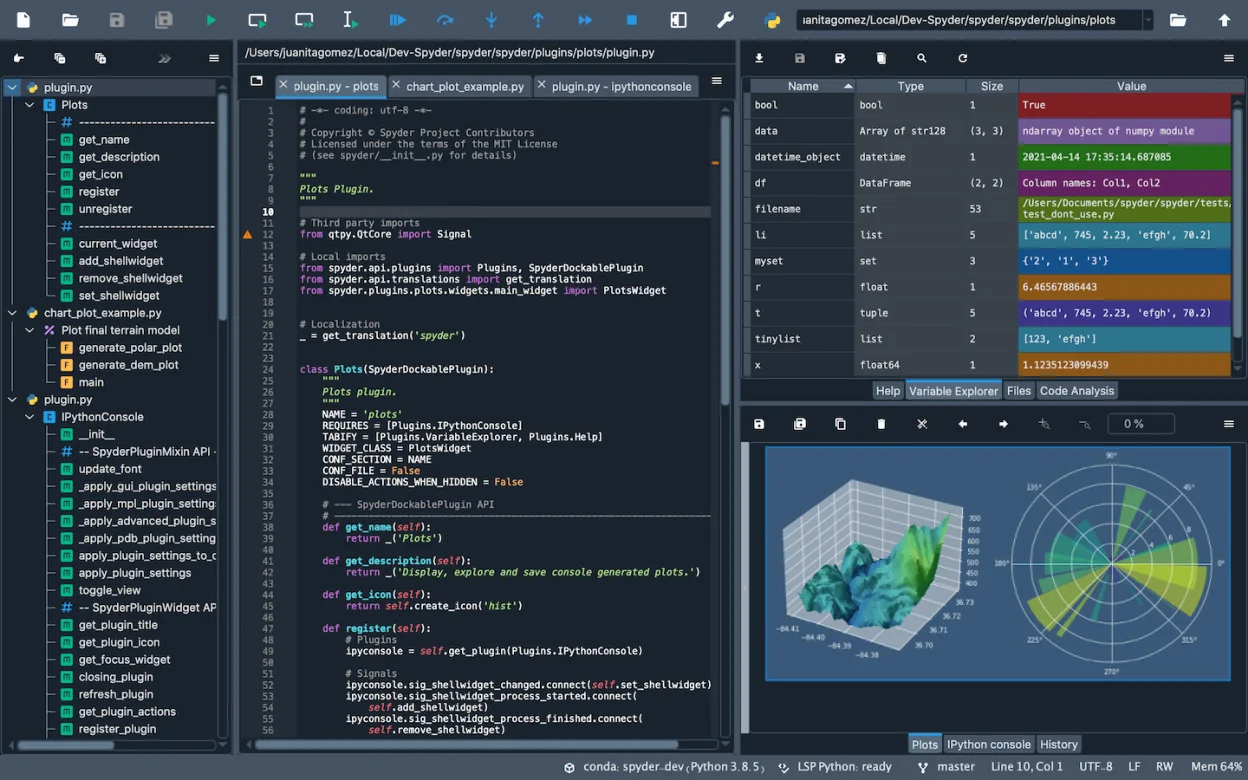
- Variablen‑Explorer zur Inspektion großer NumPy‑Arrays und Pandas‑DataFrames
- Integriertes Debugging mit Schritt‑durch‑Schritt‑Ausführung und Breakpoint‑Verwaltung
- Eingebaute Unterstützung für Matplotlib, SymPy und SciPy‑Visualisierung
- Plugin‑Architektur zur Erweiterung der Funktionalität mit eigenen Werkzeugen
- Projekt‑Manager zur Organisation mehrerer Dateien und Konfigurationen
- Code‑Analyse und Linting via Pylint und PEP8‑Integration
Spyder unter Linux installieren
flatpak install flathub org.spyder_ide.spydersudo apt install spydersudo apt install spydersudo dnf install spydersudo pacman -S spydersudo zypper install spyderHäufige Fragen
Can I use Spyder for web development?
Yes, but it is less ideal than PyCharm. Spyder lacks specific tooling for Django or Flask, such as template highlighting or URL routing maps. You will manage these projects manually or with external tools.
Is Spyder free?
Yes, Spyder is free and open-source under the MIT license. There are no paid tiers or feature locks.
Does Spyder support virtual environments?
Yes, Spyder allows you to select a specific Python interpreter or virtual environment for your project, similar to PyCharm.
3 weitere Alternativen zu PyCharm
 Visual Studio CodeEin leichter, erweiterbarer Code-Editor, der Debugging, Git und viele Sprachen unterstützt.KostenlosFlatpakVisual Studio Code vs. PyCharm
 ThonnyThonny ist eine leichtgewichtige Python-IDE für Einsteiger, die einen integrierten Debugger und Paketmanager…Open SourceKostenlosFlatpakThonny vs. PyCharm
 GeanyGeany ist eine leichte, schnelle IDE, die von Haus aus viele Sprachen und Plugins unterstützt.Open SourceKostenlosFlatpakGeany vs. PyCharm