
 DB Browser for SQLiteLinux
vs
Microsoft AccessWindows
DB Browser for SQLiteLinux
vs
Microsoft AccessWindows
DB Browser for SQLite als Linux-Alternative zu Microsoft Access
Aktualisiert am
Unser Fazit
DB Browser for SQLite is not a full replacement for Microsoft Access. It can create and edit SQLite tables, run SQL queries, and import/export CSV, but it lacks Access‑style forms, reports, macro automation, and enterprise‑level security. It suits developers or power users who need a lightweight editor for SQLite databases or who want to migrate small Access projects to a portable file format. For users who rely on Access’s visual database design and reporting features, a different Linux solution such as LibreOffice Base or a custom web app would be more appropriate.
- Lizenz
- MPL-2.0 and GPL-3.0+
- Preis
- Kostenlos
- Aktuelle Version
- 3.13.1 (16. Oktober 2024)
- Bewertung
- —
Was gleich funktioniert
- Both allow creation and modification of relational tables via a GUI
- Both support running arbitrary SQL queries
- Both provide import/export of CSV data
- Both can export database contents to SQL dump files
Was anders ist
- DB Browser lacks form and report builders that Access offers
- No macro or VBA scripting support in DB Browser
- No built‑in security or user‑access control
- Does not support ODBC connections to external data sources
- Only works with SQLite, not with other DBMS engines
Ihre Microsoft Access-Dateien öffnen
DB Browser for SQLite cannot open Microsoft Access (.mdb or .accdb) files directly. You would need to export the Access database to a format such as CSV or SQL dump, then import that into DB Browser. Exporting from Access is straightforward via the Export wizard, but the reverse process (importing into Access) is not supported by DB Browser.
Von Microsoft Access zu DB Browser for SQLite wechseln – Schritt für Schritt
- Export each Access table to CSV using Access’s Export wizard.
- Create a new SQLite database in DB Browser for SQLite and import the CSV files as tables.
- Recreate any necessary indexes or primary keys manually in DB Browser.
- If you need queries or reports, write them in SQL and run them in DB Browser.
- Export the SQLite database to a SQL dump if you need to move it elsewhere.
- Test the data integrity by running sample queries and comparing results with the original Access database.
Wichtige Funktionen von DB Browser for SQLite
- Datenbankdateien erstellen und komprimieren
- Tabellen und Indizes definieren, ändern und löschen
- Datensätze durchsuchen, bearbeiten, hinzufügen und löschen
- Datensätze suchen und filtern
- Tabellen als CSV importieren/exportieren
- Datenbanken als SQL-Dump importieren/exportieren
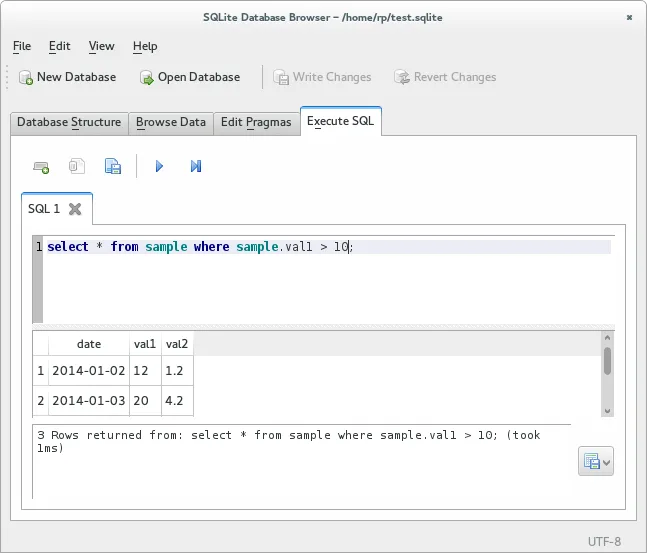
- Beliebige SQL-Abfragen ausführen und Ergebnisse anzeigen
- Ein Log aller ausgeführten SQL-Befehle anzeigen
DB Browser for SQLite unter Linux installieren
flatpak install flathub org.sqlitebrowser.sqlitebrowserHäufige Fragen
Can I use DB Browser for SQLite to build a GUI application like Access does?
No, DB Browser is only a database editor. For GUI applications you would need to develop your own front‑end using a language like Python, Java, or C#.
Does DB Browser support VBA or macros?
No, it does not support VBA or any macro language. You can only execute SQL queries directly.
Is there a way to connect DB Browser to other databases via ODBC?
DB Browser is limited to SQLite files; it cannot act as an ODBC client for other database engines.
3 weitere Alternativen zu Microsoft Access
 LibreOffice BaseLibreOffice Base ist ein Desktop‑Datenbank‑Management‑Tool zum Erstellen und Verwalten von Datenbanken und…Open SourceKostenlosFlatpakLibreOffice Base vs. Microsoft Access
 GnuCashKostenlos, quelloffene doppelte Buchführung für Privat- und Kleinunternehmensgebrauch.Open SourceKostenlosFlatpakGnuCash vs. Microsoft Access
 KexiKexi ist ein visuelles Werkzeug zur Datenbankgestaltung und -verwaltung, mit dem Sie Datenbanken ohne…Open SourceKostenlosKexi vs. Microsoft Access