
 ThonnyLinux
vs
PyCharmWindows
ThonnyLinux
vs
PyCharmWindows
Thonny als Linux-Alternative zu PyCharm
Aktualisiert am
Unser Fazit
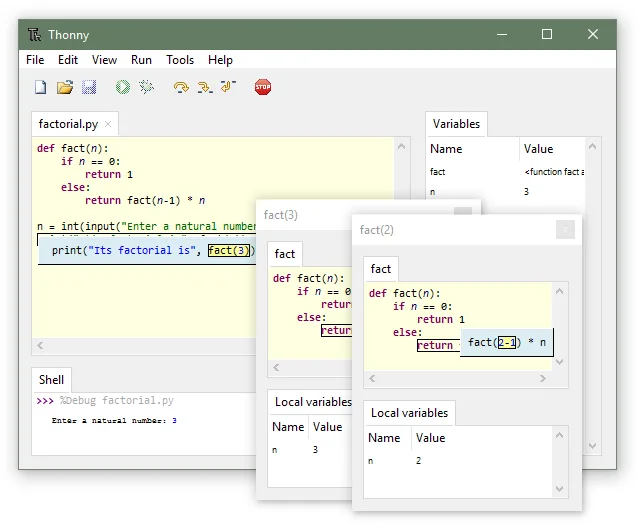
Thonny is not a direct replacement for PyCharm if you are a professional developer. It is a beginner-focused tool that lacks the advanced project management, web framework support, and database tools PyCharm offers. However, if your primary need is learning Python syntax, debugging simple scripts, and understanding memory management, Thonny is an excellent, lightweight alternative. It excels in educational contexts where step-by-step execution visualization is more valuable than complex IDE features. For serious production work, stick with PyCharm or use VS Code.
- Lizenz
- MIT
- Preis
- Kostenlos
- Aktuelle Version
- 4.1.7 (16. Dezember 2024)
- Bewertung
- —
Was gleich funktioniert
- Both provide integrated Python debugging capabilities.
- Both support Python 3 development environments.
- Both are cross-platform applications running on Linux, Windows, and macOS.
- Both offer syntax highlighting for Python code.
Was anders ist
- Thonny lacks integrated version control (Git/SVN) support, requiring external tools.
- Thonny does not provide specific support for web frameworks like Django or Flask.
- PyCharm includes advanced project navigation and refactoring tools absent in Thonny.
- Thonny focuses on educational visualization of the call stack, whereas PyCharm focuses on professional workflow efficiency.
Ihre PyCharm-Dateien öffnen
Thonny does not use PyCharm's proprietary project file format (.idea). You can open individual .py files directly in Thonny, but complex project structures, run configurations, and settings from PyCharm will not transfer. You will need to manually recreate your virtual environments and dependency lists using Thonny's package manager or system pip.
Von PyCharm zu Thonny wechseln – Schritt für Schritt
- Install Thonny via your Linux package manager or Flathub.
- Copy your Python source files to a local directory.
- Open the main script in Thonny to verify syntax highlighting.
- Use Thonny's GUI package installer to add necessary third-party libraries.
- Configure your debugger to visualize execution steps for learning purposes.
Wichtige Funktionen von Thonny
- Integrierter Debugger mit schrittweiser Visualisierung
- GUI‑Paketinstaller
- Spezial‑Referenzmodus zum Lernen des Speicher‑Managements
- Einfaches, ein‑Fenster‑Layout
- Python 3.10+ Unterstützung
- Plattformübergreifend (Linux, Windows, macOS)
- Open source (MIT)
Thonny unter Linux installieren
flatpak install flathub org.thonny.Thonnysudo apt install thonnysudo apt install thonnysudo dnf install thonnysudo zypper install thonnyHäufige Fragen
Can I use Thonny for professional web development?
No. Thonny lacks the framework support, refactoring tools, and version control integration required for professional Django or Flask development.
Does Thonny support virtual environments?
Thonny uses the system Python or a specific interpreter selected in settings. It does not manage virtual environments as robustly as PyCharm, so you may need to activate them externally.
Is Thonny suitable for learning Python?
Yes. Its step-by-step debugger and reference-mode visualization make it ideal for beginners to understand how Python executes code and manages memory.
3 weitere Alternativen zu PyCharm
 Visual Studio CodeEin leichter, erweiterbarer Code-Editor, der Debugging, Git und viele Sprachen unterstützt.KostenlosFlatpakVisual Studio Code vs. PyCharm
 SpyderSpyder ist eine kostenlose, quelloffene Python‑IDE, die speziell für wissenschaftliches Rechnen, Datenanalyse…Open SourceKostenlosFlatpakSpyder vs. PyCharm
 GeanyGeany ist eine leichte, schnelle IDE, die von Haus aus viele Sprachen und Plugins unterstützt.Open SourceKostenlosFlatpakGeany vs. PyCharm