
 Tux PaintLinux
vs
Paint 3DWindows
Tux PaintLinux
vs
Paint 3DWindows
Tux Paint als Linux-Alternative zu Paint 3D
Aktualisiert am
Unser Fazit
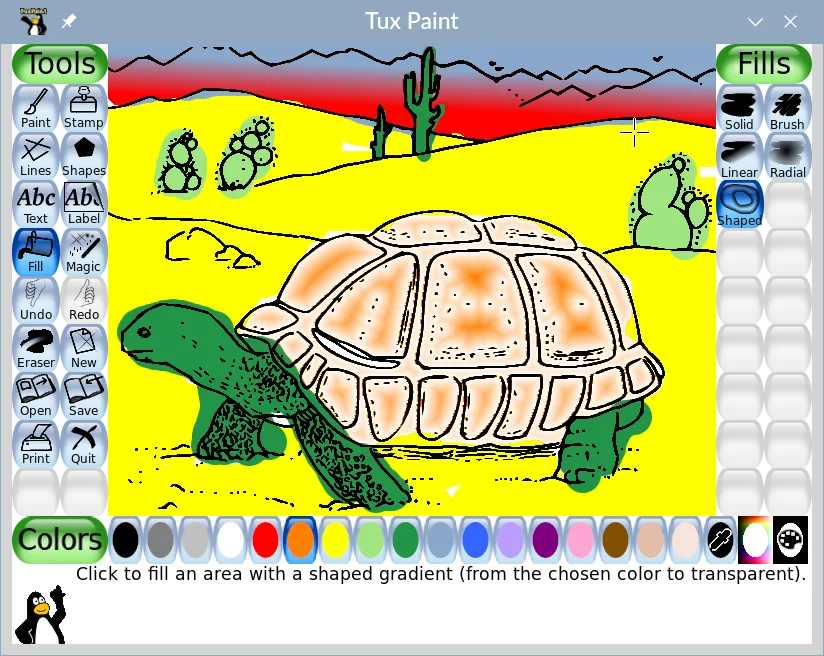
Tux Paint can replace Paint 3D for very basic 2‑D drawing tasks and for users who only need simple brushes, shapes, and a child‑friendly interface. It does not support 3‑D object creation, layer compositing, or the more advanced export options that Paint 3D offers. It is best suited for children or educators looking for a straightforward drawing tool, but not for users who require 3‑D modeling or complex image editing.
- Lizenz
- GPL-2.0+
- Preis
- Kostenlos
- Aktuelle Version
- 0.9.35 (26. Mai 2025)
- Bewertung
- —
Was gleich funktioniert
- Both provide simple brush and shape tools for 2‑D drawing
- Both export to common image formats such as PNG and JPEG
- Both have an intuitive, minimal‑menu interface
Was anders ist
- Tux Paint lacks any 3‑D object creation or editing capabilities
- Paint 3D supports layers and basic compositing, which Tux Paint does not
- Paint 3D can export to 3‑D formats (STL, OBJ) while Tux Paint cannot
- Paint 3D offers a more extensive brush and shape palette
- Tux Paint is designed for children with sound effects and a mascot guide, not for general users
Ihre Paint 3D-Dateien öffnen
Paint 3D uses the .mp4 or .png files for images and .obj/.stl for 3‑D models. Tux Paint can open PNG and JPEG files, but it cannot import Paint 3D’s native 3‑D files or proprietary image formats. Exporting from Tux Paint will not produce Paint 3D compatible 3‑D files.
Von Paint 3D zu Tux Paint wechseln – Schritt für Schritt
- Export your Paint 3D drawings to PNG or JPEG if you only need 2‑D images.
- Open the PNG/JPEG files in Tux Paint via the File → Open menu.
- Use Tux Paint’s brush, shape, and stamp tools to edit or recreate the artwork.
- Save the final image as PNG or JPEG again for use in other applications.
- If you need 3‑D models, export them from Paint 3D as STL/OBJ and use a dedicated 3‑D viewer or editor; Tux Paint cannot handle these.
Wichtige Funktionen von Tux Paint
- Einfache Pinsel-, Stempel- und Formwerkzeuge
- Ermutigendes Cartoon-Maskottchen als Guide
- Spielerische Soundeffekte für Aktionen
- Geschichtsmodus für sequenzielles Zeichnen
- Masken- und Collage-Werkzeuge
- Export nach PNG, JPEG und PDF
- Keine komplexen Menüs oder Einstellungen
Tux Paint unter Linux installieren
flatpak install flathub org.tuxpaint.Tuxpaintsudo apt install tuxpaintsudo apt install tuxpaintsudo dnf install tuxpaintsudo zypper install tuxpaintHäufige Fragen
Can Tux Paint edit existing Paint 3D files?
No. Tux Paint can only open standard image files like PNG and JPEG. Paint 3D’s proprietary files are not supported.
Does Tux Paint support layers?
No. Tux Paint works on a single canvas layer and does not offer layer compositing.
Is Tux Paint suitable for adults who use Paint 3D for simple tasks?
It can handle basic 2‑D drawing, but it lacks many of the features that adult users might expect, such as advanced brush settings or 3‑D object editing.
6 weitere Alternativen zu Paint 3D
 KritaKrita ist ein vollwertiges Open‑Source-Programm für digitales Malen und Illustration.Open SourceKostenlosFlatpakKrita vs. Paint 3D
 GIMPGIMP ist ein kostenloser, quelloffener Rastergrafik‑Editor für Fotobearbeitung, digitale Malerei und…Open SourceKostenlosFlatpakGIMP vs. Paint 3D
 InkscapeInkscape ist ein kostenloser, quelloffener Vektorgrafikeditor, der Adobe Illustrator und CorelDRAW Konkurrenz…Open SourceKostenlosFlatpakInkscape vs. Paint 3D
 BlenderBlender ist eine kostenlose, quelloffene 3D-Suite für Modellierung, Animation, Rendering und Videobearbeitung.Open SourceKostenlosFlatpakBlender vs. Paint 3D
 FreeCADFreeCAD ist ein Open‑Source‑parametrischer 3D‑CAD‑Modellierer für Design, Ingenieurwesen und 3D‑Druck.Open SourceKostenlosFlatpakFreeCAD vs. Paint 3D
 OpenSCADOpenSCAD ist ein parametrischer 3D-CAD-Modeller, der feste Modelle aus textbasierten Skripten erzeugt…Open SourceKostenlosFlatpakOpenSCAD vs. Paint 3D