
Windows · Wissenschaft & Bildung
Die besten Linux-Alternativen zu WolframAlpha
WolframAlpha is a computational engine that calculates answers from curated data, not a web search tool.
Aktualisiert am
Kurz gesagt
Die beste Linux-Alternative zu WolframAlpha ist SageMath. Weitere gute Optionen: GNU Octave, Qalculate! (GTK UI).
3 Linux-Alternativen zu WolframAlpha
-
An open-source computer algebra system (CAS) that combines Python, SageMath, and many other mathematics libraries in one interface.
SageMath is a strong replacement for WolframAlpha if you need local, offline computational power and are comfortable with Python. It handles symbolic math, numerical analysis, and plotting well, integrating libraries like Maxima and PARI/GP. However, it lacks WolframAlpha’s curated, up-to-date…
Funktionsabdeckung60% -

GNU Octave ist eine kostenlose, quelloffene Umgebung für numerische Berechnungen, die weitgehend mit der MATLAB‑Syntax kompatibel ist.
GNU Octave is a strong replacement for the numerical and plotting aspects of WolframAlpha, but it is not a direct substitute for the full computational engine. It excels at linear algebra, differential equations, and MATLAB-compatible scripting, making it ideal for engineers and scientists who need…
Funktionsabdeckung45% -
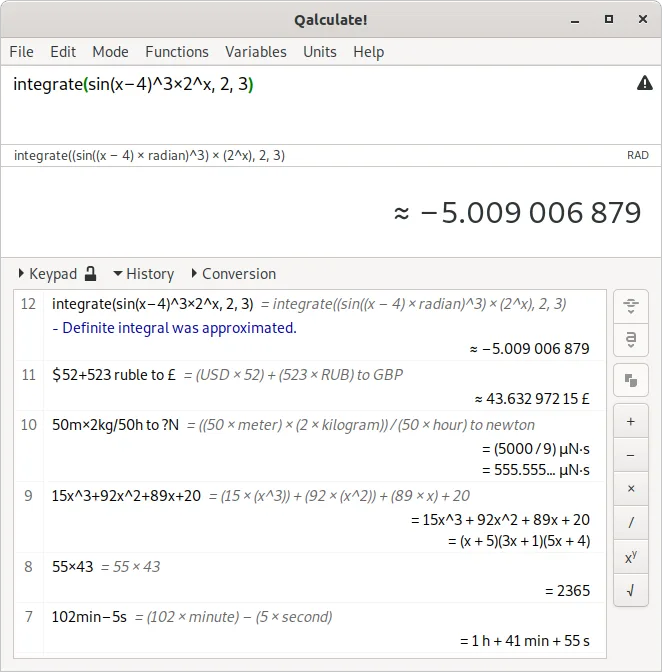
A powerful, multi-purpose desktop calculator with symbolic math, unit conversion, and arbitrary precision capabilities.
Qalculate! is a solid local alternative for users who need symbolic math, unit conversion, and plotting without internet dependency. It handles standard calculus and physics calculations well, making it suitable for students and engineers doing routine work. However, it is not a direct replacement…
Funktionsabdeckung45%

Was ist WolframAlpha?
WolframAlpha serves scientists, students, and engineers who need precise computational answers to factual queries. Unlike standard search engines that return links, it processes natural language input to perform calculations, look up physical constants, and solve mathematical problems using a vast, curated database. It is particularly useful for verifying results, exploring complex systems, and accessing specialized scientific data quickly.
The service operates on a freemium model. Basic access is free but limited in query volume and depth. Power users can subscribe to Pro or Enterprise tiers for unlimited queries, advanced plotting, and API access. The underlying Wolfram Language is proprietary, meaning the core engine and data sources are owned by Wolfram Research and not open source.
Linux users seek alternatives because the native desktop application is Windows-only. While the web version works in any browser, relying on a cloud service for sensitive or offline work is impractical for some. Users also prefer local, open-source tools that offer similar computational capabilities without subscription fees or data privacy concerns, especially for heavy mathematical or symbolic computation tasks.
Was ein Ersatz für WolframAlpha können muss
- Symbolic and numerical computation
- Access to curated scientific data
- Natural language or structured query input
- Plotting and visualization capabilities
- Offline or local processing options
- Open-source or free licensing
Läuft WolframAlpha unter Linux?
WolframAlpha does not have a native Linux desktop application. The primary way to use it on Linux is via the web interface, which works in any modern browser. There is no official Linux client. Running the Windows version via Wine or Proton is possible but often unstable due to reliance on web technologies and proprietary components; success varies by user setup. For guaranteed functionality, the web version is the recommended method, though it requires an internet connection.
Welche Alternative passt zu Ihnen?
If you need a full-featured, open-source alternative for symbolic and numerical math, SageMath is the strongest choice, offering a comprehensive environment similar to Mathematica. For quick, command-line calculations without heavy dependencies, Qalculate! is lightweight and effective. GNU Octave is best suited for users who need numerical computing compatible with MATLAB syntax, particularly for engineering simulations. MAX is less common but can be used for specific mathematical modeling tasks if you are already familiar with its interface.
Dateien und Gewohnheiten aus WolframAlpha mitnehmen
There is no direct file format migration from WolframAlpha to these Linux tools because WolframAlpha is primarily a query engine, not a document-based application. If you have saved outputs, they are typically images or plain text, which can be imported into any of the listed tools. For workflows involving code, you would need to rewrite Wolfram Language snippets into Python (for SageMath), Octave syntax, or Qalculate! expressions. No proprietary project files are exported or imported between these systems.
Direkter Vergleich
| Programm | Lizenz | Flatpak | Aktuelle Version | Funktionsabdeckung | Bewertung |
|---|---|---|---|---|---|
| SageMath | GPL-2.0-or-later | — | 10.10 | 60% | — |
| GNU Octave | GPL-3.0+ | ✓ | 11.3.0 | 45% | — |
| Qalculate! (GTK UI) | GPL-2.0+ | ✓ | 5.13.0 | 45% | — |
WolframAlpha: häufige Fragen
Can I use WolframAlpha offline on Linux?
No, the standard WolframAlpha service requires an internet connection. The Linux alternatives like SageMath and GNU Octave run entirely locally and offline.
Is SageMath a direct replacement for WolframAlpha?
SageMath covers much of the computational math functionality but lacks WolframAlpha's curated factual database and natural language interface. It is more of a programming environment for math.
Do I need to install anything to use the web version?
No, just a web browser. However, for a local, private, and offline experience, you must install one of the listed Linux applications.
Which tool is best for quick daily calculations?
Qalculate! is the lightest option for quick, everyday calculations. For complex symbolic math, SageMath is the better choice.
Wie wichtig ist Ihnen WolframAlpha?
Kennen Sie eine bessere Alternative? Alternative vorschlagen