
 CherryTreeLinux
vs
ObsidianWindows
CherryTreeLinux
vs
ObsidianWindows
CherryTree como alternativa Linux a Obsidian
Actualizado el
Nuestra opinión
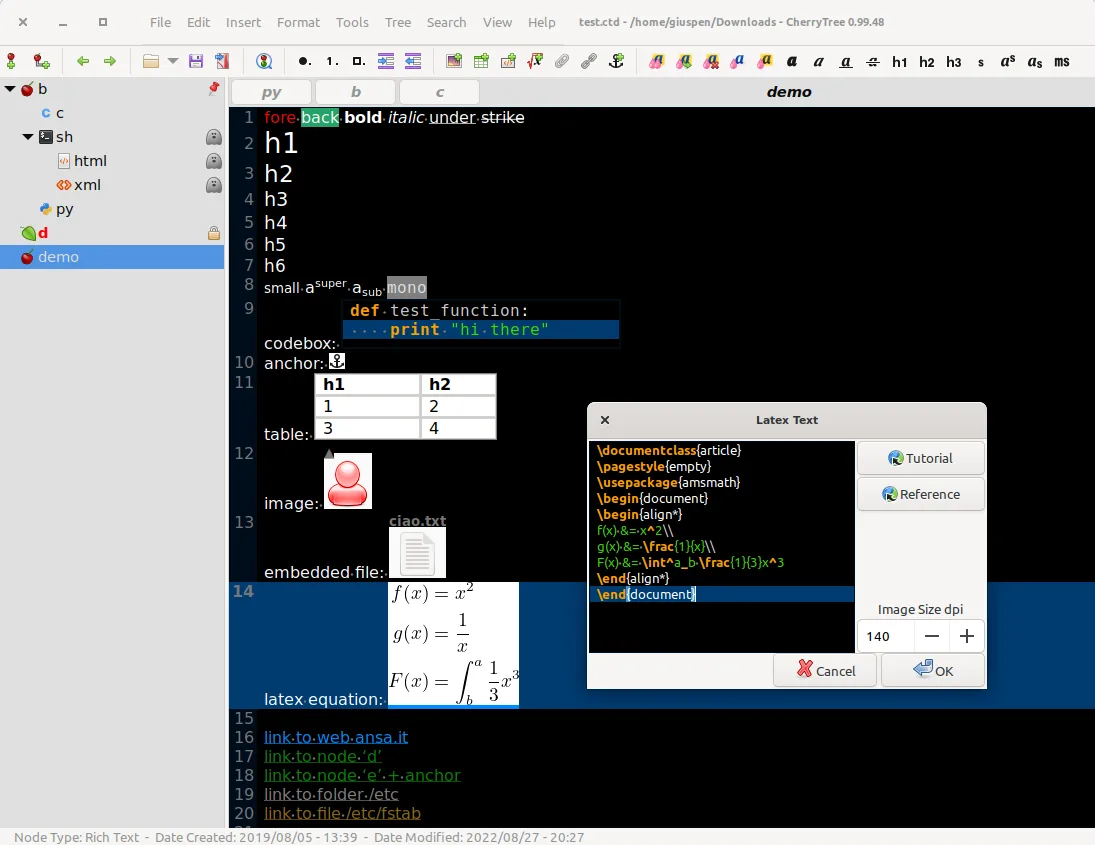
CherryTree is a decent replacement for Obsidian if you prioritize rich text formatting, local storage, and hierarchical organization over bidirectional linking and graph-based knowledge mapping. It stores notes locally and supports fast search, export, and customization, but lacks Markdown-first editing and true bidirectional links. It suits users who want a single encrypted document for notes, code snippets, and embedded media, especially if they don’t rely on link graphs or plain-text Markdown workflows. Not ideal for Obsidian users focused on networked thought or publishing.
- Licencia
- GPL-3.0+
- Precio
- Gratis
- Última versión
- b'1.7.2' (11 de noviembre de 2011)
- Valoración
- —
Lo que funciona igual
- Stores all notes locally in a single file (XML or SQLite)
- Supports fast search, find/replace, and spell check
- Allows embedding images, tables, code blocks with syntax highlighting
- Offers export to PDF, HTML, and plain text
- Works offline with no forced cloud sync
Lo que cambia
- No native Markdown editing — uses rich text instead of plain text files
- No bidirectional links or graph view of note connections
- Hierarchy is tree-based, not tag- or link-driven like Obsidian
- No plugin system or community themes
- Interface is desktop-focused, not cross-platform with mobile sync
Abrir tus archivos de Obsidian
CherryTree cannot directly open Obsidian's Markdown files, especially those relying on bidirectional links or YAML frontmatter. While you can import plain text or HTML from Obsidian exports, formatting and links won't carry over automatically. Exporting from Obsidian to HTML and then importing into CherryTree may preserve basic content, but structure and linking will be lost. There’s no built-in tool to convert Obsidian vaults to CherryTree format.
Pasar de Obsidian a CherryTree, paso a paso
- Export your Obsidian notes to HTML or plain text using Obsidian or a plugin
- Open CherryTree and create a new document
- Manually import or copy-paste converted notes into nodes
- Rebuild hierarchy using CherryTree’s tree structure
- Use Find/Replace to fix links or formatting inconsistencies
Funciones clave de CherryTree
- Notas con estructura jerárquica en forma de árbol
- Texto enriquecido con imágenes, tablas y listas
- Resaltado de sintaxis para bloques de código
- Protección con contraseña para nodos
- Exportación a PDF, HTML y texto plano
- Importación desde otras aplicaciones de notas
- Corrector ortográfico y herramientas de búsqueda/reemplazo
- Almacena datos en XML o SQLite
Cómo instalar CherryTree en Linux
flatpak install flathub net.giuspen.cherrytreesudo apt install cherrytreesudo apt install cherrytreesudo pacman -S cherrytreesudo zypper install cherrytreePreguntas frecuentes
Can CherryTree display a graph view like Obsidian?
No, CherryTree does not have a graph or network view of note connections. Relationships between notes must be managed manually through hyperlinks or hierarchy.
Does CherryTree support Markdown files?
No, CherryTree uses rich text formatting and stores content in XML or SQLite. It does not natively edit or save Markdown files.
Can I sync CherryTree notes across devices?
You can sync the single CherryTree file (e.g., .ctb) using any file sync tool like Syncthing or Dropbox, but there’s no built-in sync or mobile app support.
Otras 5 alternativas a Obsidian
 JoplinJoplin es una aplicación de código abierto y multiplataforma para tomar notas y tareas que almacena los datos…Código abiertoGratisFlatpakJoplin vs Obsidian
 ZettlrZettlr es un editor de Markdown rápido, de código abierto, con soporte para Zettelkasten y citas.Código abiertoGratisFlatpakZettlr vs Obsidian
 LogseqLogseq es una herramienta local primero para bases de conocimiento no lineales que almacena notas como…Código abiertoGratisFlatpakLogseq vs Obsidian
 Standard NotesStandard Notes es una aplicación de notas multiplataforma con cifrado de extremo a extremo que se sincroniza…Código abiertoGratisFlatpakStandard Notes vs Obsidian
 QOwnNotesQOwnNotes es un editor de Markdown de texto plano con soporte para listas de tareas que puede sincronizarse…Código abiertoGratisFlatpakQOwnNotes vs Obsidian