
Windows · Science & Education
Mejores alternativas Linux a Jupyter Notebook
Jupyter Notebook is an open-source web app for interactive computing, combining live code, equations, and visualizations in shareable documents.
Actualizado el
Respuesta rápida
La mejor alternativa Linux a Jupyter Notebook es JupyterLab. Otras buenas opciones: Spyder, VS Code, PyCharm OSS.
4 alternativas Linux a Jupyter Notebook
-
JupyterLab is an open‑source web‑based IDE for interactive computing with notebooks, code, and data visualizations.
JupyterLab is a solid replacement for Jupyter Notebook for anyone who wants a more feature‑rich, IDE‑like environment while still keeping the notebook workflow. It supports the same core interactive cell execution, Markdown, LaTeX, and rich media output, and adds a file browser, terminal, and…
Cobertura de funciones90% -
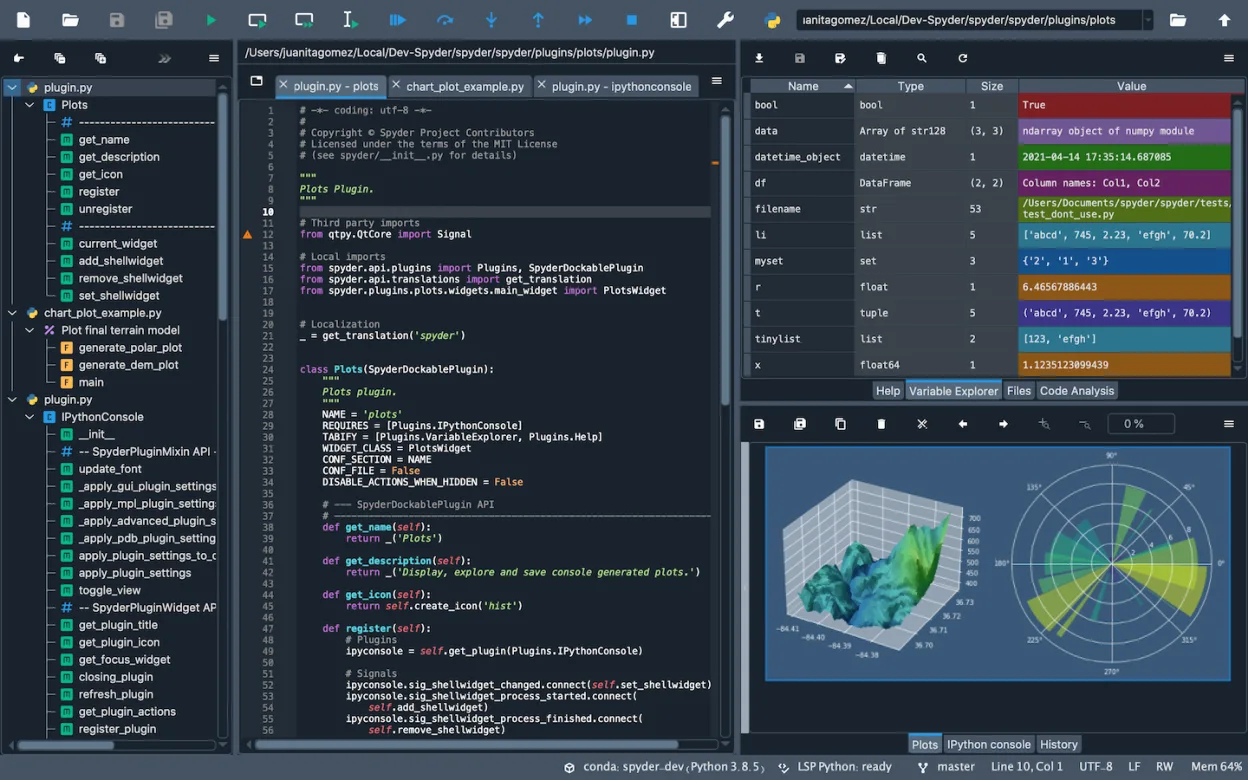
Spyder es un IDE de Python gratuito y de código abierto diseñado específicamente para el cálculo científico, el análisis de datos y la depuración.
Spyder can replace Jupyter Notebook for users who prefer a desktop IDE with a rich console and variable explorer, but it lacks the notebook‑style cell execution and easy sharing of interactive documents. It works well for Python‑only data science workflows, especially when debugging or profiling is…
Cobertura de funciones70% -
Un editor de código fuente ligero y extensible que admite muchos lenguajes, construido sobre Electron y con núcleo de código abierto.
VS Code is a strong alternative for developers who prefer an integrated development environment over a browser-based interface. It handles interactive code execution, markdown, and plots effectively through its Jupyter extension. However, it is not a direct drop-in replacement for data scientists…
Cobertura de funciones85% -

PyCharm Community Edition is a free, open‑source IDE for Python development on Linux.
PyCharm Community Edition is not a drop‑in replacement for Jupyter Notebook. It is an IDE focused on script development, debugging, and project management, not on interactive notebooks. If you need a notebook environment for data exploration, teaching, or sharing live code, Jupyter remains the…
Cobertura de funciones30%


¿Qué es Jupyter Notebook?
Jupyter Notebook is primarily used by data scientists, researchers, and educators to explore data, test hypotheses, and present findings. It allows users to mix executable code cells with markdown text, making it ideal for teaching and reproducible research. The interface runs in a browser, which simplifies sharing work without requiring recipients to install specific environments.
The software is completely free and open-source, governed by the Jupyter Project. There are no licensing fees or proprietary restrictions. While the core notebook is free, some third-party extensions or cloud-hosted versions of Jupyter may have their own pricing models, but the standard desktop and server installation remains cost-free.
People often look for Linux alternatives because Jupyter is already native to Linux, but they may seek different interfaces or integrated development environments. Some users prefer a more traditional IDE layout over the notebook cell structure, while others want tighter integration with version control or debugging tools that are standard in dedicated code editors.
Lo que debe hacer un sustituto de Jupyter Notebook
- Interactive code execution in cells
- Support for multiple programming languages
- Markdown and LaTeX rendering
- Rich media output like plots and videos
- Kernel management for different environments
- Easy sharing of interactive documents
- Integration with Python data science libraries
¿Se puede usar Jupyter Notebook en Linux?
Jupyter Notebook runs natively on Linux as a Python package. You install it via pip or your system package manager and run it from the terminal. It opens in your default web browser. There is no need for Wine, Proton, or Bottles because it is not a Windows-specific application. The web-based nature means it works identically across Linux distributions as long as Python and the necessary dependencies are installed.
¿Qué alternativa elegir?
If you want the closest experience to the classic notebook, JupyterLab is the direct successor and offers a more flexible interface. For users who prefer a traditional IDE with a code editor and terminal, VS Code is a strong choice, especially with the Jupyter extension. PyCharm OSS is suitable for professional Python development if you need robust debugging and refactoring tools. Spyder is best for scientific computing workflows that require deep integration with data analysis libraries and a variable explorer.
Migrar tus archivos y hábitos de Jupyter Notebook
Jupyter notebooks use the .ipynb file format, which is a JSON-based standard. This format is fully supported by JupyterLab, VS Code, and PyCharm, meaning you can open existing .ipynb files directly without conversion. If you move to Spyder, you may need to convert notebooks to .py scripts, as Spyder focuses on script-based development. All your code, outputs, and markdown content are preserved in the .ipynb file, making migration straightforward for compatible tools.
Comparativa lado a lado
| Aplicación | Licencia | Flatpak | Última versión | Cobertura de funciones | Valoración |
|---|---|---|---|---|---|
| JupyterLab | BSD-3-Clause | — | 4.6.6 | 90% | — |
| Spyder | MIT | ✓ | v6.1.6 | 70% | — |
| VS Code | MIT | — | 1.147.0 | 85% | — |
| PyCharm OSS | Apache-2.0 | ✓ | 2026.3.0.1 | 30% | — |
Jupyter Notebook: preguntas frecuentes
Is Jupyter Notebook the same as JupyterLab?
No, JupyterLab is the next-generation interface that replaces the classic Notebook. It offers a more flexible layout with multiple panels and better support for extensions, but both use the same underlying kernel and file format.
Do I need to install a browser to use Jupyter?
Yes, Jupyter runs on a local server and requires a web browser to display the interface. Any modern browser like Firefox or Chrome will work.
Can I use Jupyter with languages other than Python?
Yes, Jupyter supports many languages through kernels, including R, Julia, and Scala. You just need to install the appropriate kernel for that language.
Is Jupyter Notebook still being developed?
The classic Notebook is in maintenance mode, with most new features going to JupyterLab. However, the classic Notebook remains widely used and fully functional for existing workflows.
¿Qué importancia tiene Jupyter Notebook para ti?
¿Conoces una alternativa mejor? Sugerir una alternativa