

Linux · Internet
Quassel IRC
Quassel IRC is a distributed IRC client that keeps you connected via a central core you can attach to from any device.
- Licencia
- GPL-2.0
- Última versión
- —
¿Qué es Quassel IRC?
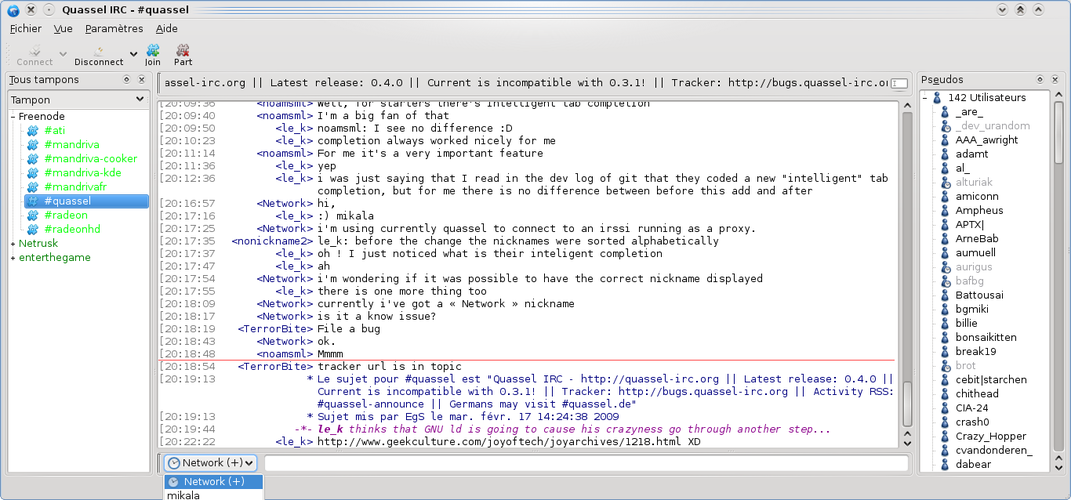
Quassel started around 2008 as a response to the need for a persistent IRC session that survived client restarts. It uses a split architecture: a always‑on core (server) holds the connection and logs, while thin clients on desktop, laptop or mobile attach to that core. The project is still maintained, with regular releases and a modest but active community.
Quassel is aimed at users who need a reliable IRC presence across multiple machines – for example developers, sysadmins, or hobbyists who hop between work and home. It appeals to people who miss the always‑connected feel of mIRC but want a modern, Linux‑friendly solution.
Compared with mIRC, Quassel feels less like a single monolithic program and more like a service you log into. The UI is Qt‑based, so it looks native on KDE and GNOME, and you can run the client on Windows, macOS or Android to attach to the same core. It lacks the flashy scripting ecosystem of mIRC, but it offers a clean, stable experience.
Ideal para: Anyone who wants a always‑on IRC experience across multiple machines without relying on a single client.
Funciones clave de Quassel IRC
- Core/client split for persistent connections
- Multiple simultaneous client connections
- Built‑in logging and searchable history
- TLS/SSL encryption for secure IRC
- Qt interface with customizable themes
- Channel and private message notifications
- Support for multiple IRC networks
- Cross‑platform clients (Linux, Windows, macOS, Android)
Ventajas
- Stay connected even when the client is closed
- Access the same session from any device
- Strong security with SSL/TLS
- Open source and actively maintained
Inconvenientes
- Initial setup of core and client can be a bit technical
- No native scripting language like mIRC's DLL scripts
- UI is functional but not as flashy as some Windows IRC clients
Programas de Windows que sustituye Quassel IRC
 mIRC
mIRCConsejos para usuarios de Windows
Export your mIRC scripts and aliases manually; Quassel doesn't import them, so recreate needed shortcuts using its built‑in command shortcuts (e.g., /join, /msg). The core runs as a background service—start it once and then just launch the client. Expect to spend a few minutes configuring the core's port and SSL settings, then you can attach from any device.
Quassel IRC: preguntas frecuentes
How do I install the Quassel core on Linux?
Use your distro's package manager (e.g., sudo apt install quassel-core on Debian/Ubuntu) and start the service with systemctl enable --now quasselcore.
Can I run the Quassel client on Windows?
Yes, Windows builds are available; the client connects to the same core you run on Linux.
Does Quassel support SSL/TLS connections?
Yes, both the core and client support encrypted connections; enable SSL in the core's configuration and trust the certificate on the client.
Where are the chat logs stored?
Logs are kept in the core's data directory (usually ~/.quassel/), and can be viewed or exported from the client’s log viewer.
Actualizado el