 MComixLinux
vs
ComicRackWindows
MComixLinux
vs
ComicRackWindows
MComix como alternativa Linux a ComicRack
Actualizado el
Nuestra opinión
MComix can serve as a practical replacement for ComicRack for users who mainly need to read, organize and lightly annotate comics on Linux. It handles the common archive formats, offers dual‑page and continuous scrolling, bookmarks and basic tagging, and runs with a small memory footprint. Power users who rely on ComicRack’s advanced library management, extensive metadata editing, or sophisticated export features will find MComix lacking, but for casual readers and those comfortable with manual folder organization it is a solid choice.
- Licencia
- GPL-2.0+
- Precio
- Gratis
- Última versión
- 3.1.0 (21 de enero de 2024)
- Valoración
- —
Lo que funciona igual
- Supports CBZ, CBR and PDF containers
- Dual‑page and continuous scrolling modes
- Zoom, rotate and fit‑to‑window controls
- Bookmarking and simple page history
- Keyboard shortcuts for navigation
Lo que cambia
- No built‑in advanced library database; relies on filesystem hierarchy
- Limited tagging and metadata editing compared to ComicRack
- No built‑in export or sharing of annotated pages
- No built‑in search/filter by metadata across a large collection
- No integrated comic‑rack style reading list or collection syncing
Abrir tus archivos de ComicRack
MComix can open the same CBZ, CBR, CB7, CBT, LHA and PDF files that ComicRack uses. It does not provide a dedicated export format for annotated pages; you would need to take screenshots or use external tools to share them. There is no native support for ComicRack’s proprietary library files, so you’ll have to rebuild the collection manually on Linux.
Pasar de ComicRack a MComix, paso a paso
- Export your ComicRack library as a folder hierarchy with comics in subfolders
- Copy the folders to your Linux home directory or a shared location
- Install MComix via your package manager or Flathub (e.g., sudo apt install mcomix or flatpak install flathub com.github.MComix)
- Open MComix and point it to the top‑level comic folder to generate thumbnails
- Re‑create any tags or bookmarks manually using MComix’s bookmark feature
Funciones clave de MComix
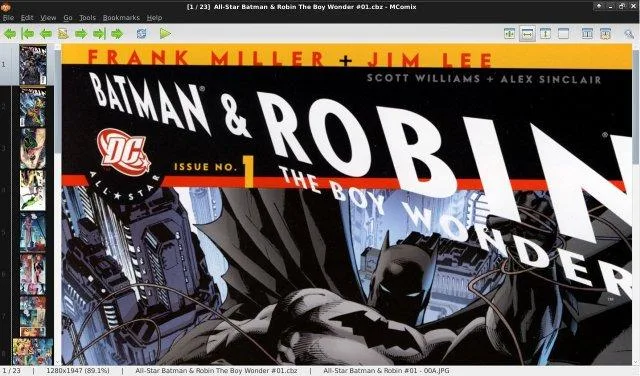
- Soporta contenedores CBR, CBZ, CB7, CBT, LHA y PDF
- Modos de doble página y desplazamiento continuo
- Vista en miniaturas para navegación rápida
- Controles de zoom, rotación y ajuste a ventana
- Marcadores y historial simple de páginas
- Atajos de teclado personalizables
- Modo Manga (lectura de derecha a izquierda)
- Ligero, con bajo consumo de memoria
Cómo instalar MComix en Linux
flatpak install flathub net.sourceforge.mcomixsudo apt install mcomixsudo apt install mcomixsudo zypper install mcomixPreguntas frecuentes
Can MComix read manga right‑to‑left?
Yes, it has a manga mode that flips pages automatically for right‑to‑left reading.
Does MComix support automatic metadata fetching?
No, it does not pull metadata from online databases; you must add tags manually.
Is there a way to sync my ComicRack collection across multiple Linux machines?
MComix itself has no sync feature; you would need to use a file‑sync service (e.g., Syncthing or a cloud drive) to keep the comic folders in sync.