
 OpenOffice.org CalcLinux
vs
OpenOffice.org CalcLinux
vs
 Microsoft Office ExcelWindows
OpenOffice.org Calc como alternativa Linux a Microsoft Office Excel
Actualizado el
Nuestra opinión
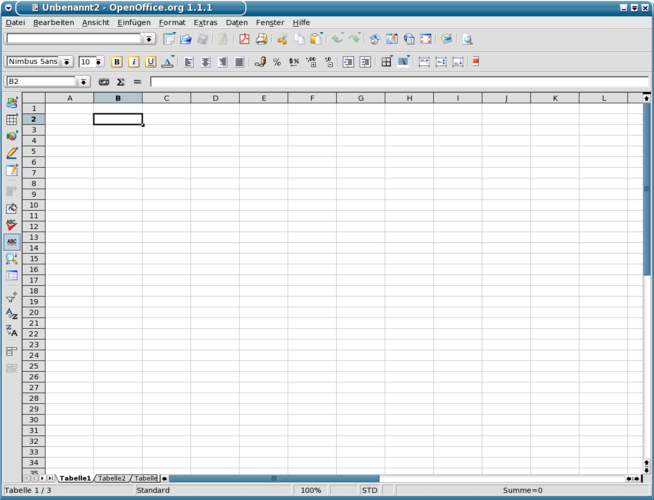
OpenOffice.org Calc is a solid, free alternative for most everyday spreadsheet tasks. It handles formulas, charts, pivot tables and basic macros well, making it suitable for students, small businesses, and power users who do not rely on advanced Excel‑only features or deep VBA integration. If you need tight compatibility with complex Excel workbooks or extensive add‑ins, you may run into limitations, but for standard data analysis and reporting Calc works fine on Linux.
- Licencia
- Apache-2.0
- Precio
- Gratis
- Última versión
- —
- Valoración
- —
Lo que funciona igual
- Supports .xls and .xlsx file formats
- Rich function library and formula handling
- Chart creation with multiple types
- Pivot tables and data analysis tools
- Keyboard navigation shortcuts
Lo que cambia
- Macro language is OpenOffice Basic, not VBA; many Excel macros need rewriting
- Advanced Excel features like Power Query, Power Pivot, and dynamic arrays are missing
- Add‑in ecosystem is smaller; many third‑party Excel plug‑ins have no counterpart
- Performance on very large worksheets can be slower
- Collaboration features (real‑time co‑authoring) are limited
Abrir tus archivos de Microsoft Office Excel
Calc opens both .xls and .xlsx files reasonably well and can export to those formats. Simple workbooks usually retain formulas and formatting, but complex features such as advanced charts, conditional formatting rules, or VBA macros may be lost or altered during import/export. Testing with critical files is recommended before a full migration.
Pasar de Microsoft Office Excel a OpenOffice.org Calc, paso a paso
- Install OpenOffice.org Calc from your distribution's repository or the official site.
- Open your existing Excel files in Calc to verify that data, formulas, and charts appear correctly.
- Save the files as .ods (OpenDocument Spreadsheet) for native editing, or re‑export to .xlsx if you need to share with Excel users.
- Recreate any VBA macros using OpenOffice Basic or replace them with built‑in functions.
- Adjust any broken formulas or formatting issues identified in step 2.
- Train users on Calc shortcuts and the location of equivalent features.
Funciones clave de OpenOffice.org Calc
- Supports .xls, .xlsx, .ods and other common spreadsheet formats
- Rich formula library with over 400 functions
- Pivot tables and data analysis tools
- Chart creation with multiple types and styling options
- Conditional formatting and data validation
- Macro support via OpenOffice Basic
- Multi‑sheet workbooks and cell referencing across sheets
- Extensible via extensions and templates
Preguntas frecuentes
Can Calc run Excel VBA macros?
No. Calc uses OpenOffice Basic, so VBA macros must be rewritten or replaced.
Is real‑time collaboration possible with Calc?
Calc lacks built‑in real‑time co‑authoring; you need to use external tools like Nextcloud or share files manually.
Will large Excel files load slowly in Calc?
Calc can handle typical spreadsheets, but very large files (tens of thousands of rows) may experience slower performance compared to Excel.
Otras 4 alternativas a Microsoft Office Excel
 ONLYOFFICE Desktop EditorsONLYOFFICE Desktop Editors es una suite de oficina gratuita y de código abierto para Linux que edita Word…Código abiertoGratisFlatpakONLYOFFICE Desktop Editors vs Microsoft Office Excel
 LibreOffice CalcLibreOffice Calc es un programa de hojas de cálculo gratuito que reemplaza a Microsoft Excel en Linux.Código abiertoGratisFlatpakLibreOffice Calc vs Microsoft Office Excel
 GnumericGnumeric es un programa de hojas de cálculo ligero y de código abierto, centrado en la precisión y el…Código abiertoGratisFlatpakGnumeric vs Microsoft Office Excel
 KSpreadKSpread was a spreadsheet application from the KOffice suite, designed for KDE-based systems and now…Código abiertoGratisAbandonadoKSpread vs Microsoft Office Excel