
 PolychromaticLinux
vs
Razer SynapseWindows
PolychromaticLinux
vs
Razer SynapseWindows
Polychromatic como alternativa Linux a Razer Synapse
Actualizado el
Nuestra opinión
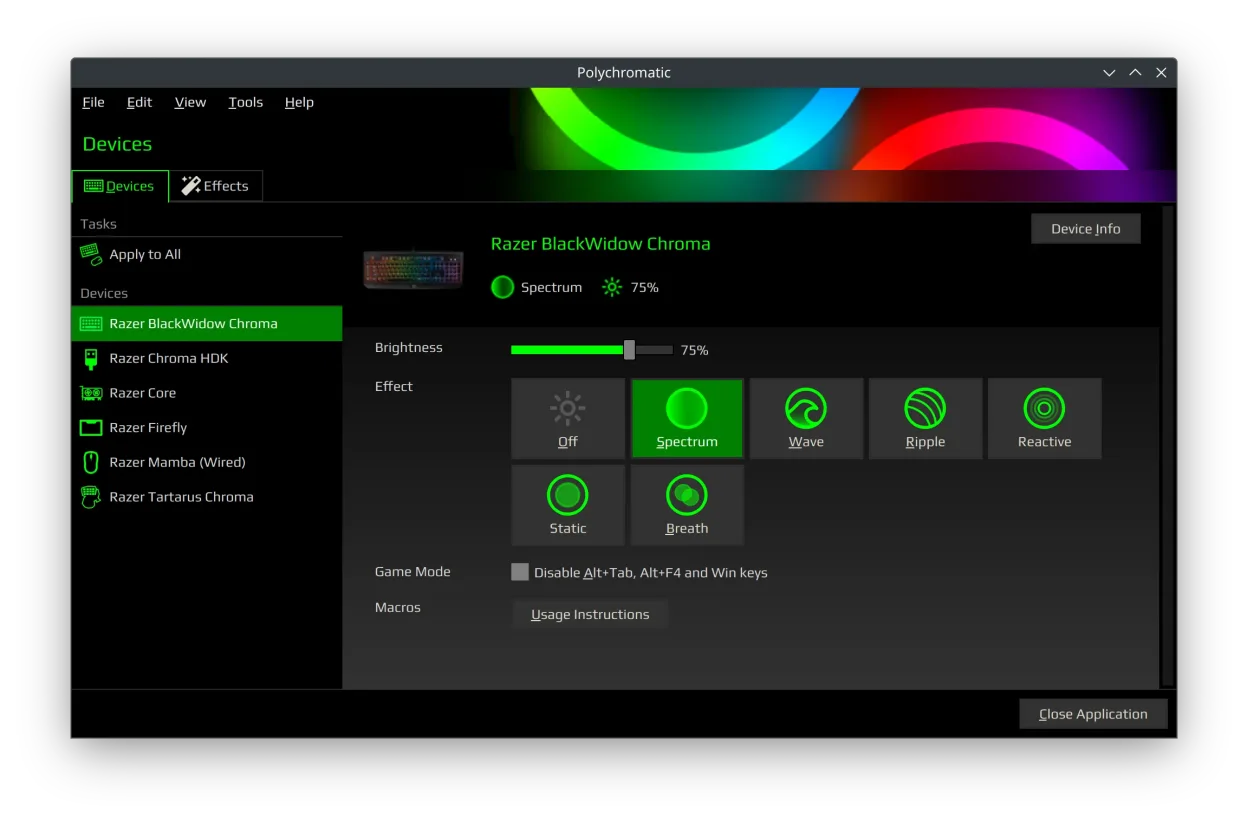
Polychromatic is a solid replacement for Razer Synapse on Linux, but with clear limits. It handles core functions like RGB lighting, DPI, polling rate, and profile management reliably if you're using supported devices and OpenRazer. Button remapping and macros are not supported—this is the biggest gap. If you mainly want lighting effects and hardware settings without macros, Polychromatic works well. It's best for users who prioritize visual customization and basic device tuning over advanced input programming. Requires some setup, but once running, it's stable and persistent.
- Licencia
- GPL-3.0-or-later
- Precio
- Gratis
- Última versión
- 0.9.8 (8 de agosto de 2026)
- Valoración
- —
Lo que funciona igual
- Controls RGB lighting effects and colors on Razer devices
- Adjusts DPI settings and polling rate per device
- Supports saving and loading per-device profiles
- Displays device info like firmware version and battery
- Applies settings locally and persists across reboots
Lo que cambia
- No button remapping or macro support
- No cloud profile sync—profiles are local only
- No mobile app or cross-platform sync
- Limited to devices supported by OpenRazer
- No automatic firmware updates
Abrir tus archivos de Razer Synapse
Polychromatic cannot import or export Razer Synapse profile files (.rzsyn). The two apps use incompatible formats and ecosystems. You cannot transfer lighting or DPI settings directly from Synapse to Polychromatic. Profiles must be recreated manually. There is no converter tool available, and Synapse's cloud profiles are not accessible on Linux.
Pasar de Razer Synapse a Polychromatic, paso a paso
- Install OpenRazer from your distribution's repository or the official site
- Install Polychromatic via Flatpak or native package
- Connect your Razer device and verify it appears in Polychromatic
- Recreate lighting effects and DPI settings manually
- Save profiles and enable hardware-saving for persistence
Funciones clave de Polychromatic
- Controla la iluminación RGB en teclados, ratones y auriculares Razer
- Ajusta la DPI, la tasa de sondeo y las configuraciones de Game Mode
- Prueba posiciones individuales de LED en dispositivos compatibles
- Crea y edita efectos de iluminación y animaciones personalizados
- Visualiza información del dispositivo: versión del firmware, serie, batería
- Admite perfiles por dispositivo y guardado en hardware
- Funciona con el soporte de controladores a nivel de kernel de OpenRazer
- Disponible como Flatpak o paquete nativo
Cómo instalar Polychromatic en Linux
flatpak install flathub app.polychromatic.controllerPreguntas frecuentes
Does Polychromatic support all Razer devices?
No. Support depends on OpenRazer. Most wired devices are supported, but newer or wireless models may have limited or no support. Check the OpenRazer device list before relying on it.
Can I assign macros to buttons with Polychromatic?
No. Polychromatic does not support button remapping or macros. It only configures lighting, DPI, polling rate, and Game Mode. For input remapping, use xbindkeys or udev rules with custom scripts.
Why isn’t my Razer device showing up in Polychromatic?
First, confirm OpenRazer is installed and running. Check that your device is listed in the OpenRazer compatibility table. If it’s supported, try reconnecting the device or restarting the OpenRazer service.
Otras 3 alternativas a Razer Synapse
 PiperPiper es una interfaz gráfica para Linux que permite configurar ratones gaming mediante ratbagd.Código abiertoGratisFlatpakPiper vs Razer Synapselibratbaglibratbag es una biblioteca y herramienta CLI para Linux que gestiona perfiles de ratones gaming…Código abiertoGratislibratbag vs Razer SynapseopenrazerUn daemon para Linux y una herramienta CLI para controlar periféricos gamer de Razer como ratones, teclados y…Código abiertoGratisopenrazer vs Razer Synapse