
 QDirStatLinux
vs
TreeSize FreeWindows
QDirStatLinux
vs
TreeSize FreeWindows
QDirStat como alternativa Linux a TreeSize Free
Actualizado el
Nuestra opinión
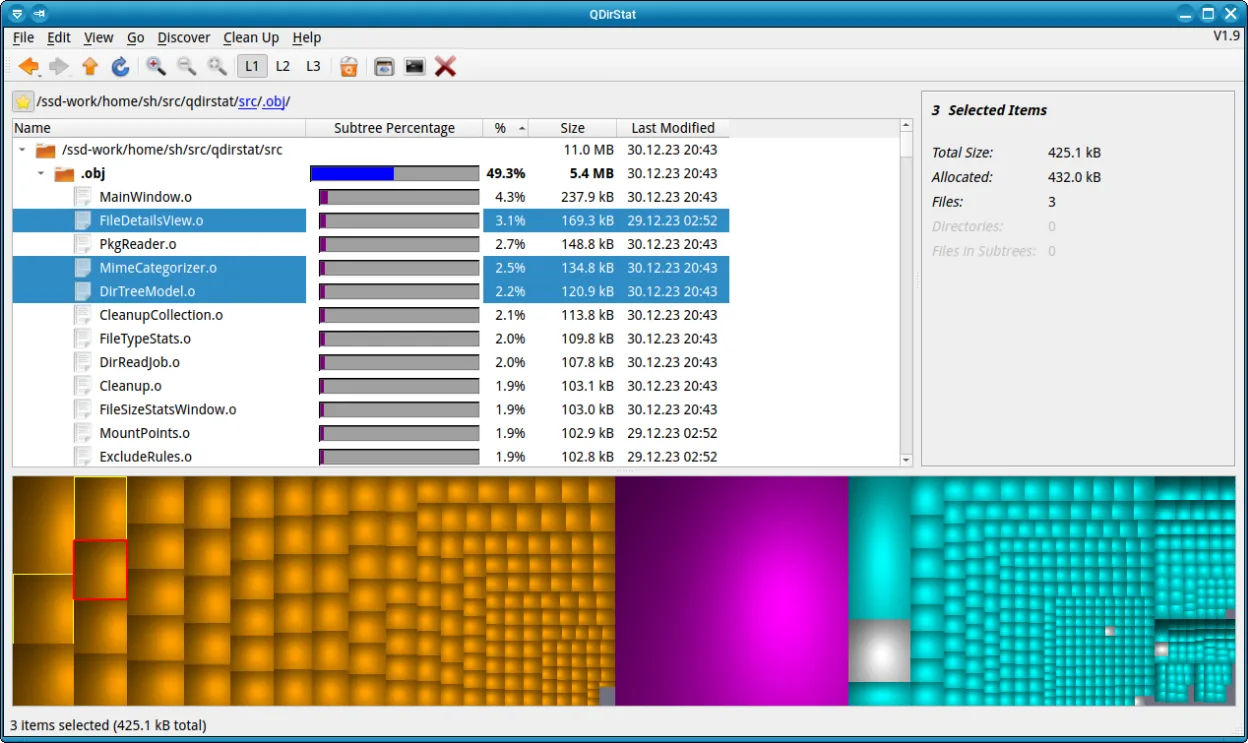
QDirStat is a solid Linux alternative to TreeSize Free for users who need a graphical overview of disk usage and occasional cleanup. It offers a tree view and a treemap, lets you delete files to trash, and can export data, which covers most everyday tasks. Power users who rely on extensive scripting or need deep command‑line integration may still prefer a CLI‑only tool, but for typical desktop users the feature set is more than adequate.
- Licencia
- GPL-2.0-only
- Precio
- Gratis
- Última versión
- 2.0 (18 de enero de 2026)
- Valoración
- —
Lo que funciona igual
- Tree view of directories with size information
- Ability to sort or filter by size
- Export of statistics to text/CSV
- Graphical interface for quick inspection
Lo que cambia
- QDirStat includes a treemap visualization, TreeSize Free does not
- QDirStat can delete files to trash directly from the UI, TreeSize Free only marks for deletion
- TreeSize Free offers a command‑line mode for scripting; QDirStat lacks a native CLI interface
- Export formats may differ; TreeSize Free can copy results to clipboard more directly
Abrir tus archivos de TreeSize Free
QDirStat does not understand TreeSize Free's proprietary report files. You can manually copy or re‑export data from TreeSize Free as plain text or CSV and then import that into QDirStat if needed, but there is no automated conversion. If you only need the exported CSV, QDirStat can read similar CSV structures, so re‑creating the report is straightforward.
Pasar de TreeSize Free a QDirStat, paso a paso
- Install QDirStat from your distribution’s repository or via Flathub
- Run QDirStat and let it scan the desired partitions
- Compare the tree view with your TreeSize Free output to verify sizes
- If you need exported data, use QDirStat’s Export to CSV feature
- Delete or move unwanted files using the built‑in trash function
- Optionally, create a script that calls QDirStat’s command‑line options for automated scans
Funciones clave de QDirStat
- Vista de árbol de directorios y archivos
- Gráfico treemap con codificación de colores
- Haz clic para navegar y eliminar a la papelera
- Opciones de búsqueda y filtrado
- Esquemas de colores personalizables
- Exportar estadísticas a texto o CSV
- Atajos de teclado para navegación
- Multiplataforma (Debian, Fedora, openSUSE, Ubuntu)
Cómo instalar QDirStat en Linux
flatpak install flathub io.github.shundhammer.qdirstatsudo apt install qdirstatsudo apt install qdirstatsudo dnf install qdirstatsudo zypper install qdirstatPreguntas frecuentes
Can QDirStat be used in scripts?
It has limited command‑line support; you can launch a scan and export results, but it lacks the full scripting capabilities of TreeSize Free.
Does QDirStat run on all Linux distributions?
Yes, it is packaged for Debian, Fedora, openSUSE, Ubuntu and available as a Flathub flatpak, so it works on most modern distros.
Is there a way to open TreeSize Free export files directly in QDirStat?
No native importer exists; you would need to convert the data to a supported format like CSV manually.
Otras 4 alternativas a TreeSize Free
 FilelightFilelight visualiza el uso del disco con anillos concéntricos, lo que te permite identificar y eliminar…Código abiertoGratisFlatpakFilelight vs TreeSize FreencduUna herramienta de línea de comandos rápida e interactiva para analizar el uso del disco con una interfaz…Código abiertoGratisncdu vs TreeSize Freexduxdu es un analizador de uso de disco en línea de comandos para Linux, similar a TreeSize Free de Windows.Código abiertoGratisxdu vs TreeSize Free