
 QtractorLinux
vs
Logic ProWindows
QtractorLinux
vs
Logic ProWindows
Qtractor como alternativa Linux a Logic Pro
Actualizado el
Nuestra opinión
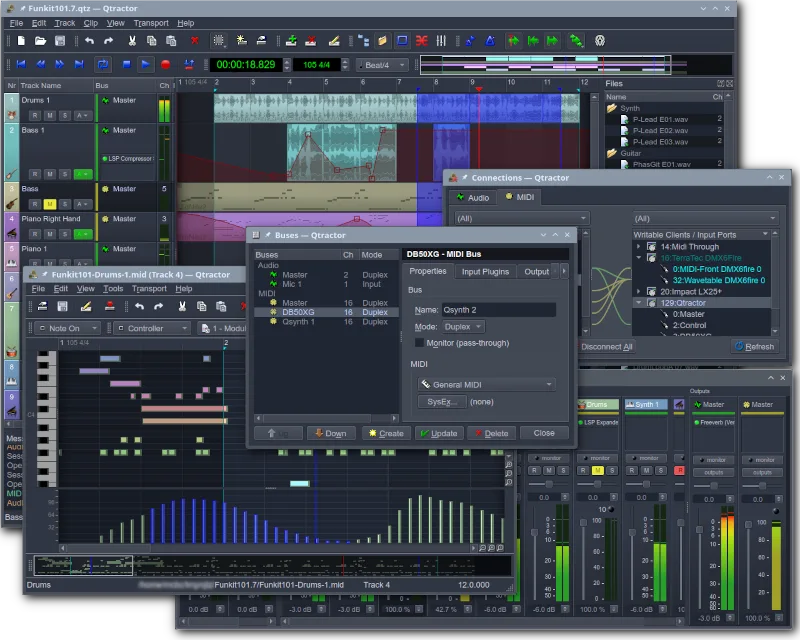
Qtractor can replace Logic Pro for basic multitrack audio and MIDI work on Linux, especially for hobbyists or small home studios. It covers core tasks like recording, editing, sequencing, and mixing with VST/LADSPA effects. However, it lacks Logic Pro’s extensive instrument library, advanced mastering suite, and tight integration with macOS hardware. Users who need a full‑featured commercial DAW or large virtual instrument collection may find Qtractor limited, but for straightforward projects it offers a solid free alternative.
- Licencia
- GPL-2.0+
- Precio
- Gratis
- Última versión
- 1.6.4 (6 de septiembre de 2026)
- Valoración
- —
Lo que funciona igual
- Both provide multitrack audio and MIDI recording and editing
- Both support plugin-based effects (VST in Qtractor, AU/RTAS in Logic Pro)
- Both include a mixing console with channel strips and routing options
- Both allow session/project saving and management
Lo que cambia
- Logic Pro ships with a large built‑in instrument library; Qtractor relies on external VST/LADSPA plugins
- Logic Pro offers advanced mastering tools (e.g., channel strip EQ, compressor, limiter) that Qtractor does not include natively
- Logic Pro runs on macOS only; Qtractor runs natively on Linux via JACK/ALSA
- Logic Pro has a more polished UI and workflow; Qtractor’s UI is functional but less refined
- Logic Pro supports audio file formats like AIFF, WAV, MP3, and proprietary .logic files; Qtractor handles standard WAV/FLAC but not .logic files
Abrir tus archivos de Logic Pro
Qtractor does not natively open Logic Pro’s .logic project files. It can import standard audio files (WAV, AIFF, FLAC) and MIDI files, but converting a full Logic Pro session would require manually recreating tracks and routing in Qtractor. Exporting from Qtractor to common formats (WAV, AIFF, MP3) is straightforward, but there is no direct way to produce a .logic file.
Pasar de Logic Pro a Qtractor, paso a paso
- Re‑apply effects and mix adjustments in Qtractor’s mixer, then export the final mix
Funciones clave de Qtractor
- Grabación de audio y MIDI multicanal
- Integración con el servidor de audio JACK
- Soporte para dispositivos MIDI mediante ALSA
- Soporte para plugins VST y LADSPA
- Edición y mezcla no destructivas
- Efectos y procesamiento integrados
- Gestión de sesiones y guardado de proyectos
- Compatibilidad multiplataforma mediante Qt
Cómo instalar Qtractor en Linux
flatpak install flathub org.rncbc.qtractorsudo apt install qtractorsudo apt install qtractorsudo dnf install qtractorsudo pacman -S qtractorsudo zypper install qtractorPreguntas frecuentes
Is Qtractor suitable for professional recording studios?
It can handle basic recording and mixing, but lacks the advanced features, plugin ecosystem, and performance stability expected in professional studio environments.
Can I use Logic Pro plugins in Qtractor?
No. Logic Pro uses AU/RTAS plugins, which are macOS‑specific. Qtractor supports VST and LADSPA plugins that are available for Linux.
Does Qtractor support audio file formats used by Logic Pro?
Yes, it supports WAV, AIFF, FLAC, and standard MIDI files, but it cannot read or write the proprietary .logic format.
Otras 2 alternativas a Logic Pro
 ArdourArdour es una estación de trabajo de audio digital de código abierto y profesional para grabar, editar y…Código abiertoGratisFlatpakArdour vs Logic Pro
 LMMSLMMS es una estación de trabajo de audio digital gratuita para componer, secuenciar y mezclar música usando…Código abiertoGratisFlatpakLMMS vs Logic Pro