
 Sticky NotesLinux
vs
Microsoft Sticky NotesWindows
Sticky Notes como alternativa Linux a Microsoft Sticky Notes
Actualizado el
Nuestra opinión
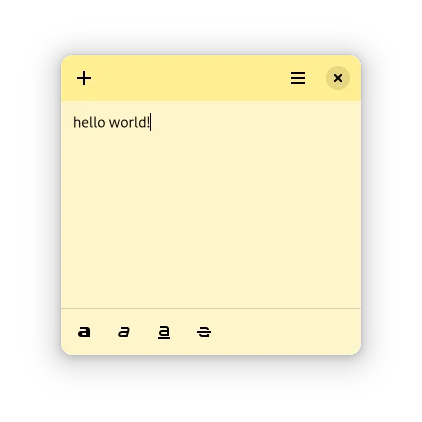
Sticky Notes is a decent replacement for Microsoft Sticky Notes if you're on a GNOME desktop and want basic, lightweight note-taking directly on your desktop. It handles core tasks like persistent, color-coded notes with simple formatting and auto-start. While it lacks some polish and advanced organization features, it respects user privacy with local-only storage and no cloud sync. It's ideal for Linux users who want a no-frills, always-on-top note app that stays out of the way.
- Licencia
- MIT
- Precio
- Gratis
- Última versión
- 0.2.7 (16 de abril de 2025)
- Valoración
- —
Lo que funciona igual
- Both allow creating small, always-on-top desktop notes
- Support basic text formatting like bold, italic, underline, and strikethrough
- Offer color-coded note backgrounds for visual organization
- Notes persist across sessions if left open
- Lightweight and fast to launch
Lo que cambia
- Sticky Notes does not support bullet or numbered lists
- No native import or sync with Microsoft Sticky Notes data
- Lacks handwriting or ink support (not relevant for most desktop users)
- No search across notes or tagging system
- Auto-restore only works for notes that were open at exit
Abrir tus archivos de Microsoft Sticky Notes
There is no direct way to import Microsoft Sticky Notes files into Sticky Notes. Microsoft Sticky Notes stores data in a proprietary format within the Windows app data directory, while Sticky Notes uses its own local storage mechanism. If you can export notes as plain text or HTML, you can manually recreate them. Otherwise, migration requires copy-pasting each note individually.
Pasar de Microsoft Sticky Notes a Sticky Notes, paso a paso
- Export or copy your Microsoft Sticky Notes content to a text file
- Install Sticky Notes via Flathub: flatpak install flathub com.angeloiscoding.StickyNotes
- Launch Sticky Notes and create a new note for each original sticky
- Apply background colors and formatting as needed
- Ensure Sticky Notes is added to startup applications in GNOME
Funciones clave de Sticky Notes
- Crear y fijar notas directamente en el escritorio
- Formato de texto básico: negrita, *cursiva*, subrayado, tachado
- Cambiar el color de fondo de la nota para agrupar visualmente
- Soporta tema oscuro para una apariencia coherente con el escritorio
- Las notas permanecen entre sesiones si se dejan abiertas
- Inicio rápido y bajo consumo de recursos
- Diseño integrado con GNOME
- Restaura automáticamente las notas abiertas tras reiniciar
Cómo instalar Sticky Notes en Linux
flatpak install flathub com.vixalien.stickyPreguntas frecuentes
Does Sticky Notes sync across devices?
No, Sticky Notes stores data locally only. It does not include cloud sync, which keeps it lightweight and private.
Can I use Sticky Notes on desktop environments other than GNOME?
Yes, but it works best on GNOME. On other environments like KDE or XFCE, it may lack integration but still functions.
Is there a way to back up my sticky notes?
Yes, the app stores notes locally in your home directory under ~/.var/app/com.angeloiscoding.StickyNotes/, so you can back up that folder.
Otras 3 alternativas a Microsoft Sticky Notes
 GnoteGnote es una aplicación sencilla de notas para GNOME que admite enlaces al estilo wiki, cuadernos y…Código abiertoGratisFlatpakGnote vs Microsoft Sticky NotesKNotesKNotes es una aplicación ligera para tomar notas en KDE, que ofrece funcionalidad similar a las notas…Código abiertoGratisKNotes vs Microsoft Sticky Notes