
 VesktopLinux
vs
DiscordWindows
VesktopLinux
vs
DiscordWindows
Vesktop como alternativa Linux a Discord
Actualizado el
Nuestra opinión
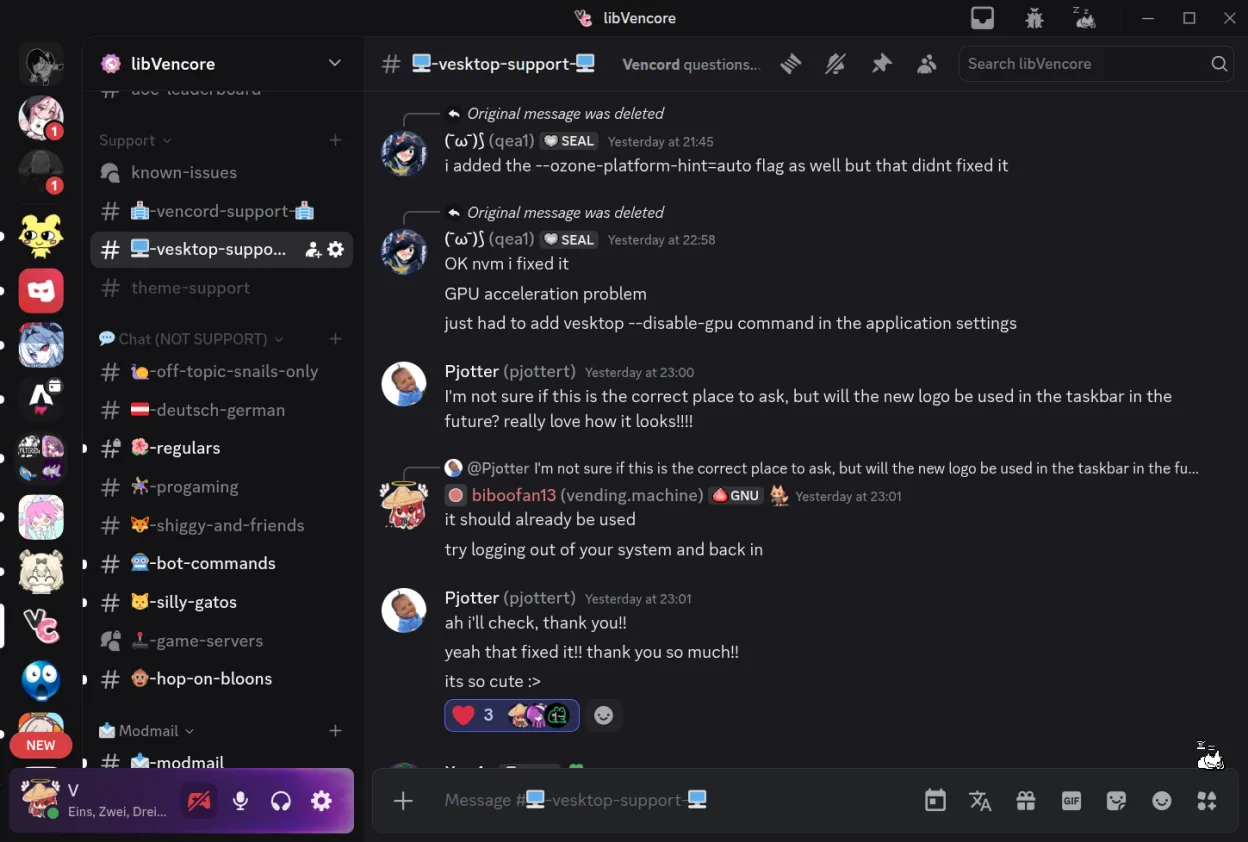
Vesktop is a solid native Linux replacement for Discord. It delivers the full Discord experience—text, voice, video, screen‑share, server management, moderation, and cross‑platform presence—while adding a privacy‑friendly, open‑source layer and a plugin system for UI tweaks. It works best for Linux users who want a lightweight, native client without Wine or web wrappers. Gamers, community managers, and developers who need customizability or stricter privacy will benefit most.
- Licencia
- GPL-3.0-or-later
- Precio
- Gratis
- Última versión
- 1.6.8 (22 de octubre de 2026)
- Valoración
- —
Lo que funciona igual
- Full Discord feature set (text, voice, video, screen‑share, server/room management, moderation tools)
- Cross‑platform presence support
- Native Linux windowing and notifications
- Regular updates and security patches
- Open‑source code on GitHub
Lo que cambia
- No built‑in support for Discord Nitro perks beyond what Discord offers
- Missing Discord’s built‑in game‑overlay for Windows/Linux gaming
- No official Discord support channel; relies on community forums
- No native integration with Windows‑specific features like Game Bar
- Requires Vencord plugins for advanced UI customizations
Abrir tus archivos de Discord
Vesktop can open and display Discord messages, channels, and media exactly as the official client does. Exporting or importing Discord data (like chat logs or settings) is not directly supported; users must rely on Discord’s own export tools or third‑party scripts.
Pasar de Discord a Vesktop, paso a paso
- 1. Install Vesktop via Flathub or the .flatpak package
- 2. Launch Vesktop and sign in with your Discord credentials
- 3. If you use custom themes or plugins, install them via the Vencord plugin manager
- 4. Verify voice, video, and screen‑share functionality by joining a test server
- 5. (Optional) Disable or uninstall the official Discord client to avoid conflicts
Funciones clave de Vesktop
- Interfaz personalizable mediante plugins de Vencord
- Venmic integrado para compartir pantalla con audio
- Ventanas y notificaciones nativas de Linux
- Soporta el conjunto completo de funciones de Discord
- No necesita Wine ni wrapper web
- Código abierto en GitHub
- Actualizaciones regulares y parches de seguridad
Cómo instalar Vesktop en Linux
flatpak install flathub dev.vencord.VesktopPreguntas frecuentes
Does Vesktop support Discord Nitro features?
Yes, it works with Nitro like any other Discord client, but there is no separate Nitro interface in Vesktop; you use the same Discord account.
Is Vesktop safe to use?
It is open‑source, licensed GPL‑3.0-or-later, and receives regular security updates from the Vencord community.
Can I use Vesktop on other operating systems?
Vesktop is designed for Linux only; it does not run natively on Windows or macOS.
Otras 6 alternativas a Discord
 MumbleCliente de chat de voz cifrado, de código abierto y baja latencia, diseñado para juegos y comunicación en…Código abiertoGratisFlatpakMumble vs Discord
 ElementElement es un cliente seguro de mensajería y videoconferencia basado en Matrix para Linux.Código abiertoGratisFlatpakElement vs Discord
 SlackSlack es una aplicación propietaria de comunicación para equipos en Linux que centraliza conversaciones…FlatpakSlack vs Discord
 TelegramTelegram es un mensajero instantáneo rápido, seguro y basado en la nube, con intercambio de archivos…Código abiertoGratisFlatpakTelegram vs Discord
 Signal DesktopSignal Desktop es un mensajero privado gratuito y de código abierto para Linux que sincroniza mensajes y…Código abiertoGratisFlatpakSignal Desktop vs Discord
 Jitsi MeetJitsi Meet es un cliente de videoconferencias de código abierto que se conecta a cualquier servidor Jitsi…Código abiertoGratisFlatpakJitsi Meet vs Discord