
 WPS OfficeLinux
vs
Microsoft Excel MobileWindows
WPS Office como alternativa Linux a Microsoft Excel Mobile
Actualizado el
Nuestra opinión
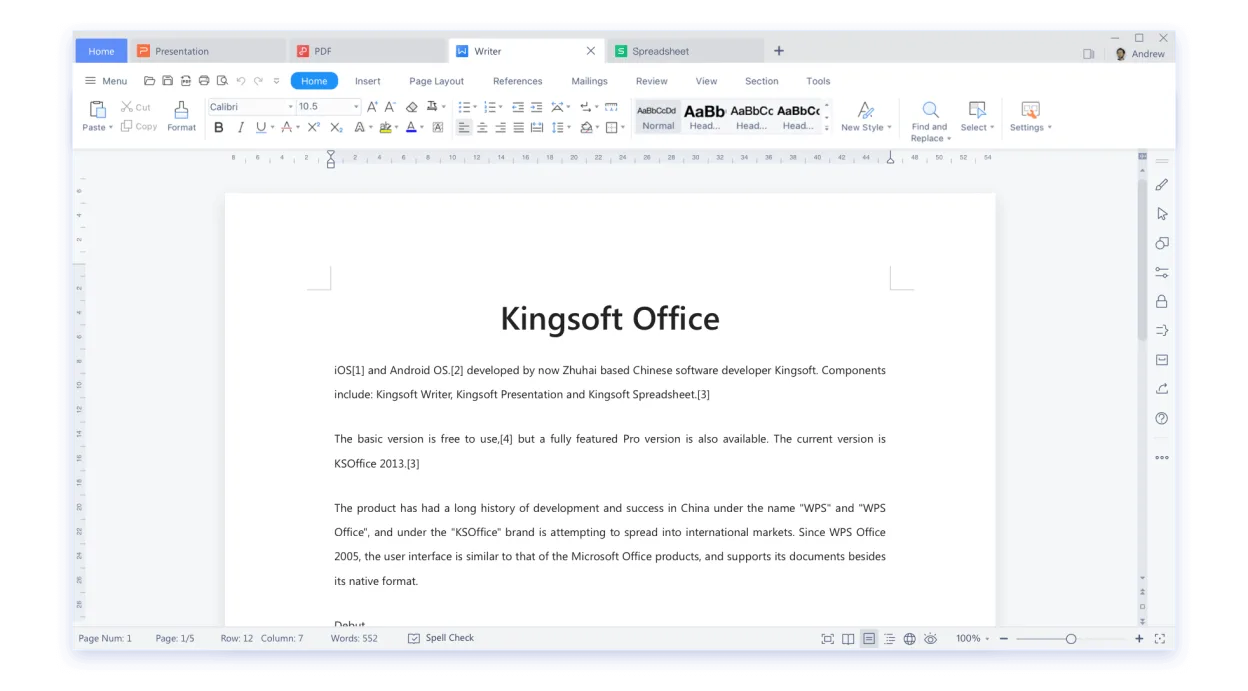
WPS Office’s Spreadsheets can replace Microsoft Excel Mobile for most everyday tasks. It supports the same file formats, basic formulas, charting, conditional formatting, and cloud collaboration. The interface is more feature‑rich than Excel Mobile, which is intentionally lightweight, but for users who need a full desktop‑style spreadsheet on Linux, WPS Office is a solid choice.
- Licencia
- LicenseRef-proprietary=https://www.wps.c…
- Precio
- freemium
- Última versión
- 11.1.0.11723 (22 de febrero de 2024)
- Valoración
- —
Lo que funciona igual
- Supports .xlsx and .csv import/export
- Includes common formulas and functions
- Provides basic charting and conditional formatting
- Offers cloud sync with OneDrive, Google Drive, and WPS Cloud
- Ribbon‑style UI familiar to Office users
Lo que cambia
- WPS Office is a full office suite, not a lightweight app
- More advanced features like pivot tables and advanced chart types
- Requires a larger installation footprint
- Less optimized for touch or small screens
- Not specifically designed for quick data entry on mobile devices
Abrir tus archivos de Microsoft Excel Mobile
WPS Office opens .xlsx and .csv files natively and can save spreadsheets in those formats. It can also export to PDF. The app can read files created by Excel Mobile without issues, and exported files are fully compatible with Excel Mobile. No additional steps are needed for file compatibility.
Pasar de Microsoft Excel Mobile a WPS Office, paso a paso
- 1. Install WPS Office from Flathub or the official package.
- 2. Open the .xlsx or .csv file you used in Excel Mobile.
- 3. Verify formulas and formatting appear correctly.
- 4. Save the file in .xlsx format to keep compatibility with other Office apps.
- 5. If needed, set up cloud sync in WPS Office to match your Excel Mobile collaboration setup.
- 6. Test sharing the file via OneDrive or Google Drive to confirm collaboration works.
Funciones clave de WPS Office
- Writer: procesador de textos completo con biblioteca de plantillas
- Spreadsheets: soporte de fórmulas, tablas dinámicas, gráficos
- Presentation: editor de diapositivas con transiciones y animaciones
- Alta compatibilidad con archivos .docx, .xlsx, .pptx
- UI estilo cinta similar a Microsoft Office
- Exportación a PDF y edición básica
- Integración con almacenamiento en la nube (WPS Cloud, Google Drive, OneDrive)
- Interfaz multilingüe
Cómo instalar WPS Office en Linux
flatpak install flathub com.wps.OfficePreguntas frecuentes
Is WPS Office free on Linux?
Yes, WPS Office offers a free tier with core features; a premium subscription adds extra templates and cloud storage.
Does WPS Office support touch input on tablets?
The desktop version is not optimized for touch; however, the interface can be used on tablets with a mouse or stylus.
Will my Excel Mobile macros run in WPS Office?
WPS Office does not support VBA macros, so any macro‑heavy workbooks will need to be converted or rewritten.
Otras 3 alternativas a Microsoft Excel Mobile
 LibreOffice CalcLibreOffice Calc es un programa de hojas de cálculo gratuito que reemplaza a Microsoft Excel en Linux.Código abiertoGratisFlatpakLibreOffice Calc vs Microsoft Excel Mobile
 GnumericGnumeric es un programa de hojas de cálculo ligero y de código abierto, centrado en la precisión y el…Código abiertoGratisFlatpakGnumeric vs Microsoft Excel Mobile
 CalligraCalligra is a KDE‑based office suite offering word processing, spreadsheets, presentations and vector…Código abiertoGratisFlatpakCalligra vs Microsoft Excel Mobile