
 CherryTreeLinux
vs
ObsidianWindows
CherryTreeLinux
vs
ObsidianWindows
CherryTree, alternative Linux à Obsidian
Mis à jour le
Notre avis
CherryTree is a decent replacement for Obsidian if you prioritize rich text formatting, local storage, and hierarchical organization over bidirectional linking and graph-based knowledge mapping. It stores notes locally and supports fast search, export, and customization, but lacks Markdown-first editing and true bidirectional links. It suits users who want a single encrypted document for notes, code snippets, and embedded media, especially if they don’t rely on link graphs or plain-text Markdown workflows. Not ideal for Obsidian users focused on networked thought or publishing.
- Licence
- GPL-3.0+
- Prix
- Gratuit
- Dernière version
- b'1.7.2' (11 novembre 2011)
- Note
- —
Ce qui fonctionne pareil
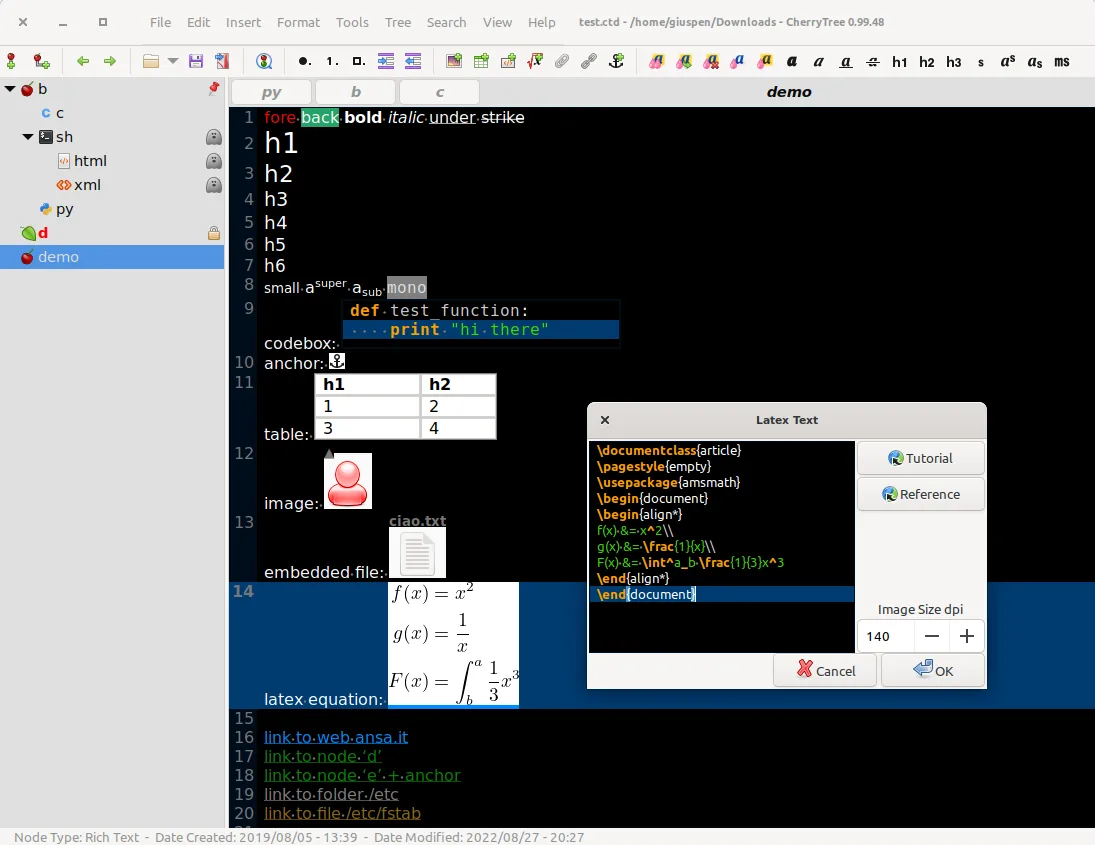
- Stores all notes locally in a single file (XML or SQLite)
- Supports fast search, find/replace, and spell check
- Allows embedding images, tables, code blocks with syntax highlighting
- Offers export to PDF, HTML, and plain text
- Works offline with no forced cloud sync
Ce qui change
- No native Markdown editing — uses rich text instead of plain text files
- No bidirectional links or graph view of note connections
- Hierarchy is tree-based, not tag- or link-driven like Obsidian
- No plugin system or community themes
- Interface is desktop-focused, not cross-platform with mobile sync
Ouvrir vos fichiers Obsidian
CherryTree cannot directly open Obsidian's Markdown files, especially those relying on bidirectional links or YAML frontmatter. While you can import plain text or HTML from Obsidian exports, formatting and links won't carry over automatically. Exporting from Obsidian to HTML and then importing into CherryTree may preserve basic content, but structure and linking will be lost. There’s no built-in tool to convert Obsidian vaults to CherryTree format.
Passer de Obsidian à CherryTree, étape par étape
- Export your Obsidian notes to HTML or plain text using Obsidian or a plugin
- Open CherryTree and create a new document
- Manually import or copy-paste converted notes into nodes
- Rebuild hierarchy using CherryTree’s tree structure
- Use Find/Replace to fix links or formatting inconsistencies
Fonctionnalités clés de CherryTree
- Notes hiérarchiques en structure arborescente
- Texte enrichi avec images, tableaux et listes
- Coloration syntaxique pour les blocs de code
- Protection par mot de passe des nœuds
- Exportation au format PDF, HTML et texte brut
- Importation depuis d'autres applications de prise de notes
- Vérification orthographique et outils de recherche/remplacement
- Stockage des données en XML ou SQLite
Installer CherryTree sous Linux
flatpak install flathub net.giuspen.cherrytreesudo apt install cherrytreesudo apt install cherrytreesudo pacman -S cherrytreesudo zypper install cherrytreeQuestions fréquentes
Can CherryTree display a graph view like Obsidian?
No, CherryTree does not have a graph or network view of note connections. Relationships between notes must be managed manually through hyperlinks or hierarchy.
Does CherryTree support Markdown files?
No, CherryTree uses rich text formatting and stores content in XML or SQLite. It does not natively edit or save Markdown files.
Can I sync CherryTree notes across devices?
You can sync the single CherryTree file (e.g., .ctb) using any file sync tool like Syncthing or Dropbox, but there’s no built-in sync or mobile app support.
5 autres alternatives à Obsidian
 JoplinJoplin est une application open source et multiplateforme de prise de notes et de gestion de tâches qui…Open sourceGratuitFlatpakJoplin ou Obsidian
 ZettlrZettlr est un éditeur Markdown rapide et open‑source avec prise en charge du Zettelkasten et des citations.Open sourceGratuitFlatpakZettlr ou Obsidian
 LogseqLogseq est un outil de base de connaissances non linéaire, privilégiant le stockage local, qui enregistre les…Open sourceGratuitFlatpakLogseq ou Obsidian
 Standard NotesStandard Notes est une application de prise de notes sécurisée, chiffrée de bout en bout, qui synchronise vos…Open sourceGratuitFlatpakStandard Notes ou Obsidian
 QOwnNotesQOwnNotes est un éditeur Markdown en texte brut avec prise en charge des listes de tâches, pouvant se…Open sourceGratuitFlatpakQOwnNotes ou Obsidian