
 FreeFileSyncLinux
vs
Resilio SyncWindows
FreeFileSyncLinux
vs
Resilio SyncWindows
FreeFileSync, alternative Linux à Resilio Sync
Mis à jour le
Notre avis
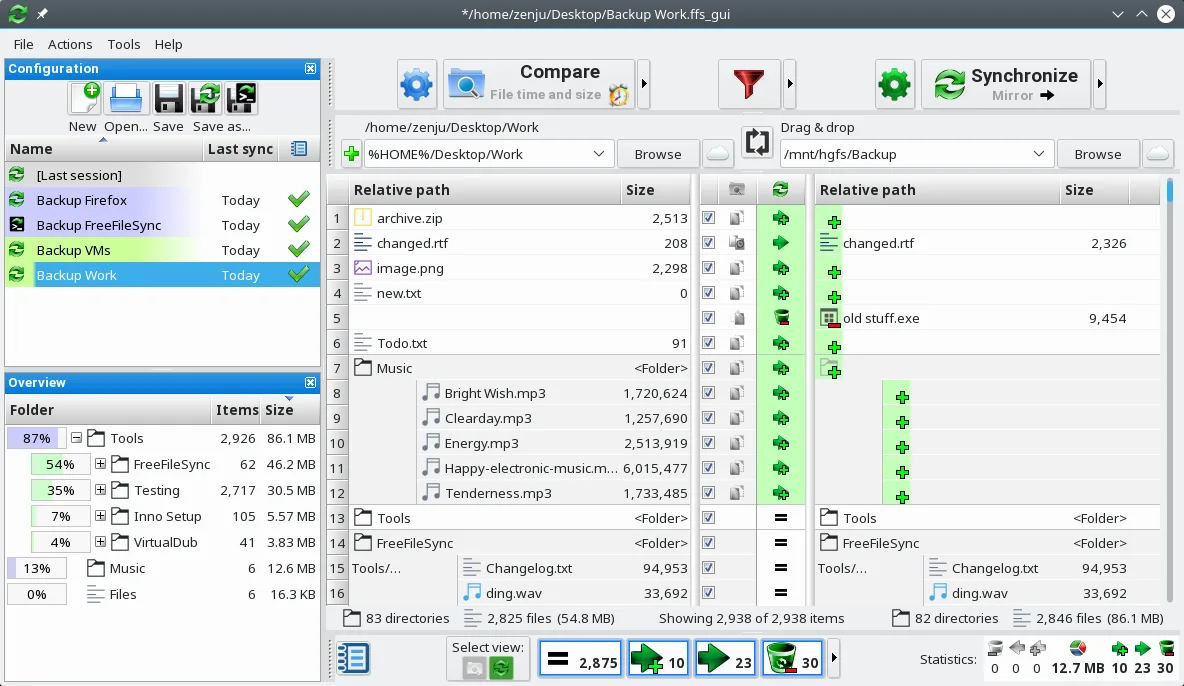
FreeFileSync is not a direct replacement for Resilio Sync, but serves a different purpose. If you need real-time, peer-to-peer folder syncing across devices without central servers, FreeFileSync does not provide that. It's ideal for manual or scheduled one-time syncs between local or networked paths, not continuous background syncing. However, for users who prefer full control, transparency, and don't need automatic P2P sync, FreeFileSync is a solid choice. It excels in visual verification and precise file management, making it better suited for local backups than decentralized collaboration.
- Licence
- GPL-3.0
- Prix
- Gratuit
- Dernière version
- 14.13 (26 octobre 2026)
- Note
- —
Ce qui fonctionne pareil
- Both synchronize folders to keep content consistent across locations
- Support bidirectional and one-way sync modes
- Can sync over network drives and shared folders
- Detect file changes, renames, and moves accurately
- Offer filtering options to include or exclude specific files
Ce qui change
- FreeFileSync lacks peer-to-peer networking; it doesn't sync directly between devices like Resilio Sync
- No built-in real-time syncing—requires external tools like cron for automation
- Does not use BitTorrent protocol or support sync keys/links for easy sharing
- Runs only when launched, not as a background service
- Missing encryption in transit and decentralized authentication features
Ouvrir vos fichiers Resilio Sync
FreeFileSync does not use or recognize Resilio Sync's configuration files, metadata, or .sync folders. There is no import function for Resilio Sync setups. You cannot directly open or migrate Resilio Sync profiles into FreeFileSync. Sync relationships must be recreated manually by defining source and target folders. Any files already synced by Resilio Sync can be accessed normally since they’re standard files on disk, but the synchronization logic and history are not transferable.
Passer de Resilio Sync à FreeFileSync, étape par étape
- Identify all active Resilio Sync folder pairs and their sync direction
- On each Linux machine, install FreeFileSync via your package manager or Flathub
- Create a new synchronization job in FreeFileSync for each Resilio Sync folder pair
- Set up filters and exclusions to match your previous Resilio Sync rules
- Save the job and schedule it using cron or systemd for recurring syncs
- Test manually first, then verify logs for accuracy before relying on automation
Fonctionnalités clés de FreeFileSync
- Comparaison visuelle côte à côte des dossiers
- Synchronisation en temps réel et par lots
- Prend en charge les disques locaux, réseau et externes
- Filtres pour inclure ou exclure des fichiers
- Peut créer des tâches par lots pour l’automatisation
- Détecte les fichiers déplacés et renommés
- S’exécute selon un calendrier via des outils externes
- Génère des journaux de synchronisation détaillés
Installer FreeFileSync sous Linux
flatpak install flathub org.freefilesync.FreeFileSyncsudo apt install freefilesyncsudo apt install freefilesyncsudo zypper install FreeFileSyncQuestions fréquentes
Can FreeFileSync sync folders between two computers like Resilio Sync?
Not directly. FreeFileSync can sync over network shares (e.g., Samba), but requires both machines to be accessible. It doesn't do peer-to-peer syncing or work over the internet without shared storage.
Is real-time sync possible with FreeFileSync?
No, FreeFileSync has no built-in real-time monitoring. You must trigger syncs manually or schedule them using external tools like cron or inotify scripts.
Does FreeFileSync encrypt data during transfer?
No. FreeFileSync transfers files directly over mounted paths or network drives. Encryption depends on the underlying system, such as an encrypted SSHFS mount or VPN.
5 autres alternatives à Resilio Sync
 SyncThingySyncThingy est une icône de barre système légère qui contrôle Syncthing, vous permettant de consulter l'état…Open sourceGratuitFlatpakSyncThingy ou Resilio Sync
 Nextcloud Desktop ClientSynchronise les fichiers entre votre bureau Linux et un serveur Nextcloud, gardant vos documents et photos à…Open sourceGratuitFlatpakNextcloud Desktop Client ou Resilio Syncrsyncrsync est un outil en ligne de commande permettant de synchroniser efficacement des fichiers et des…Open sourceGratuitrsync ou Resilio Sync
 UnisonUnison est un outil de synchronisation de fichiers multiplateforme qui maintient deux répertoires…Open sourceGratuitFlatpakUnison ou Resilio SyncLsyncdLsyncd synchronise des répertoires localement ou en réseau à l'aide de rsync, idéal pour la synchronisation…Open sourceGratuitLsyncd ou Resilio Sync