
 KWriteLinux
vs
Windows NotepadWindows
KWriteLinux
vs
Windows NotepadWindows
KWrite, alternative Linux à Windows Notepad
Mis à jour le
Notre avis
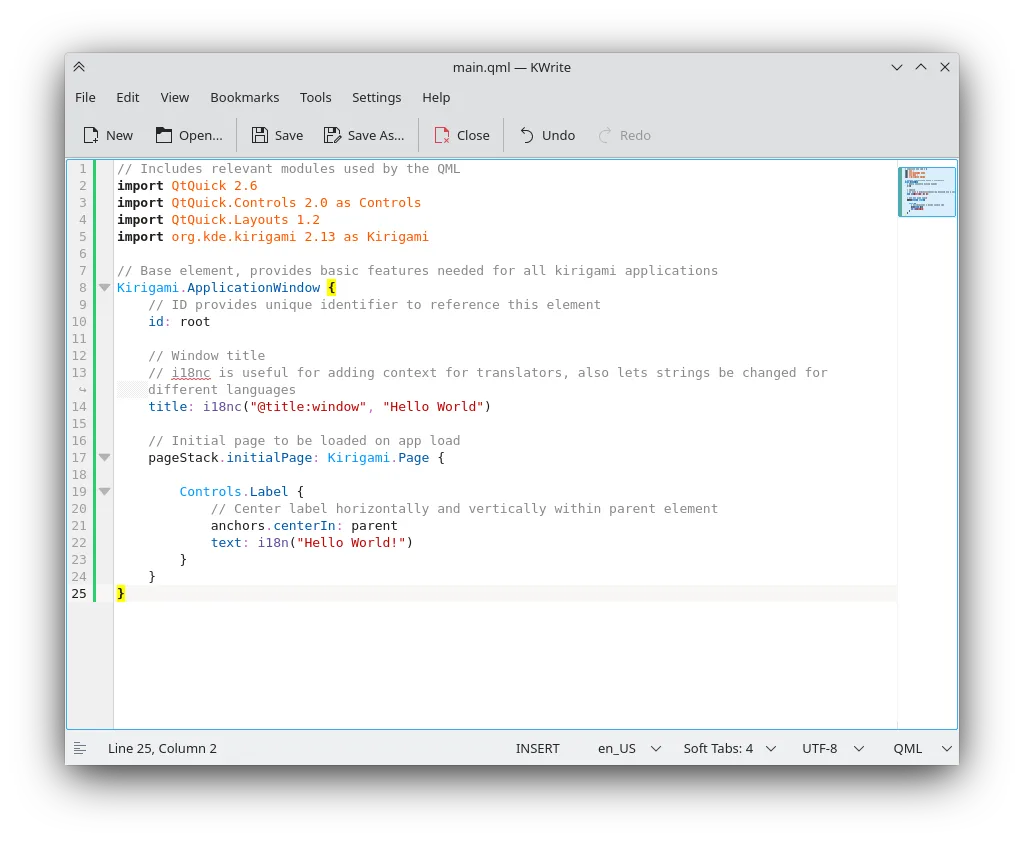
KWrite is a capable replacement for Windows Notepad if you're comfortable with KDE and want more features. It handles plain text quickly and supports UTF-8 and common encodings reliably. The interface is simple but offers advanced options you can ignore. It launches fast enough for quick edits, though heavier than Notepad due to KDE dependencies. If you value syntax highlighting, search with regex, or vi mode, KWrite is excellent. But if you want absolute minimalism, something like Mousepad or gedit might suit better.
- Licence
- LGPL-2.1+
- Prix
- Gratuit
- Dernière version
- 26.04.3 (2 juillet 2026)
- Note
- —
Ce qui fonctionne pareil
- Edits plain text files efficiently
- Supports UTF-8 and common text encodings
- Fast enough for quick editing tasks
- Simple menu layout with minimal learning curve
- Integrates with system clipboard for copy-paste
Ce qui change
- Includes syntax highlighting, which Notepad lacks
- Offers vi mode and auto-indentation—useful but unnecessary for basic text
- Supports plugins and advanced search (regex), going beyond Notepad's scope
- Requires KDE libraries, making it heavier than minimal editors
- Line numbering and folding not present in classic Notepad
Ouvrir vos fichiers Windows Notepad
KWrite opens and saves files created by Windows Notepad without issues. It correctly handles DOS line endings (CRLF) and detects them automatically. Files encoded in UTF-8, ANSI, and common Windows code pages like CP1252 are supported. You can edit and resave files without altering formatting unless you choose to. No compatibility problems are known when sharing .txt files between Notepad and KWrite.
Passer de Windows Notepad à KWrite, étape par étape
- Install KWrite via your package manager or Flatpak
- Open a .txt file from Windows Notepad to test
- Check encoding settings if text appears garbled
- Use 'Configure KWrite' to disable syntax highlighting if desired
- Set KWrite as default for .txt files in your file manager
Fonctionnalités clés de KWrite
- Coloration syntaxique pour de nombreux langages
- Saisie semi-automatique et retrait automatique
- Numéros de ligne et pliage de code
- Mode vi pour une édition modale
- Prise en charge des plugins via le framework KDE
- Recherche et remplacement avec expressions régulières
- Thèmes de couleurs et polices personnalisables
- Intégration avec les boîtes de dialogue de fichiers de KDE
Installer KWrite sous Linux
flatpak install flathub org.kde.kwriteQuestions fréquentes
Does KWrite run outside KDE?
Yes, but it pulls in KDE libraries. It works on GNOME or Xfce, but feels more at home in KDE.
Can I disable advanced features to make it more like Notepad?
Yes. Turn off syntax highlighting, line numbers, and auto-indent in settings for a simpler view.
Is KWrite as lightweight as Notepad?
No. It's heavier due to KDE dependencies, but still fast for everyday editing.
5 autres alternatives à Windows Notepad
 geditgedit est l'éditeur de texte léger et polyvalent de GNOME, idéal pour les notes, les documents et l'édition…Open sourceGratuitFlatpakgedit ou Windows Notepad
 KateKate est un éditeur de texte riche en fonctionnalités, axé sur les programmeurs, issu de KDE, prenant en…Open sourceGratuitFlatpakKate ou Windows Notepad
 MousepadMousepad est un éditeur de texte léger, basé sur GTK, pour le bureau Xfce.Open sourceGratuitFlatpakMousepad ou Windows NotepadPlumaPluma est un éditeur de texte léger basé sur GTK pour le bureau GNOME, conçu comme une alternative simple à…Open sourceGratuitPluma ou Windows NotepadLeafpadLeafpad est un éditeur de texte léger, basé sur GTK, conçu pour la rapidité et la simplicité sur les bureaux…Open sourceGratuitLeafpad ou Windows Notepad