
 NotepadLinux
vs
NotepadLinux
vs
 Notepad++Windows
Notepad, alternative Linux à Notepad++
Mis à jour le
Notre avis
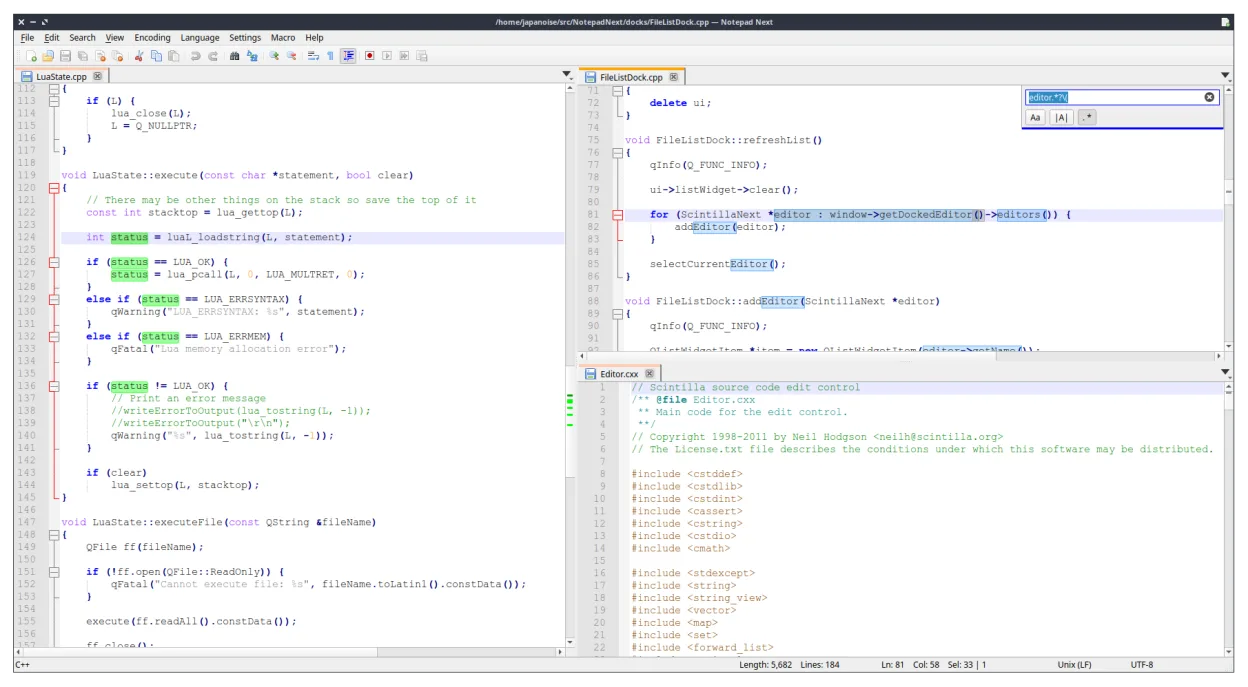
Notepad Next is a solid, lightweight replacement for Notepad++ on Linux, particularly for users who prioritize speed and a familiar interface. It handles core tasks like syntax highlighting and regex search effectively. However, it is still in early development (v0.15), so you may encounter rough edges or missing advanced features found in the mature Windows version. It is best suited for developers who need a quick, low-memory editor for daily coding and text manipulation, rather than those relying on complex plugin ecosystems or heavy macro automation.
- Licence
- GPL-3.0
- Prix
- Gratuit
- Dernière version
- v0.15 (21 septembre 2026)
- Note
- —
Ce qui fonctionne pareil
- Lightweight design with fast startup times
- Syntax highlighting for over 50 programming languages
- Tabbed interface for managing multiple files
- Find and replace functionality with regular expression support
- Unicode and UTF-8 handling
Ce qui change
- Lacks the extensive plugin architecture of Notepad++
- Macro recording and scripting capabilities are limited or absent
- Fewer built-in plugins for advanced file operations
- Being a newer project, it has a smaller community and fewer documented workflows
- Distribution via Flatpak may introduce slight overhead compared to native binaries
Ouvrir vos fichiers Notepad++
Notepad Next opens standard text files, including .txt, .c, .py, and other source code files, without issue. Since it is a reimplementation of Notepad++, it generally handles the same file formats. However, specific Notepad++ session files (like workspace layouts or macro definitions) are not compatible and will need to be recreated. If you have custom settings, you will need to manually reconfigure them in Notepad Next, as there is no direct import tool for Notepad++ configuration files.
Passer de Notepad++ à Notepad, étape par étape
- Install Notepad Next via Flatpak: flatpak install flathub com.github.jdailey.notepad-next
- Open Notepad Next and configure your preferred font and color scheme
- Enable syntax highlighting for your primary languages in the settings
- Test regex search and replace on a sample file to verify functionality
- Recreate any essential macros or shortcuts manually, as they do not transfer
- Keep Notepad++ installed on Windows for any tasks requiring specific plugins until Notepad Next matures
Fonctionnalités clés de Notepad
- Édition par onglets
- Coloration syntaxique pour plus de 50 langages
- Recherche/remplacement avec expressions régulières
- Multiplateforme via Flatpak
- Interface légère
- Sous licence GPL
Installer Notepad sous Linux
flatpak install flathub com.github.dail8859.NotepadNextQuestions fréquentes
Is Notepad Next stable enough for daily use?
It is active and functional, but being at v0.15, it is still maturing. Expect occasional bugs or missing features compared to the stable Windows version. It is usable for many tasks but may not be ready for critical, production-grade workflows.
Can I use Notepad++ plugins in Notepad Next?
No. Notepad Next is a reimplementation, not a port. It does not support the Notepad++ plugin API. You will need to find native Linux alternatives for specific plugin functions or wait for Notepad Next to develop similar features.
Does it support large files well?
As a lightweight editor, it is designed for speed and low memory usage. It handles typical source code files well. For extremely large files (gigabytes), performance may vary, and specialized tools might be better suited.
4 autres alternatives à Notepad++
 geditgedit est l'éditeur de texte léger et polyvalent de GNOME, idéal pour les notes, les documents et l'édition…Open sourceGratuitFlatpakgedit ou Notepad++
 KateKate est un éditeur de texte riche en fonctionnalités, axé sur les programmeurs, issu de KDE, prenant en…Open sourceGratuitFlatpakKate ou Notepad++
 KDevelopKDevelop est un IDE gratuit et basé sur des modules complémentaires pour KDE, prenant en charge C++, Python…Open sourceGratuitFlatpakKDevelop ou Notepad++
 MousepadMousepad est un éditeur de texte léger, basé sur GTK, pour le bureau Xfce.Open sourceGratuitFlatpakMousepad ou Notepad++