
 QOwnNotesLinux
vs
Microsoft OneNote for Windows 10Windows
QOwnNotesLinux
vs
Microsoft OneNote for Windows 10Windows
QOwnNotes, alternative Linux à Microsoft OneNote for Windows 10
Mis à jour le
Notre avis
QOwnNotes is a decent replacement for Microsoft OneNote for users who prioritize text-based, Markdown-driven notes over free-form canvas layouts and multimedia. It works well for those already using Nextcloud or ownCloud for sync and who value speed, simplicity, and open-source ethics. However, it lacks support for ink, embedded audio/video, and real-time collaboration. If your workflow relies heavily on drawings, recordings, or shared notebooks with others, QOwnNotes will fall short. It's best suited for minimalists and technical users comfortable with plain text.
- Licence
- GPL-2.0+
- Prix
- Gratuit
- Dernière version
- 26.10.12 (25 octobre 2026)
- Note
- —
Ce qui fonctionne pareil
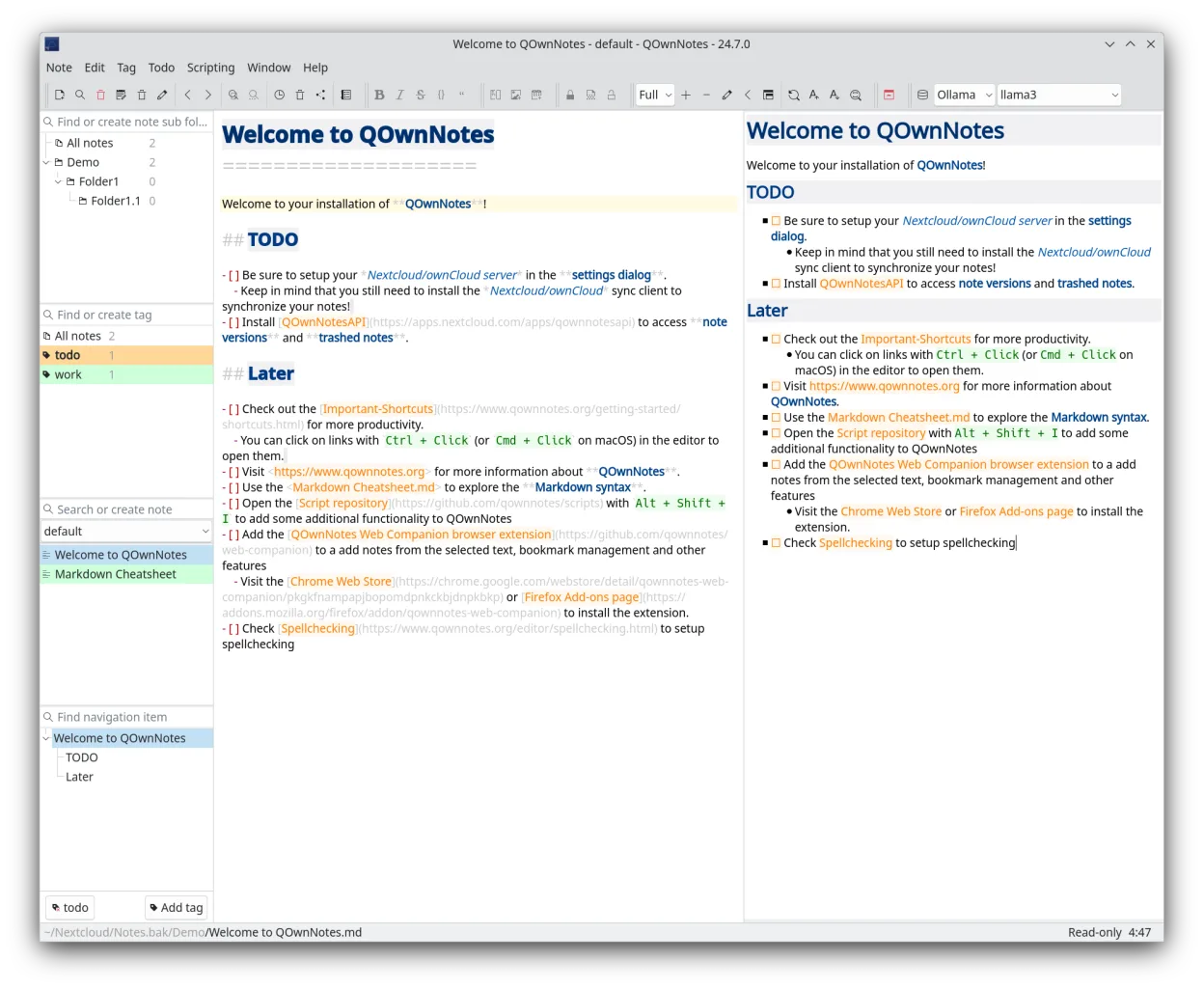
- Supports text, images, and links in notes
- Organizes notes with tags and hierarchical lists
- Syncs across Linux, Windows, and macOS via Nextcloud/ownCloud
- Exports to PDF and HTML
- Offers cross-platform availability
Ce qui change
- No free-form canvas; uses linear Markdown documents instead
- Does not support audio or video embedding
- No built-in collaboration features
- No ink or drawing support
- Relies on external sync solutions, not cloud-agnostic
Ouvrir vos fichiers Microsoft OneNote for Windows 10
QOwnNotes cannot open Microsoft OneNote .one files directly. There is no built-in import function for OneNote formats, and no known third-party tool reliably converts .one files to Markdown at scale. Users migrating must extract content manually—copying text, images, and links from OneNote into QOwnNotes. This limits bulk migration, especially for heavily formatted or media-rich notes.
Passer de Microsoft OneNote for Windows 10 à QOwnNotes, étape par étape
- Export important OneNote pages as PDF or HTML for backup
- Set up a Nextcloud or ownCloud instance for syncing
- Install QOwnNotes on all devices
- Manually recreate key notes in Markdown format
- Use tagging and note folders to mirror OneNote's notebook/section structure
Fonctionnalités clés de QOwnNotes
- Édition Markdown avec aperçu en temps réel
- Gestionnaire de liste de tâches
- Gestion par tags et recherche
- Synchronisation avec ownCloud/Nextcloud
- Multiplateforme (Linux, macOS, Windows)
- Raccourcis clavier personnalisables
- Léger et rapide
- Open source sous licence GPL-2.0+
Installer QOwnNotes sous Linux
flatpak install flathub org.qownnotes.QOwnNotessudo dnf install qownnotesQuestions fréquentes
Can QOwnNotes sync without Nextcloud?
No, QOwnNotes requires Nextcloud or ownCloud for synchronization. It does not support local folder sync or other cloud providers natively.
Does QOwnNotes support handwriting or drawing?
No. It does not support ink, stylus input, or canvas-style drawing like OneNote.
Can multiple people edit the same note in QOwnNotes?
No. It lacks real-time or even version-aware collaboration features. Shared notes must be managed manually via the sync server.
5 autres alternatives à Microsoft OneNote for Windows 10
 JoplinJoplin est une application open source et multiplateforme de prise de notes et de gestion de tâches qui…Open sourceGratuitFlatpakJoplin ou Microsoft OneNote for Windows 10
 ZimZim est un wiki de bureau permettant de prendre et organiser des notes dans des fichiers texte brut.Open sourceGratuitFlatpakZim ou Microsoft OneNote for Windows 10
 ObsidianObsidian est une application de base de connaissances basée sur le markdown qui stocke les notes sous forme…FlatpakObsidian ou Microsoft OneNote for Windows 10
 Standard NotesStandard Notes est une application de prise de notes sécurisée, chiffrée de bout en bout, qui synchronise vos…Open sourceGratuitFlatpakStandard Notes ou Microsoft OneNote for Windows 10
 Trilium NotesTrilium Notes est une application de prise de notes hiérarchique, auto‑hébergeable, pour créer des bases de…Open sourceGratuitFlatpakTrilium Notes ou Microsoft OneNote for Windows 10