
 Quassel IRCLinux
vs
Quassel IRCLinux
vs
 mIRCWindows
Quassel IRC, alternative Linux à mIRC
Mis à jour le
Notre avis
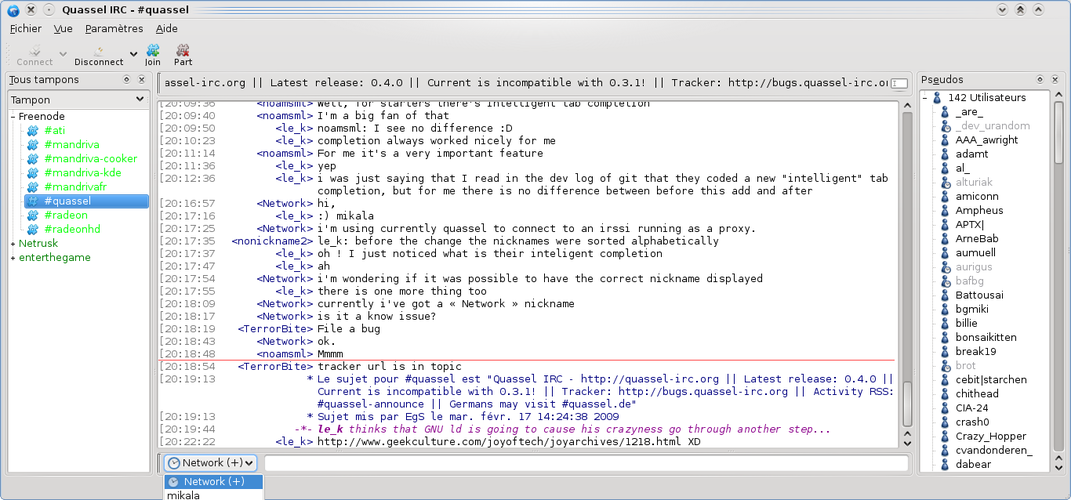
Quassel IRC can replace mIRC for users who want a modern, cross‑platform client with persistent server connections and a clean Qt interface. It handles multi‑server connections, channel and private messages, user lists, topics, and DCC file transfer. However, it lacks mIRC’s extensive scripting engine and some advanced alias features. It is best suited for users who prefer a lightweight, network‑agnostic experience over deep script customization.
- Licence
- GPL-2.0
- Prix
- Gratuit
- Dernière version
- —
- Note
- —
Ce qui fonctionne pareil
- Supports multiple IRC networks and simultaneous connections
- Provides channel and private message handling with userlist and topic display
- Offers DCC file transfer
- Allows configurable themes and interface customization
- Includes TLS/SSL encryption for secure connections
Ce qui change
- No built‑in, powerful scripting engine like mIRC’s Perl‑style scripts
- Missing advanced alias and macro system for command shortcuts
- Core/client split requires a running Quassel core, whereas mIRC runs standalone
- Quassel’s logging is built‑in but lacks the same level of scriptable log filtering
- User‑defined triggers and event handling are less flexible than mIRC’s script hooks
Ouvrir vos fichiers mIRC
mIRC uses .cfg and .script files that are not directly readable by Quassel. Users can export channel logs and settings from mIRC in plain text or CSV, but importing them into Quassel is not supported. Manual reconfiguration of networks and channels will be required.
Passer de mIRC à Quassel IRC, étape par étape
- Install Quassel Core on a server or local machine
- Create a new Quassel profile and add IRC networks manually
- Set up TLS/SSL for each network as needed
- Configure channel and userlist settings in Quassel’s preferences
- If you need DCC, enable DCC in Quassel’s settings and adjust file paths
- Optional: export mIRC logs to plain text and import into Quassel’s log viewer
Fonctionnalités clés de Quassel IRC
- Séparation noyau/client pour des connexions persistantes
- Connexions clientes multiples simultanées
- Journaux intégrés et historique consultable
- Chiffrement TLS/SSL pour une connexion IRC sécurisée
- Interface Qt avec thèmes personnalisables
- Notifications pour les canaux et messages privés
- Prise en charge de plusieurs réseaux IRC
- Clients multiplateformes (Linux, Windows, macOS, Android)
Questions fréquentes
Does Quassel support mIRC scripts?
No, Quassel does not interpret mIRC scripts. You would need to rewrite any scripts using Quassel’s own scripting or plugin system, which is limited compared to mIRC.
Can I use Quassel on Windows?
Yes, Quassel offers a Windows client that connects to the same core, allowing you to use the same configuration across platforms.
Is DCC file transfer reliable in Quassel?
Quassel supports DCC, but some users report that it can be less reliable than mIRC’s implementation, especially with firewalls or NAT traversal.
3 autres alternatives à mIRC
 KonversationKonversation est un client IRC KDE mature et convivial, prenant en charge plusieurs serveurs, SSL et les…Open sourceGratuitFlatpakKonversation ou mIRC
 IrssiIrssi est un client IRC léger, basé sur le terminal, pour Linux.Open sourceGratuitIrssi ou mIRC
 XChatXChat est un client IRC léger et scriptable pour Linux et Windows, apprécié pour sa simplicité et son support…Open sourceGratuitAbandonnéXChat ou mIRC