
 Syncthing TrayLinux
vs
SyncthingWindows
Syncthing Tray, alternative Linux à Syncthing
Mis à jour le
Notre avis
Syncthing Tray is not a replacement for Syncthing; it is an add‑on that improves the user experience of the existing Syncthing service. If you already run Syncthing on Linux and want a system‑tray icon, quick actions, and desktop notifications, Syncthing Tray is useful. It does not provide the core sync functionality itself, so it is only suitable for users who have Syncthing installed and want a more convenient interface.
- Licence
- GPL-2.0+
- Prix
- Gratuit
- Dernière version
- 2.1.8-1.9c06589 (7 octobre 2026)
- Note
- —
Ce qui fonctionne pareil
- Both use the same Syncthing core engine
- Both provide a web‑based configuration interface
- Both support cross‑platform peer‑to‑peer encrypted sync
- Both can be managed via systemd
Ce qui change
- Syncthing Tray does not perform file synchronization; it only adds a tray icon and menu
- It lacks the full set of configuration options that the Syncthing web UI offers
- Tray does not replace the Syncthing service binary or its command‑line interface
- It does not provide the ability to add or remove devices directly from the tray
- Missing advanced features like device discovery, advanced security settings, and detailed logs
Ouvrir vos fichiers Syncthing
Syncthing Tray does not create or modify Syncthing configuration files; it merely reads the existing config to display status. Importing or exporting configuration is handled by Syncthing itself. Therefore, opening or exporting Syncthing files is unchanged when using Syncthing Tray.
Passer de Syncthing à Syncthing Tray, étape par étape
- Install Syncthing on your Linux system if it isn’t already installed.
- Start Syncthing and confirm it is running via its web UI.
- Download and install Syncthing Tray from your distribution’s package manager or Flathub.
- Launch Syncthing Tray; it will automatically detect the running Syncthing instance and display a tray icon.
- Use the tray menu for quick actions or click the icon to open the web UI.
- Configure any desired notifications or systemd integration from the tray settings.
Fonctionnalités clés de Syncthing Tray
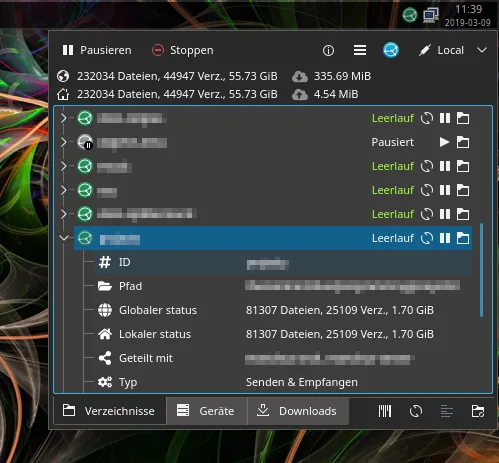
- System tray icon displaying overall Syncthing status
- Menu with detailed status information for each device and folder
- Quick actions to trigger rescans or pause syncing
- Desktop notifications for specific sync events
- One-click access to the web-based Syncthing UI
- Integration with systemd for proper service management
Installer Syncthing Tray sous Linux
flatpak install flathub io.github.martchus.syncthingtraysudo apt install syncthingtraysudo apt install syncthingtraysudo pacman -S syncthingtray-plasmaQuestions fréquentes
Can I use Syncthing Tray on a system that doesn’t have Syncthing installed?
No. Syncthing Tray requires a running Syncthing instance to function; it only adds a UI layer on top of Syncthing.
Does Syncthing Tray replace the Syncthing web UI?
No. The web UI remains the primary configuration interface; Syncthing Tray simply provides shortcuts and status indicators.
Will Syncthing Tray interfere with Syncthing’s performance?
It has minimal impact; it only runs a small tray process and listens for status updates from Syncthing.
2 autres alternatives à Syncthing
 Nextcloud Desktop ClientSynchronise les fichiers entre votre bureau Linux et un serveur Nextcloud, gardant vos documents et photos à…Open sourceGratuitFlatpakNextcloud Desktop Client ou Syncthing
 Seafile ClientSeafile est un client de synchronisation de fichiers multiplateforme qui maintient les dossiers locaux…Open sourceGratuitFlatpakSeafile Client ou Syncthing