
 Tux PaintLinux
vs
Paint 3DWindows
Tux PaintLinux
vs
Paint 3DWindows
Tux Paint, alternative Linux à Paint 3D
Mis à jour le
Notre avis
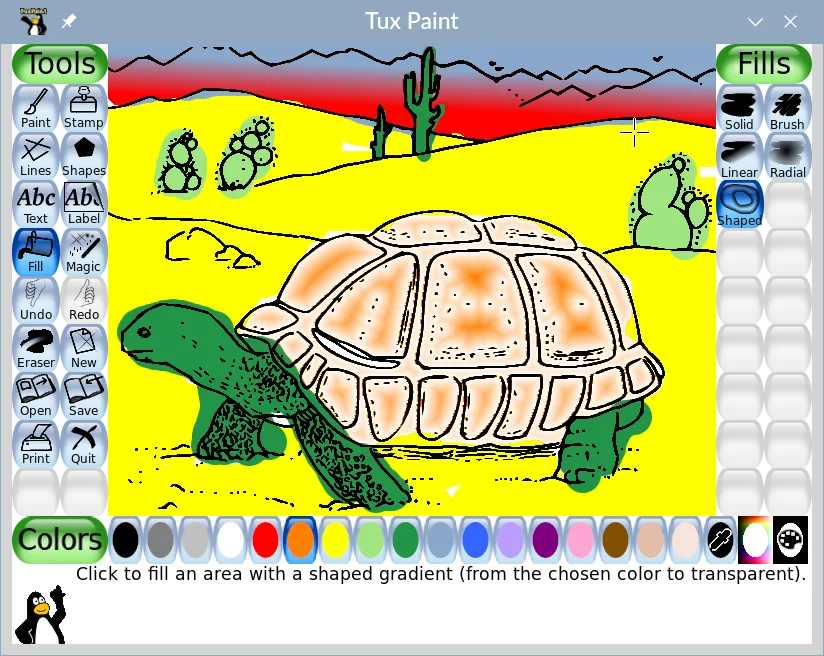
Tux Paint can replace Paint 3D for very basic 2‑D drawing tasks and for users who only need simple brushes, shapes, and a child‑friendly interface. It does not support 3‑D object creation, layer compositing, or the more advanced export options that Paint 3D offers. It is best suited for children or educators looking for a straightforward drawing tool, but not for users who require 3‑D modeling or complex image editing.
- Licence
- GPL-2.0+
- Prix
- Gratuit
- Dernière version
- 0.9.35 (26 mai 2025)
- Note
- —
Ce qui fonctionne pareil
- Both provide simple brush and shape tools for 2‑D drawing
- Both export to common image formats such as PNG and JPEG
- Both have an intuitive, minimal‑menu interface
Ce qui change
- Tux Paint lacks any 3‑D object creation or editing capabilities
- Paint 3D supports layers and basic compositing, which Tux Paint does not
- Paint 3D can export to 3‑D formats (STL, OBJ) while Tux Paint cannot
- Paint 3D offers a more extensive brush and shape palette
- Tux Paint is designed for children with sound effects and a mascot guide, not for general users
Ouvrir vos fichiers Paint 3D
Paint 3D uses the .mp4 or .png files for images and .obj/.stl for 3‑D models. Tux Paint can open PNG and JPEG files, but it cannot import Paint 3D’s native 3‑D files or proprietary image formats. Exporting from Tux Paint will not produce Paint 3D compatible 3‑D files.
Passer de Paint 3D à Tux Paint, étape par étape
- Export your Paint 3D drawings to PNG or JPEG if you only need 2‑D images.
- Open the PNG/JPEG files in Tux Paint via the File → Open menu.
- Use Tux Paint’s brush, shape, and stamp tools to edit or recreate the artwork.
- Save the final image as PNG or JPEG again for use in other applications.
- If you need 3‑D models, export them from Paint 3D as STL/OBJ and use a dedicated 3‑D viewer or editor; Tux Paint cannot handle these.
Fonctionnalités clés de Tux Paint
- Outils simples de pinceau, de tampon et de forme
- Mascotte cartoon encourageante
- Effets sonores amusants pour les actions
- Mode histoire pour le dessin séquentiel
- Masques et outils de collage
- Export en PNG, JPEG et PDF
- Aucun menu ou réglage complexe
Installer Tux Paint sous Linux
flatpak install flathub org.tuxpaint.Tuxpaintsudo apt install tuxpaintsudo apt install tuxpaintsudo dnf install tuxpaintsudo zypper install tuxpaintQuestions fréquentes
Can Tux Paint edit existing Paint 3D files?
No. Tux Paint can only open standard image files like PNG and JPEG. Paint 3D’s proprietary files are not supported.
Does Tux Paint support layers?
No. Tux Paint works on a single canvas layer and does not offer layer compositing.
Is Tux Paint suitable for adults who use Paint 3D for simple tasks?
It can handle basic 2‑D drawing, but it lacks many of the features that adult users might expect, such as advanced brush settings or 3‑D object editing.
6 autres alternatives à Paint 3D
 KritaKrita est un programme de peinture numérique et d'illustration open‑source complet.Open sourceGratuitFlatpakKrita ou Paint 3D
 GIMPGIMP est un éditeur de graphiques raster gratuit et open source, conçu pour la retouche photo, la peinture…Open sourceGratuitFlatpakGIMP ou Paint 3D
 InkscapeInkscape est un éditeur de graphiques vectoriels gratuit et open source qui rivalise avec Adobe Illustrator…Open sourceGratuitFlatpakInkscape ou Paint 3D
 BlenderBlender est une suite 3D libre et open-source pour la modélisation, l’animation, le rendu et le montage vidéo.Open sourceGratuitFlatpakBlender ou Paint 3D
 FreeCADFreeCAD est un modélisateur 3D paramétrique open‑source pour la conception, l’ingénierie et l’impression 3D.Open sourceGratuitFlatpakFreeCAD ou Paint 3D
 OpenSCADOpenSCAD est un modélisateur 3D paramétrique qui génère des modèles solides à partir de scripts textuels…Open sourceGratuitFlatpakOpenSCAD ou Paint 3D