

Windows · System Tools
Best Linux alternatives to Net Meter
NetMeter is a lightweight Windows utility that displays real-time network traffic statistics, including bandwidth usage and connection details.
Updated
Quick answer
The best Linux alternative to Net Meter is GNOME System Monitor.
1 Linux alternatives to Net Meter
-
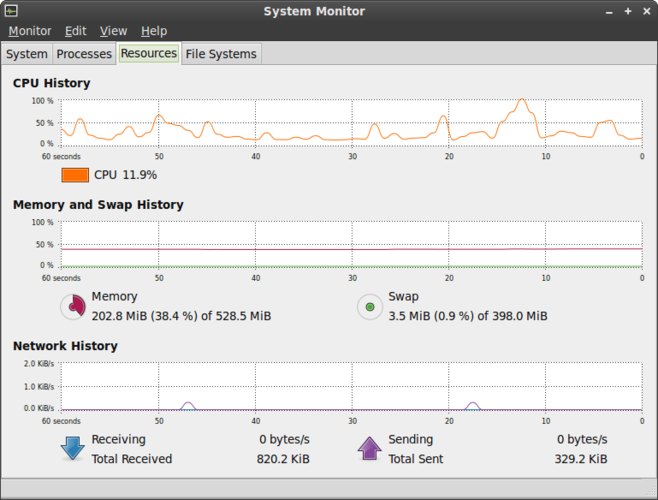
GNOME System Monitor is the standard Linux utility for viewing running processes, CPU, memory, and system resource usage.
GNOME System Monitor is not a good replacement for Net Meter. It shows a network activity overview but lacks real‑time per‑interface upload/download counters, total data transferred, and detailed active connection lists. It is useful for users who only need a quick glance at overall network usage…
Feature parity30%

What is Net Meter?
NetMeter is a small, no-frills tool used by system administrators and power users who need a quick glance at network activity. It sits in the system tray and provides immediate feedback on upload and download speeds, total data transferred, and active connections. It is not a full packet analyzer but rather a status indicator for monitoring general throughput.
The software is free for personal use. It is a standalone executable that does not require a complex installation process or a subscription. Being a simple utility, it lacks a formal licensing model for commercial redistribution, but it is generally distributed as freeware for individual users.
Users look for a Linux alternative because NetMeter is Windows-specific and does not run natively on Linux. Many Linux users prefer native applications that integrate better with the desktop environment, provide more detailed information about specific interfaces, or offer command-line equivalents for scripting and automation without relying on Wine compatibility layers.
What a replacement for Net Meter must do
- Real-time upload and download speed display
- Total data transferred counters
- Per-interface traffic monitoring
- System tray or panel integration
- Lightweight resource usage
- Active connection details
Can you run Net Meter on Linux?
NetMeter is a Windows-only application and does not have a native Linux version. It is not a web-based service. While it might run under Wine, doing so is often unstable for simple tray utilities and is not recommended. For reliable monitoring on Linux, you should use native tools designed for the Linux kernel and network stack.
Which alternative should you choose?
GNOME System Monitor is the only listed alternative. It is a solid choice if you are using the GNOME desktop environment and want a graphical overview of system resources, including network activity. It is less specialized than a dedicated network meter but sufficient for general users who do not need per-packet analysis or advanced filtering.
Moving your Net Meter files and habits
There is no data to migrate. NetMeter is a real-time monitoring tool that does not store logs, configurations, or historical data in a user-accessible format. You simply install the Linux alternative and start monitoring; no import or export steps are required.
Net Meter: frequently asked questions
Can I use NetMeter with Wine on Linux?
Technically yes, but it is often unreliable for tray applications. Native Linux tools are more stable and efficient.
Does GNOME System Monitor show real-time bandwidth?
Yes, it displays current network activity in the network tab, though it may not be as granular as dedicated network meters.
Is there a command-line alternative to NetMeter?
Yes, tools like nethogs or iftop are common on Linux for terminal-based monitoring, though they are not listed on this page.
Does NetMeter log data to a file?
No, it is a live viewer. It does not keep a history of past sessions for later review.
How important is Net Meter to you?
Know a better alternative? Suggest an alternative