

Windows · System Tools
Best Linux alternatives to PowerQuest PartitionMagic
PartitionMagic was a paid Windows disk‑partitioning tool that is no longer sold.
Updated
Quick answer
The best Linux alternative to PowerQuest PartitionMagic is GParted.
1 Linux alternatives to PowerQuest PartitionMagic
-
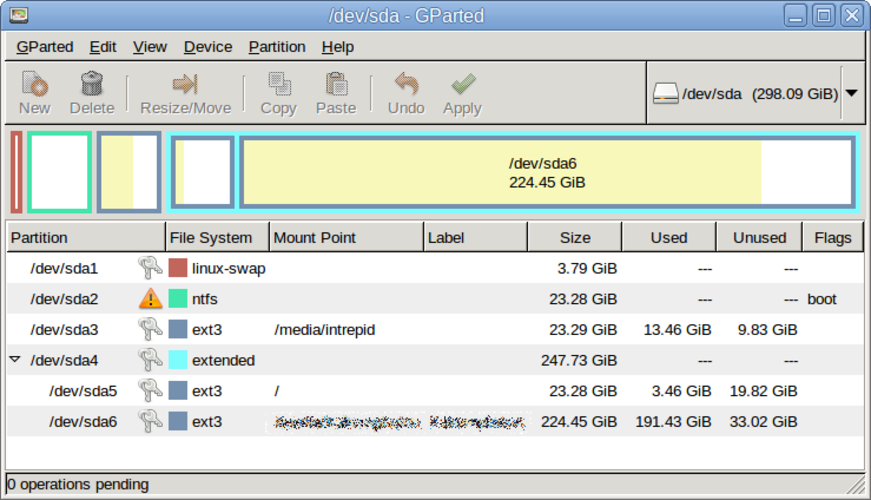
GParted is a free, open‑source graphical partition editor for creating, resizing, moving, and copying disk partitions and file systems.
GParted is a solid replacement for PowerQuest PartitionMagic for anyone who needs to create, delete, resize, move or copy partitions on Linux. It covers the core tasks, works on a wide range of file systems and can be run from a live‑USB when you need to modify the system disk. Users who are…
Feature parity85%

What is PowerQuest PartitionMagic?
PartitionMagic let users resize, merge, and create hard‑disk partitions without data loss. It was aimed at home users and small businesses who needed to reorganise storage or install multiple operating systems. The software was commercial; users paid a one‑time fee for a license that covered a single machine. Because it is discontinued, Linux users look for free, open‑source tools that can perform the same partition‑management tasks.
What a replacement for PowerQuest PartitionMagic must do
- Create, delete, resize, and move partitions
- Preserve data during operations
- Support for various file systems (NTFS, FAT, ext, etc.)
- Provide a graphical interface
- Allow backup of partition tables
- Offer undo or recovery options
Can you run PowerQuest PartitionMagic on Linux?
There is no native Linux version of PartitionMagic. It cannot run directly on Linux, and no Wine or Proton build is known to work reliably. Users must rely on Linux‑native tools such as GParted.
Which alternative should you choose?
GParted is the most common choice for most users; it works on live USBs and supports a wide range of file systems. For scripting or server environments, the command‑line tool parted is suitable. If you need a GUI but want more advanced features, KDE Partition Manager can be used.
Moving your PowerQuest PartitionMagic files and habits
PartitionMagic saved partition tables in the standard MBR or GPT format, which Linux tools read natively. No special export format is required; simply boot a GParted live session and perform the same operations.
PowerQuest PartitionMagic: frequently asked questions
Is PartitionMagic still available for download?
No, Symantec no longer offers it and it is considered discontinued.
Can I run PartitionMagic under Wine?
There is no reliable Wine build; users report crashes and missing functionality.
What file systems does PartitionMagic support?
It handled NTFS, FAT32, and some Linux file systems, but not ext4 or btrfs.
Is there a free alternative?
Yes, GParted is free, open source, and fully featured.
How important is PowerQuest PartitionMagic to you?
Know a better alternative? Suggest an alternative