
 Beekeeper StudioLinux
vs
HeidiSQLWindows
Beekeeper StudioLinux
vs
HeidiSQLWindows
Beekeeper Studio como alternativa Linux ao HeidiSQL
Atualizado em
Nossa avaliação
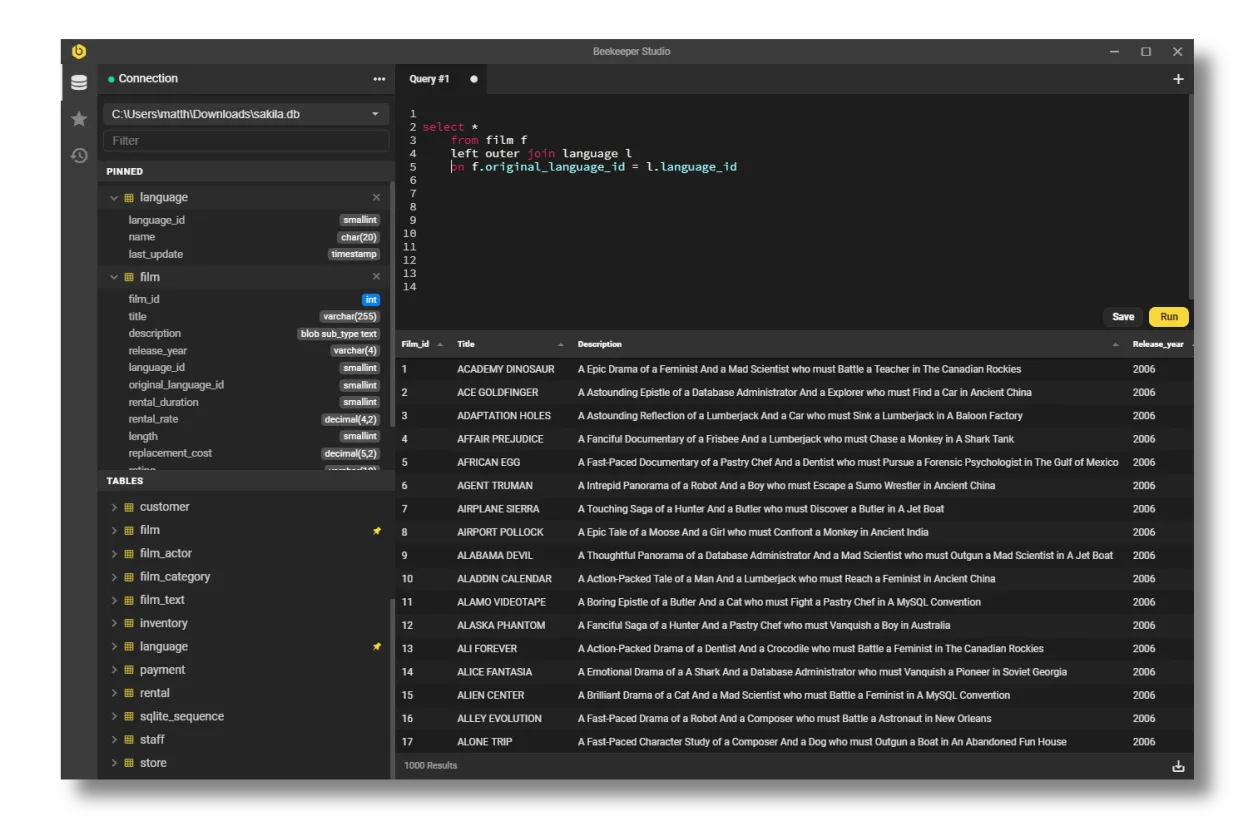
Beekeeper Studio is a solid replacement for HeidiSQL on Linux, especially for users who value a clean, modern interface and reliable core functionality. It supports all major databases HeidiSQL does—MySQL, MariaDB, PostgreSQL, SQL Server, and SQLite—and adds strong tab management, query saving, and secure connection options. While it lacks some advanced features like visual query planning or complex session scripting, its stability on Linux and active development make it a good fit for developers and DBAs who primarily manage databases through queries and table editing.
- Licença
- GPL-3.0
- Preço
- Grátis
- Versão mais recente
- 5.8.1 (2 de junho de 2026)
- Avaliação
- —
O que funciona igual
- Supports MySQL, MariaDB, PostgreSQL, SQL Server, and SQLite
- Provides syntax highlighting and auto-complete in the query editor
- Includes a visual table editor with data import and editing capabilities
- Allows exporting query results and table data to CSV, SQL, and clipboard formats
- Offers persistent session management with multiple open connections
O que muda
- Beekeeper Studio has a more modern tabbed interface with dedicated tabs for queries, DDL, and data
- Includes built-in encrypted password storage, which HeidiSQL lacks
- Lacks built-in support for running SQL Server on Linux natively (connection support is fine)
- No visual query builder or execution plan viewer like in HeidiSQL
- Does not support direct schema comparison or database synchronization tools
Abrindo seus arquivos do HeidiSQL
Beekeeper Studio does not directly open HeidiSQL configuration or session files (.hds). Connection settings must be re-entered manually or via export scripts. However, SQL query files (.sql) created in HeidiSQL are plain text and open without issue in Beekeeper Studio. Exported data in CSV or SQL format from HeidiSQL can be imported seamlessly, as both tools follow standard formats.
Trocando o HeidiSQL pelo Beekeeper Studio, passo a passo
- Install Beekeeper Studio via Flathub, Snap, or official .deb/.rpm package
- Recreate your saved connections by entering host, credentials, and SSL/SSH settings
- Use SSH tunneling or SSL as needed—Beekeeper supports both with encryption
- Import your .sql files directly; they’re plain text and fully compatible
- Organize frequently used queries using Beekeeper’s saved query folders
Principais recursos do Beekeeper Studio
- Suporta MySQL, Postgres, SQLite, SQL Server e outros
- Criptografia SSL e tunelamento SSH
- Interface em abas com abas separadas para tabelas, DDL e consultas
- Auto‑complete e realce de sintaxe
- Salva e organiza consultas
- Edita dados de tabelas com staging
- Cria tabelas via GUI
- Exporta para CSV, JSON, JSONL ou SQL
Como instalar o Beekeeper Studio no Linux
flatpak install flathub io.beekeeperstudio.StudioPerguntas frequentes
Can Beekeeper Studio connect to the same databases as HeidiSQL?
Yes, it supports MySQL, MariaDB, PostgreSQL, SQL Server, and SQLite—exactly the same engines HeidiSQL does.
Is my data safe if I save passwords in Beekeeper Studio?
Yes. Beekeeper Studio encrypts saved passwords locally using secure OS keychains or system storage.
Does it run natively on Linux without emulation?
Yes. Beekeeper Studio is a native Linux application available as a Flatpak, Snap, and native package.
Outras 3 alternativas ao HeidiSQL
 DBeaver CommunityDBeaver Community é uma IDE de banco de dados universal, gratuita e de código aberto para Linux que suporta…Código abertoGrátisFlatpakDBeaver Community vs HeidiSQLMySQL WorkbenchMySQL Workbench é a interface gráfica oficial da Oracle para gerenciar MySQL e MariaDB, oferecendo modelagem…Código abertoGrátisMySQL Workbench vs HeidiSQLAdminerAdminer é uma ferramenta leve de gerenciamento de banco de dados baseada em web, escrita em PHP…Código abertoGrátisAdminer vs HeidiSQL