
 FreeFileSyncLinux
vs
Resilio SyncWindows
FreeFileSyncLinux
vs
Resilio SyncWindows
FreeFileSync como alternativa Linux ao Resilio Sync
Atualizado em
Nossa avaliação
FreeFileSync is not a direct replacement for Resilio Sync, but serves a different purpose. If you need real-time, peer-to-peer folder syncing across devices without central servers, FreeFileSync does not provide that. It's ideal for manual or scheduled one-time syncs between local or networked paths, not continuous background syncing. However, for users who prefer full control, transparency, and don't need automatic P2P sync, FreeFileSync is a solid choice. It excels in visual verification and precise file management, making it better suited for local backups than decentralized collaboration.
- Licença
- GPL-3.0
- Preço
- Grátis
- Versão mais recente
- 14.13 (26 de outubro de 2026)
- Avaliação
- —
O que funciona igual
- Both synchronize folders to keep content consistent across locations
- Support bidirectional and one-way sync modes
- Can sync over network drives and shared folders
- Detect file changes, renames, and moves accurately
- Offer filtering options to include or exclude specific files
O que muda
- FreeFileSync lacks peer-to-peer networking; it doesn't sync directly between devices like Resilio Sync
- No built-in real-time syncing—requires external tools like cron for automation
- Does not use BitTorrent protocol or support sync keys/links for easy sharing
- Runs only when launched, not as a background service
- Missing encryption in transit and decentralized authentication features
Abrindo seus arquivos do Resilio Sync
FreeFileSync does not use or recognize Resilio Sync's configuration files, metadata, or .sync folders. There is no import function for Resilio Sync setups. You cannot directly open or migrate Resilio Sync profiles into FreeFileSync. Sync relationships must be recreated manually by defining source and target folders. Any files already synced by Resilio Sync can be accessed normally since they’re standard files on disk, but the synchronization logic and history are not transferable.
Trocando o Resilio Sync pelo FreeFileSync, passo a passo
- Identify all active Resilio Sync folder pairs and their sync direction
- On each Linux machine, install FreeFileSync via your package manager or Flathub
- Create a new synchronization job in FreeFileSync for each Resilio Sync folder pair
- Set up filters and exclusions to match your previous Resilio Sync rules
- Save the job and schedule it using cron or systemd for recurring syncs
- Test manually first, then verify logs for accuracy before relying on automation
Principais recursos do FreeFileSync
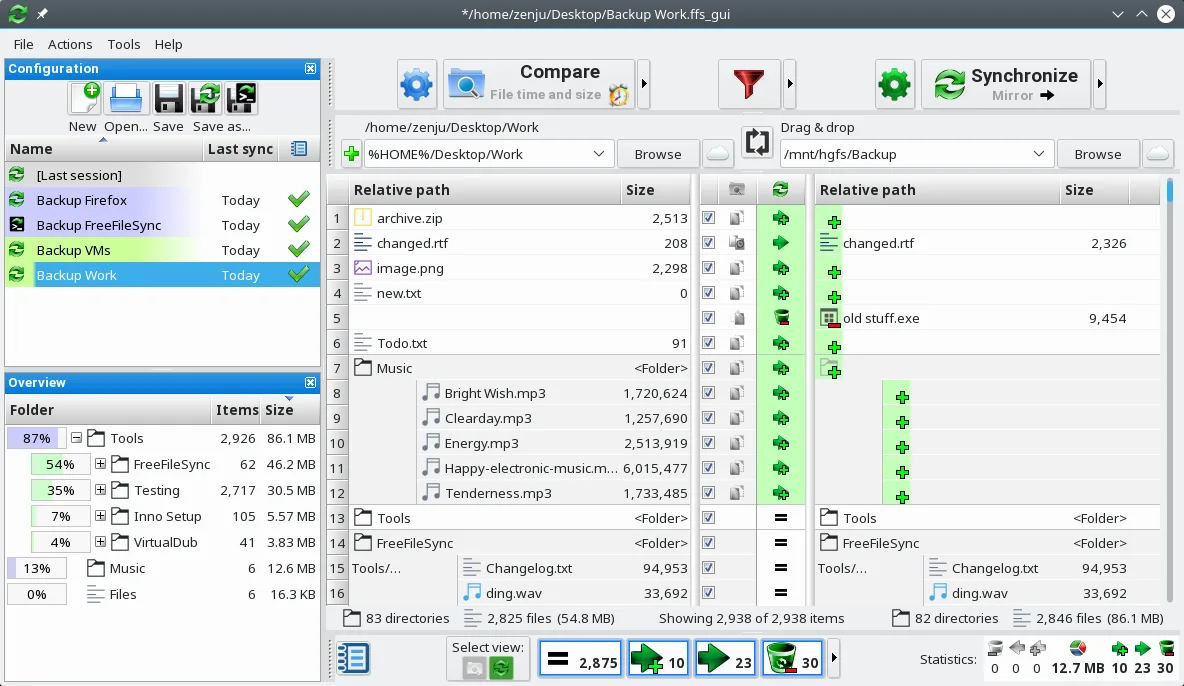
- Comparação visual lado a lado de pastas
- Sincronização em tempo real e em lote
- Suporta unidades locais, de rede e externas
- Filtros para incluir ou excluir arquivos
- Permite criar tarefas em lote para automação
- Detecta arquivos movidos e renomeados
- Executa em horários agendados com ferramentas externas
- Gera logs detalhados da sincronização
Como instalar o FreeFileSync no Linux
flatpak install flathub org.freefilesync.FreeFileSyncsudo apt install freefilesyncsudo apt install freefilesyncsudo zypper install FreeFileSyncPerguntas frequentes
Can FreeFileSync sync folders between two computers like Resilio Sync?
Not directly. FreeFileSync can sync over network shares (e.g., Samba), but requires both machines to be accessible. It doesn't do peer-to-peer syncing or work over the internet without shared storage.
Is real-time sync possible with FreeFileSync?
No, FreeFileSync has no built-in real-time monitoring. You must trigger syncs manually or schedule them using external tools like cron or inotify scripts.
Does FreeFileSync encrypt data during transfer?
No. FreeFileSync transfers files directly over mounted paths or network drives. Encryption depends on the underlying system, such as an encrypted SSHFS mount or VPN.
Outras 5 alternativas ao Resilio Sync
 SyncThingySyncThingy é um ícone leve na bandeja que controla o Syncthing, permitindo que você visualize o status, pare…Código abertoGrátisFlatpakSyncThingy vs Resilio Sync
 Nextcloud Desktop ClientSincroniza arquivos entre seu desktop Linux e um servidor Nextcloud, mantendo documentos e fotos atualizados…Código abertoGrátisFlatpakNextcloud Desktop Client vs Resilio Syncrsyncrsync is a command-line tool for efficiently syncing files and directories locally or over a network.Código abertoGrátisrsync vs Resilio Sync
 UnisonUnison é uma ferramenta de sincronização de arquivos multiplataforma que mantém dois diretórios em sincronia…Código abertoGrátisFlatpakUnison vs Resilio SyncLsyncdLsyncd mirrors directories locally or over networks using rsync, ideal for real-time file synchronization on…Código abertoGrátisLsyncd vs Resilio Sync