
 KrusaderLinux
vs
KrusaderLinux
vs
 Total CommanderWindows
Krusader como alternativa Linux ao Total Commander
Atualizado em
Nossa avaliação
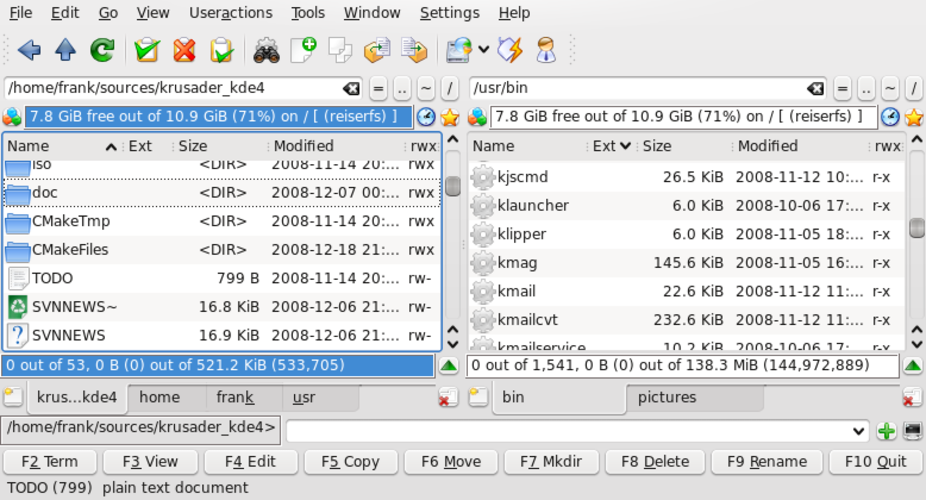
Krusader is a direct, capable replacement for Total Commander on Linux. It mirrors the dual-pane layout, supports independent navigation, and includes built-in archive handling and FTP/SFTP clients. If you rely on Total Commander's specific Windows plugins or registry-based configurations, you will need to adapt. For general file management, synchronization, and remote access, Krusader covers the essential workflow. It is ideal for KDE users or anyone comfortable with Linux file systems who wants a familiar, efficient interface without needing a Windows environment.
- Licença
- GPL-3.0
- Preço
- Grátis
- Versão mais recente
- 2.9.0
- Avaliação
- —
O que funciona igual
- Dual-pane interface with independent navigation and split views
- Built-in support for common archive formats like zip, tar, and rar
- Integrated FTP and SFTP client capabilities
- Directory synchronization and file comparison tools
- Configurable keyboard shortcuts and custom keybindings
O que muda
- Lacks native support for Windows-specific plugins and extensions
- No direct import of Total Commander configuration files or profiles
- Tab management behavior may differ slightly from Total Commander's implementation
- Relies on Linux system libraries and permissions rather than Windows ACLs
- Batch renaming uses regex syntax specific to Krusader, not Total Commander's WILDCARD syntax
Abrindo seus arquivos do Total Commander
Krusader does not natively open or export Total Commander configuration files (.ini) or plugin scripts. You must manually recreate your keybindings, color schemes, and FTP connections. File data itself is fully compatible since both operate on standard file systems. Archive files created in Total Commander can be opened directly in Krusader without conversion.
Trocando o Total Commander pelo Krusader, passo a passo
- Install Krusader via your distribution's package manager
- Configure FTP/SFTP connections in the Network Manager
- Set up custom keyboard shortcuts to match your Total Commander habits
- Configure archive associations for your preferred formats
- Test directory synchronization on a small folder set
- Adjust color schemes and column layouts to your preference
Principais recursos do Krusader
- Interface de dois painéis com visualização dividida
- Tratamento de arquivos compactados integrado (zip, tar, rar, etc.)
- Suporte a cliente FTP/SFTP
- Sincronização e comparação de diretórios
- Renomeação em lote com regex
- Busca avançada e pré-visualização
- Atalhos de teclado configuráveis
- Arquitetura de plugins para extensões
Como instalar o Krusader no Linux
sudo apt install krusadersudo apt install krusadersudo dnf install krusadersudo pacman -S krusadersudo zypper install krusaderPerguntas frequentes
Does Krusader support Total Commander plugins?
No. Krusader has its own plugin architecture, but it does not run Windows DLLs or Total Commander-specific plugins. You must use Krusader-native extensions or external command-line tools.
Can I import my Total Commander keybindings?
Not directly. You must manually map keys in Krusader's settings. While the concepts are similar, the configuration format is different.
Is Krusader only for KDE?
No. While it is part of KDE, it runs on any Linux desktop environment. It may look slightly out of place on GNOME or XFCE, but it functions fully.
Outras 2 alternativas ao Total Commander
 GNOME CommanderGNOME Commander é um gerenciador de arquivos gratuito com dois painéis, feito para a área de trabalho GNOME…Código abertoGrátisGNOME Commander vs Total Commander
 Double CommanderDouble Commander is a free, cross‑platform dual‑pane file manager inspired by Total Commander.Código abertoGrátisDouble Commander vs Total Commander