

Linux · Gráficos
Drawpile
Drawpile is a collaborative drawing application that lets multiple users paint together on the same canvas in real time.
- Licença
- GPL-3.0+
- Versão mais recente
- 2.3.1 (21 de outubro de 2026)
- Desenvolvedor
- askmeaboutloom, Calle Laakkonen and contributors
- Instalações
- 739 (Flathub, 30 dias)
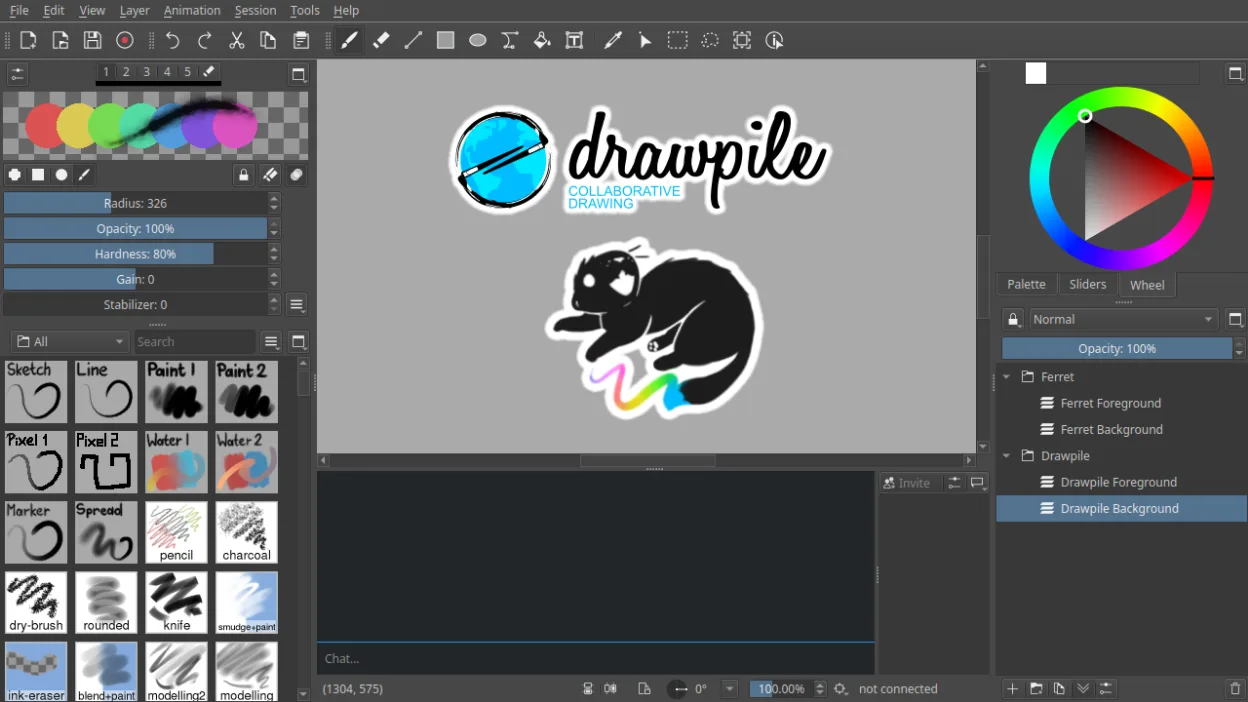
O que é o Drawpile?
Drawpile started as a niche project for shared digital art and has matured into a stable, actively developed tool. Unlike standard paint programs, it's built around real-time collaboration, letting artists draw together over a network. The 2.3.1 release in 2026 shows consistent updates and solid Linux support.
It's ideal for illustrators, sketch groups, or educators who want to teach or stream drawing sessions. The interface is functional, not flashy, prioritizing drawing tools and session controls. If you need shared canvases or remote art collaboration, this fills a gap most standalone paint apps don't.
Compared to basic Windows tools like MS Paint, it’s far more advanced in features and complexity. It doesn’t mimic Paint’s simplicity—it surpasses it with layers, animation, and network support. But if you're used to single-user workflows, the collaborative focus may feel unnecessary at first.
Ideal para: Artists and educators who want to draw or teach in real time with others over the internet.
Principais recursos do Drawpile
- Real-time collaborative drawing with multiple users
- Support for layers and layer blending modes
- Animation timeline with frame-by-frame editing
- Client-server session model for hosting drawings
- Tablet pressure and tilt sensitivity support
- Record and playback of drawing sessions
- Custom brushes and tool presets
- Cross-platform: Linux, Windows, macOS
Prós
- Free and open source with no paywalls
- True multi-user collaboration not found in most drawing apps
- Good tablet support under Linux
- Session recording useful for tutorials or review
- Lightweight compared to professional suites like Krita
Contras
- Interface feels dated and can be overwhelming for beginners
- Collaboration features are overkill if you only draw alone
- Limited brush engine compared to Krita or Photoshop
- Fewer filters and effects than advanced raster editors
Programas do Windows que o Drawpile substitui
Como instalar o Drawpile no Linux
flatpak install flathub net.drawpile.drawpileDicas para quem vem do Windows
Coming from MS Paint, expect a steeper learning curve—Drawpile supports layers, animation, and network sessions. It opens common formats like PNG and ORA, but not .BMP by default. Most keyboard shortcuts are customizable, and the brush tool behaves more like a professional app than Paint’s basic tools. Focus on setting up a local session first to get used to the interface before joining or hosting online rooms.
Versões recentes
- 2.3.1 —
Changes in this version: - Fix: Make dock tab icons show up properly on Qt 6.11, they could end up blank there. - Fix: Don't skip initial command when playing back recordings. This caused the canvas size command to be skipped on old converted recordings…
- 2.3.0 —
Changes in this version: - Fix: Don't show "exit layer view" notice when there's no canvas. - Fix: Properly remove the "unsaved changes" marker when saving to DPCS. - Feature: Add crop to selection action in the selection menu. Not any different to the resize…
- 2.2.2 —
Changes in this version: - Fix: Make annotations not cause glitches when moving them around when using the software renderer. Thanks Meru for reporting. - Feature: Add -u/--users parameter to dprectool, which will print out a table of user statistics along…
- 2.2.1 —
Changes in this version: - Fix: Default to previous directory when saving a fresh file. Thanks Crow for reporting. - Feature: Allow toggling performance-related canvas view settings, since some systems get slowdowns. Thanks DevonJP for reporting. - Fix: Don't…
Drawpile: perguntas frequentes
Can Drawpile work offline?
Yes, you can create and draw on a canvas locally without any network connection. Collaboration features just won’t be active.
Does Drawpile support pressure-sensitive tablets?
Yes, it works well with Wacom and other tablets under Linux, recognizing pressure and tilt if your driver supports it.
What file formats does Drawpile use?
It saves to its own .dp file format, which includes layers and session data. You can export to PNG, ORA, and other common image formats.
Is Drawpile like Google Jamboard or Microsoft Whiteboard?
It’s similar in allowing shared drawing, but Drawpile is focused on illustration with full layer and brush support, not just quick sketches.
Atualizado em