

Linux · Others
MComix
MComix is a free, GPL‑licensed image viewer focused on comic book formats.
- Licença
- GPL-2.0+
- Versão mais recente
- 3.1.0 (21 de janeiro de 2024)
- Desenvolvedor
- The MComix Team
- Instalações
- 772 (Flathub, 30 dias)
O que é o MComix?
MComix is a lightweight viewer for comic archives (CBR, CBZ, CB7, CBT, LHA) and PDFs. It originated as a fork of the long‑dormant Comix project, adding bug fixes and stability updates; the latest release 3.1.0 appeared in early 2024, and it is packaged in major distros like Debian, openSUSE and Ubuntu. Its maturity makes it a reliable choice for everyday reading.
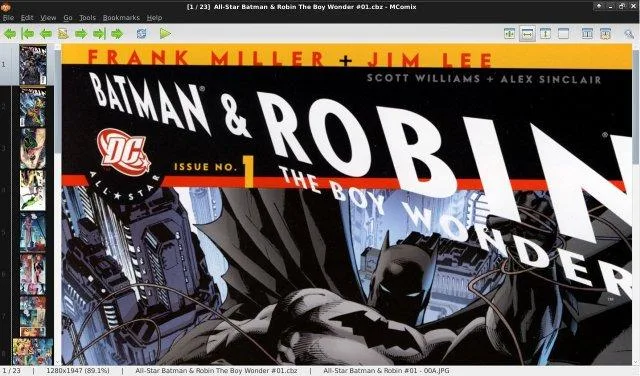
The program targets anyone who reads Western comics or manga on Linux, from casual fans to collectors with large libraries. Its interface is simple, with a toolbar, page navigation and thumbnail view, letting you focus on the content rather than configuration. Compared with ComicRack on Windows, MComix feels more minimalistic and less feature‑rich, but it covers the core tasks of opening, navigating and bookmarking comics without the clutter.
Because it runs as a native Linux application (available as a Flatpak and in distro repos), it integrates well with desktop environments and respects system themes. While it lacks some of ComicRack’s library management and sync features, it offers a stable, no‑frills reading experience that works out of the box.
Ideal para: Linux users who need a straightforward comic reader without extra library features.
Principais recursos do MComix
- Supports CBR, CBZ, CB7, CBT, LHA and PDF containers
- Dual‑page and continuous scrolling modes
- Thumbnail overview for quick navigation
- Zoom, rotate and fit‑to‑window controls
- Bookmarking and simple page history
- Customizable keyboard shortcuts
- Manga mode (right‑to‑left reading)
- Lightweight, low memory footprint
Prós
- Free and open source under GPL‑2.0+
- Works on all major Linux distributions
- Simple, responsive UI
- Good handling of many archive formats
Contras
- No built‑in library or metadata management
- Limited support for cloud sync or online services
- Interface feels dated compared to modern Windows readers
Programas do Windows que o MComix substitui
Como instalar o MComix no Linux
flatpak install flathub net.sourceforge.mcomixsudo apt install mcomixsudo apt install mcomixsudo zypper install mcomixDicas para quem vem do Windows
MComix opens the same archive formats as ComicRack, so you can drag‑and‑drop your CBR/CBZ files directly. Familiar shortcuts like Arrow keys for page turns, Ctrl+Mouse‑wheel for zoom, and 'M' for manga mode replace ComicRack's defaults. Use the thumbnail pane to jump to chapters, and bookmark pages with 'B' to resume later.
Versões recentes
- 3.1.0 —
- 3.0.0 —
- 2.1.1 —
- 2.1.0 —
MComix: perguntas frequentes
Can MComix read DRM‑protected comics?
No, MComix only handles unencrypted archive formats.
Is there a way to organize a large comic collection?
MComix itself does not provide library management; you can use external tools like ComicTagger to tag files and a file manager for organization.
How do I enable right‑to‑left reading for manga?
Press 'M' or enable Manga mode in the View menu; the pages will flip direction automatically.
Does MComix support dark themes?
It follows the system GTK theme, so using a dark desktop theme will give a dark background in the viewer.
Atualizado em