
Windows · Sound & Video
Melhores alternativas Linux ao Movavi Screen Recorder
OBS Studio and similar tools let you record screen, audio, and webcam on Linux, with options for basic editing and live streaming.
Atualizado em
Resposta rápida
A melhor alternativa Linux ao Movavi Screen Recorder é o OBS Studio. Outras boas opções: SimpleScreenRecorder, vokoscreenNG, Xournal++.
5 alternativas Linux ao Movavi Screen Recorder
-

Software livre e de código aberto para capturar, gravar e transmitir vídeo ao vivo de diversas fontes.
OBS Studio is a strong replacement for Movavi Screen Recorder if you're comfortable with a steeper learning curve. It excels at screen, audio, and webcam capture with superior customization and live streaming support. While it lacks built-in basic editing like trimming or annotations, it records…
Cobertura de recursos80% -
SimpleScreenRecorder é uma ferramenta leve e fácil de usar para captura de tela no Linux.
-

O VokoscreenNG é um gravador de tela gratuito e de código aberto para Linux e Windows que suporta Wayland, X11 e áudio de múltiplas fontes.
-
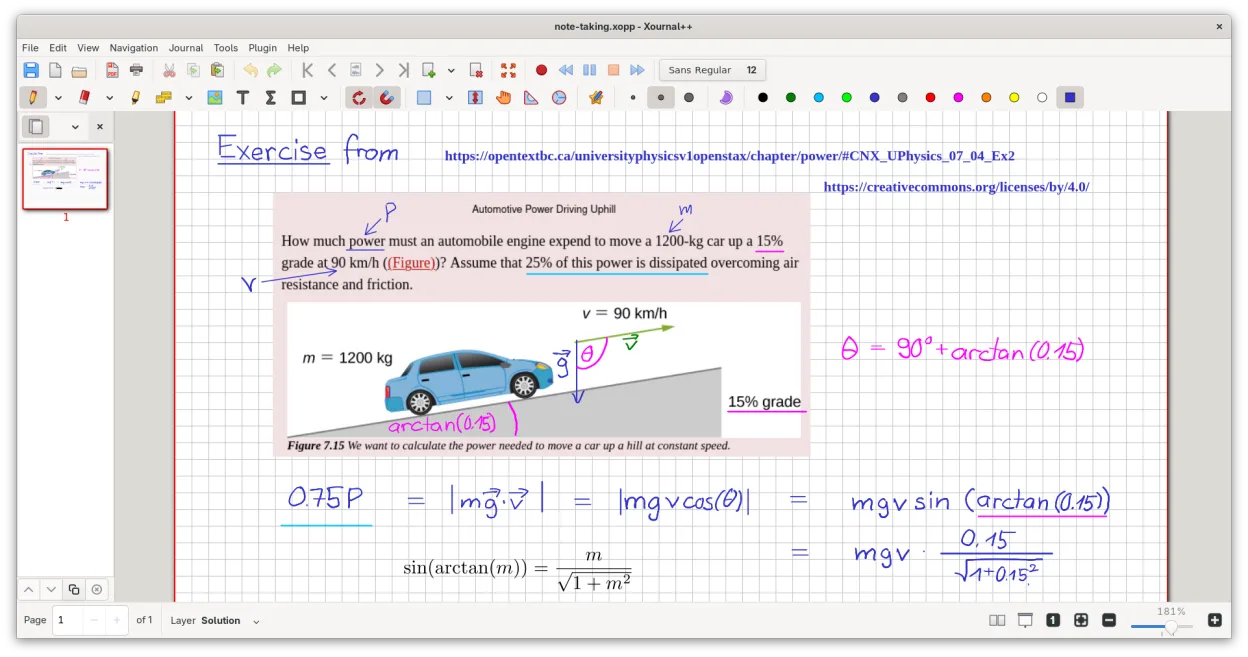
Um aplicativo de anotações de código aberto e multiplataforma para escrita à mão, anotação de PDFs e quadros brancos com suporte a caneta digital.
-
O Kazam é uma ferramenta direta de gravação de tela e captura de tela para Linux, ideal para capturas rápidas com configuração mínima.



O que é o Movavi Screen Recorder?
Movavi Screen Recorder is used to capture screen activity, system audio, microphone input, and webcam video—commonly by educators, content creators, and professionals making tutorials or presentations. It includes basic editing features like trimming, annotations, and exporting in common formats.
The Windows version is commercial software, sold as a one-time purchase or subscription. It's not free, and there's no native Linux version. The interface is designed for ease of use, targeting users who may not be technically experienced.
People seek Linux alternatives because Movavi is Windows-only and closed-source. Linux users want similar screen recording and editing capabilities without relying on compatibility layers. Privacy-conscious and open-source advocates also prefer transparent, auditable tools.
O que um substituto do Movavi Screen Recorder precisa fazer
- Record full or partial screen
- Capture system audio and microphone
- Webcam overlay support
- Basic editing (trim, cut, annotate)
- Scheduled or timed recordings
- Export to MP4 or other common formats
- Simple, intuitive interface
Dá para usar o Movavi Screen Recorder no Linux?
There is no native Linux version of Movavi Screen Recorder, nor a web-based version. It does not run reliably under Wine or Proton—some users report partial functionality with Bottles, but recording and encoding often fail or are unstable. No known workarounds provide full feature parity.
Qual alternativa escolher?
OBS Studio fits users needing advanced recording and live streaming with scene composition. SimpleScreenRecorder is ideal for straightforward desktop capture with minimal setup. Kazam suits beginners wanting a simple interface. vokoscreenNG offers extra features like camera preview and annotations. Xournal++ isn't a screen recorder—it's for annotating PDFs, so use it alongside a recorder.
Levando seus arquivos e hábitos do Movavi Screen Recorder
Since Movavi projects (.movprj) can't be opened on Linux, export your recordings as MP4 or WebM first. Most Linux tools accept these formats. Editable project files don't transfer—re-edit from source videos if needed. Use standard containers like MP4 for compatibility across platforms.
Comparação lado a lado
| Aplicativo | Licença | Flatpak | Versão mais recente | Cobertura de recursos | Avaliação |
|---|---|---|---|---|---|
| OBS Studio | GPL-2.0-or-later | ✓ | 33.0.1 | 80% | — |
| SimpleScreenRecorder | GPL-3.0 | — | 0.4.4 | — | — |
| vokoscreenNG | GPL-2.0-only | ✓ | 4.11.1 | — | — |
| Xournal++ | GPL-2.0 | ✓ | 1.3.8 | — | — |
| Kazam | GPL-2.0 | — | 1.5.7 | — | — |
Movavi Screen Recorder: perguntas frequentes
Can I use Movavi Screen Recorder on Linux with Wine?
Generally no. It may launch but often crashes or fails to record properly. Audio and video capture are unreliable. Not recommended.
Which Linux tool records screen and webcam at the same time?
OBS Studio and vokoscreenNG both support screen and webcam recording simultaneously, with layout customization.
Is there a simple alternative like Movavi for beginners?
Kazam is the most straightforward. It lacks editing but records screen and audio with one click. vokoscreenNG also has a friendly interface.
Can I edit recordings after capturing them?
Yes. Use OBS for capture and OpenShot or Kdenlive for editing. Some tools like vokoscreenNG include basic cut/trim functions.
Qual a importância do Movavi Screen Recorder para você?
Conhece uma alternativa melhor? Sugerir uma alternativa