
 NotepadLinux
vs
NotepadLinux
vs
 Notepad++Windows
Notepad como alternativa Linux ao Notepad++
Atualizado em
Nossa avaliação
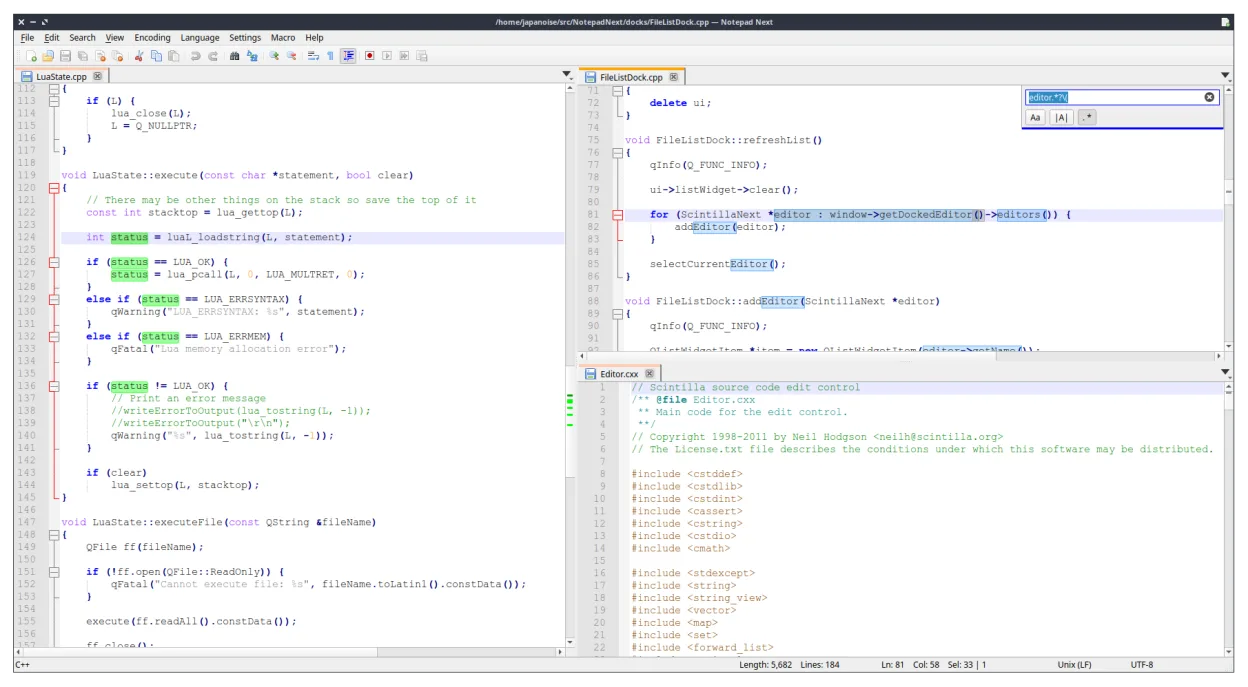
Notepad Next is a solid, lightweight replacement for Notepad++ on Linux, particularly for users who prioritize speed and a familiar interface. It handles core tasks like syntax highlighting and regex search effectively. However, it is still in early development (v0.15), so you may encounter rough edges or missing advanced features found in the mature Windows version. It is best suited for developers who need a quick, low-memory editor for daily coding and text manipulation, rather than those relying on complex plugin ecosystems or heavy macro automation.
- Licença
- GPL-3.0
- Preço
- Grátis
- Versão mais recente
- v0.15 (21 de setembro de 2026)
- Avaliação
- —
O que funciona igual
- Lightweight design with fast startup times
- Syntax highlighting for over 50 programming languages
- Tabbed interface for managing multiple files
- Find and replace functionality with regular expression support
- Unicode and UTF-8 handling
O que muda
- Lacks the extensive plugin architecture of Notepad++
- Macro recording and scripting capabilities are limited or absent
- Fewer built-in plugins for advanced file operations
- Being a newer project, it has a smaller community and fewer documented workflows
- Distribution via Flatpak may introduce slight overhead compared to native binaries
Abrindo seus arquivos do Notepad++
Notepad Next opens standard text files, including .txt, .c, .py, and other source code files, without issue. Since it is a reimplementation of Notepad++, it generally handles the same file formats. However, specific Notepad++ session files (like workspace layouts or macro definitions) are not compatible and will need to be recreated. If you have custom settings, you will need to manually reconfigure them in Notepad Next, as there is no direct import tool for Notepad++ configuration files.
Trocando o Notepad++ pelo Notepad, passo a passo
- Install Notepad Next via Flatpak: flatpak install flathub com.github.jdailey.notepad-next
- Open Notepad Next and configure your preferred font and color scheme
- Enable syntax highlighting for your primary languages in the settings
- Test regex search and replace on a sample file to verify functionality
- Recreate any essential macros or shortcuts manually, as they do not transfer
- Keep Notepad++ installed on Windows for any tasks requiring specific plugins until Notepad Next matures
Principais recursos do Notepad
- Edição com abas
- Destaque de sintaxe para mais de 50 linguagens
- Busca/substituição com regex
- Multiplataforma via Flatpak
- Interface leve
- Licenciado sob GPL
Como instalar o Notepad no Linux
flatpak install flathub com.github.dail8859.NotepadNextPerguntas frequentes
Is Notepad Next stable enough for daily use?
It is active and functional, but being at v0.15, it is still maturing. Expect occasional bugs or missing features compared to the stable Windows version. It is usable for many tasks but may not be ready for critical, production-grade workflows.
Can I use Notepad++ plugins in Notepad Next?
No. Notepad Next is a reimplementation, not a port. It does not support the Notepad++ plugin API. You will need to find native Linux alternatives for specific plugin functions or wait for Notepad Next to develop similar features.
Does it support large files well?
As a lightweight editor, it is designed for speed and low memory usage. It handles typical source code files well. For extremely large files (gigabytes), performance may vary, and specialized tools might be better suited.
Outras 4 alternativas ao Notepad++
 geditgedit é o editor de texto leve e de uso geral do GNOME, adequado para anotações, documentos e edição básica…Código abertoGrátisFlatpakgedit vs Notepad++
 KateKate é um editor de texto rico em recursos, focado em programadores, da KDE, com suporte a mais de 300…Código abertoGrátisFlatpakKate vs Notepad++
 KDevelopKDevelop é um IDE gratuito, baseado em plugins, para KDE que suporta C++, Python, PHP e outras linguagens…Código abertoGrátisFlatpakKDevelop vs Notepad++
 MousepadMousepad é um editor de texto leve, baseado em GTK, para o desktop Xfce.Código abertoGrátisFlatpakMousepad vs Notepad++