 YACReaderLinux
vs
ComicBookLibrarianWindows
YACReaderLinux
vs
ComicBookLibrarianWindows
YACReader como alternativa Linux ao ComicBookLibrarian
Atualizado em
Nossa avaliação
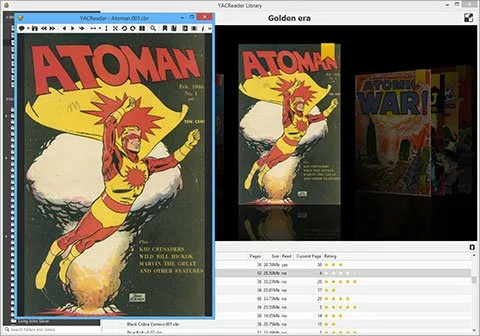
YACReader can replace ComicBookLibrarian for most users who need a Linux‑native way to browse, organise and edit comic metadata. It handles the common archive formats, tracks reading progress, pulls data from Comic Vine and offers a decent search engine. Power users who rely heavily on bulk metadata editing, CSV export, or advanced tag manipulation may find it lacking, but for everyday collection management and reading it is a solid choice.
- Licença
- GPL-3.0-only
- Preço
- Grátis
- Versão mais recente
- 10.4.0 (9 de outubro de 2026)
- Avaliação
- —
O que funciona igual
- Supports the same archive formats (CBR, CBZ, etc.)
- Provides library view with sorting and filtering
- Allows editing or downloading of metadata (title, author, series)
- Searches across the whole collection
O que muda
- No built‑in CSV or bulk‑export feature for lists
- Metadata editing is limited to what Comic Vine returns; no manual bulk edit UI
- Does not expose a dedicated metadata editor for fields like year or publisher
- Reading‑oriented features (page rotation, brightness) are present but irrelevant to pure cataloguing
Abrindo seus arquivos do ComicBookLibrarian
YACReader can open the same CBZ/CBR files that ComicBookLibrarian manages, but it does not import or export ComicBookLibrarian's proprietary database files. If you have a collection already indexed by ComicBookLibrarian, you will need to rebuild the library in YACReader; the individual comic files themselves are fine.
Trocando o ComicBookLibrarian pelo YACReader, passo a passo
- Export your ComicBookLibrarian list to CSV (if you need a backup).
- Install YACReader via Flathub, your distro package manager, or from source.
- Create a new library in YACReader and point it at the folder containing your comic archives.
- Let YACReader scan and download metadata; manually adjust any missing fields.
- (Optional) Use a CSV‑to‑YACReader script or manual entry to add any custom tags not fetched automatically.
Principais recursos do YACReader
- Suporte amplo a arquivos (rar, zip, cbr, cbz, tar, pdf, 7z, cb7, jpeg, gif, png, tiff, bmp)
- Experiência de leitura personalizável: rotação, página dupla, tamanho completo, tela cheia, cor de fundo, ajuste de página
- Ajustes de imagem: brilho, contraste, controle de gama
- Gerenciamento de biblioteca com rastreamento de progresso de leitura
- Download automático de metadados do Comic Vine
- Motor de busca interno para coleções grandes
- Marcadores e retomada de leitura
- Atalhos de teclado para navegação
Como instalar o YACReader no Linux
flatpak install flathub com.yacreader.YACReadersudo dnf install yacreadersudo zypper install yacreaderPerguntas frequentes
Can YACReader edit metadata that Comic Vine doesn’t provide?
Only through the manual edit dialog for each comic; there is no bulk‑edit tool, so large‑scale changes are tedious.
Is there a way to export a list of my comics from YACReader?
YACReader does not include a native export to CSV or plain‑text; you would need to script against its SQLite database or use a third‑party tool.
Will my existing ComicBookLibrarian database work directly in YACReader?
No. YACReader builds its own library database, so you must rescan the files and let it fetch metadata again.