
 ZimLinux
vs
Microsoft OneNote for Windows 10Windows
ZimLinux
vs
Microsoft OneNote for Windows 10Windows
Zim como alternativa Linux ao Microsoft OneNote for Windows 10
Atualizado em
Nossa avaliação
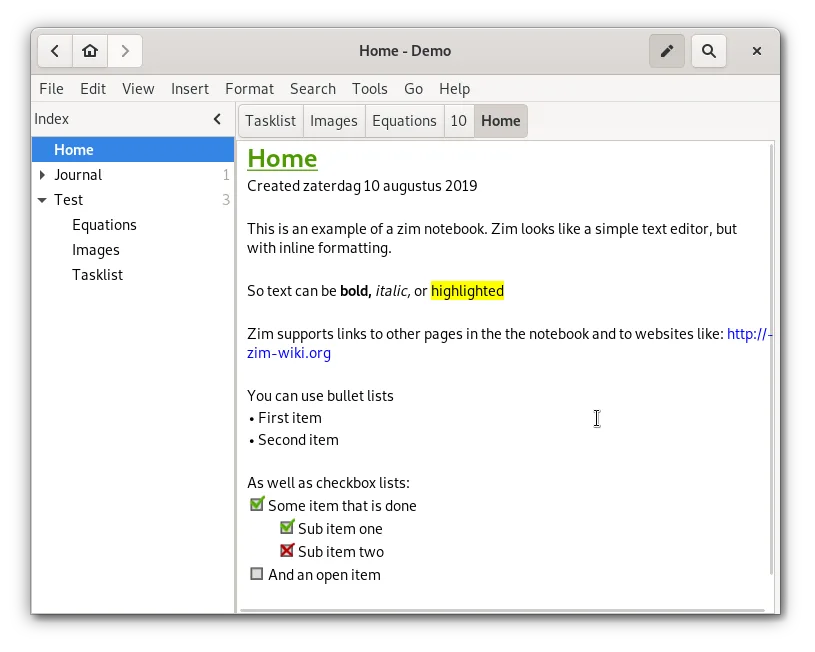
Zim is a decent replacement for Microsoft OneNote for users who prioritize structured, text-based notes over rich media and real-time collaboration. It works well for personal knowledge management, journaling, and organizing tasks with plain text files. However, it lacks support for ink, audio/video embedding, and cloud sync with collaboration. If you value simplicity, local storage, and markdown-style editing, Zim fits. But if you rely heavily on multimedia or shared notebooks, it's not a practical substitute.
- Licença
- GPL-2.0+
- Preço
- Grátis
- Versão mais recente
- 0.77.2 (26 de julho de 2026)
- Avaliação
- —
O que funciona igual
- Both support free-form note creation with text and images
- Hierarchical organization using sections and pages
- Cross-platform availability (Linux, Windows, macOS)
- Export to PDF and HTML formats
- Support for internal linking between notes
O que muda
- Zim does not support audio or video clips
- No real-time collaboration or shared notebooks
- No ink or drawing input support
- Sync must be manually set up via external tools (e.g., Nextcloud, Git)
- No native mobile apps; limited cross-device experience
Abrindo seus arquivos do Microsoft OneNote for Windows 10
Zim cannot open Microsoft OneNote files (.one). There is no built-in import functionality for OneNote content, and no known third-party tools reliably convert .one files to Zim's wiki markup format. Users migrating must manually copy text and media from OneNote to Zim. Export from OneNote to HTML or PDF is possible, which can then be referenced or imported as plain text, but formatting and structure may be lost.
Trocando o Microsoft OneNote for Windows 10 pelo Zim, passo a passo
- Export important OneNote pages to HTML or PDF for reference
- Install Zim on your system using your package manager or Flathub
- Create a new notebook directory and set up your hierarchy
- Manually recreate key pages and links in Zim using wiki markup
- Attach exported images or files as needed
- Use version control or cloud sync to back up and share your Zim notebook folder
Principais recursos do Zim
- Hierarchical sidebar tree for page organization
- Automatic plain‑text file storage with wiki markup
- Linking between pages and attachments
- Plugins for tasks, equations, tray icon, and VCS
- Cross‑platform keyboard shortcuts
- Export to HTML, PDF, and plain text
Como instalar o Zim no Linux
flatpak install flathub org.zim_wiki.Zimsudo apt install zimsudo apt install zimsudo dnf install Zimsudo pacman -S zimsudo zypper install zimPerguntas frequentes
Can Zim sync with OneDrive like OneNote?
No, Zim does not integrate with OneDrive. Sync must be handled externally using tools like rsync, Git, or cloud folders such as Nextcloud or Dropbox.
Does Zim support handwriting or stylus input?
No, Zim has no support for ink, drawing, or stylus input. It is designed for keyboard-driven, text-based note-taking.
Can multiple people edit the same Zim notebook at once?
No, Zim does not support real-time or concurrent collaboration. Sharing notebooks requires manual sync and risks conflicts without version control.
Outras 5 alternativas ao Microsoft OneNote for Windows 10
 JoplinJoplin é um aplicativo de anotações e tarefas de código aberto e multiplataforma que armazena dados em…Código abertoGrátisFlatpakJoplin vs Microsoft OneNote for Windows 10
 ObsidianO Obsidian é um aplicativo de base de conhecimento baseado em markdown que armazena notas como arquivos de…FlatpakObsidian vs Microsoft OneNote for Windows 10
 Standard NotesO Standard Notes é um aplicativo de anotações com criptografia de ponta a ponta que funciona em várias…Código abertoGrátisFlatpakStandard Notes vs Microsoft OneNote for Windows 10
 QOwnNotesQOwnNotes é um editor de Markdown de texto simples com suporte a lista de tarefas que pode sincronizar com…Código abertoGrátisFlatpakQOwnNotes vs Microsoft OneNote for Windows 10
 Trilium NotesTrilium Notes é um aplicativo de anotações hierárquico e auto-hospedado para construir bases de conhecimento…Código abertoGrátisFlatpakTrilium Notes vs Microsoft OneNote for Windows 10