
 Beekeeper StudioLinux
vs
Microsoft Azure Data StudioWindows
Beekeeper Studio als Linux-Alternative zu Microsoft Azure Data Studio
Aktualisiert am
Unser Fazit
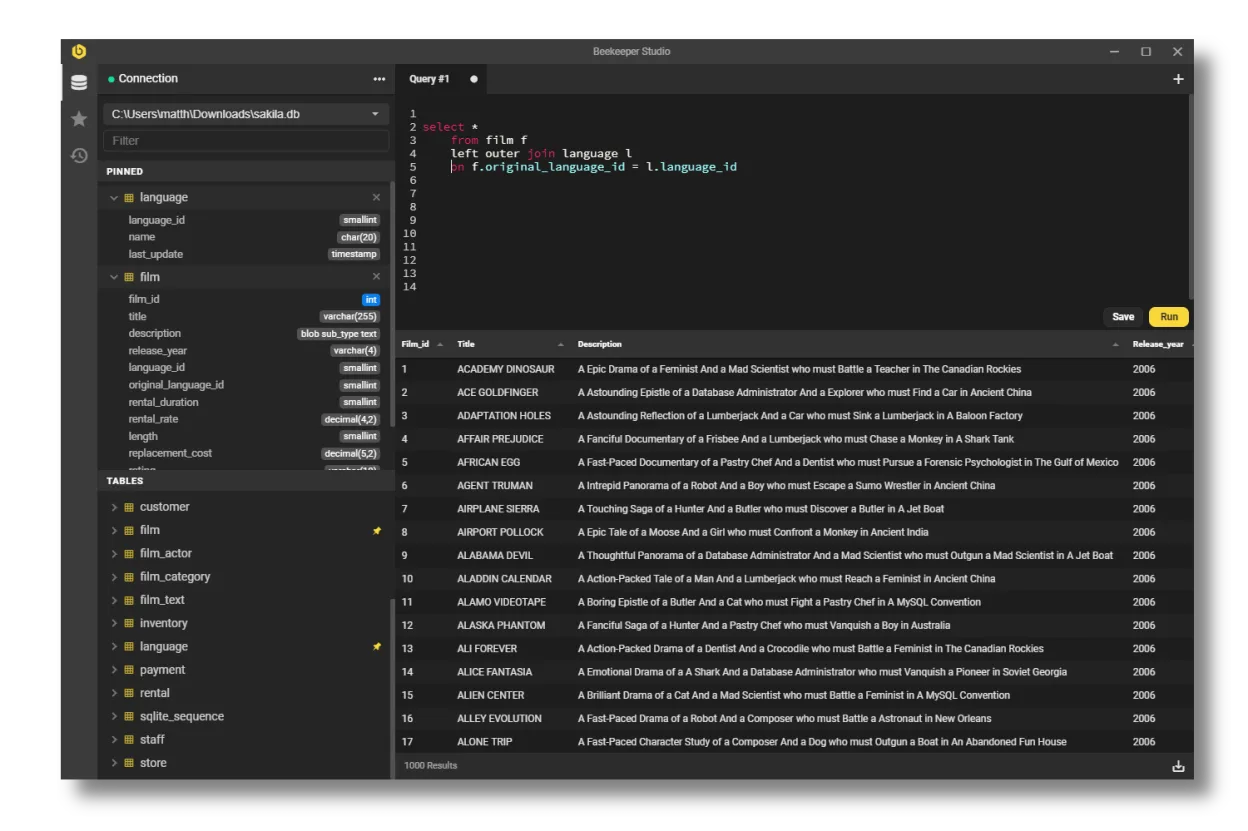
Beekeeper Studio is a solid Linux alternative for developers who mainly need a clean SQL editor, connection manager and basic data‑manipulation features. It covers MySQL, PostgreSQL, SQLite and SQL Server well, so it works for most day‑to‑day querying and simple schema work. Power users who rely on Azure‑specific extensions, integrated notebooks, advanced debugging, or deep DevOps automation will find Azure Data Studio more capable, but for typical query editing and lightweight admin tasks Beekeeper is a good fit.
- Lizenz
- GPL-3.0
- Preis
- Kostenlos
- Aktuelle Version
- 5.8.1 (2. Juni 2026)
- Bewertung
- —
Was gleich funktioniert
- Both run natively on Linux and other OSes
- Support for SQL Server, PostgreSQL and MySQL
- Syntax highlighting, auto‑completion and tabbed query editors
- Ability to export query results to common formats (CSV, JSON, etc.)
Was anders ist
- Azure Data Studio includes built‑in notebooks, extensions marketplace and integrated source‑control, which Beekeeper lacks
- Beekeeper focuses on a simple UI and does not provide advanced profiling, performance dashboards or Azure‑specific services integration
- Automation features such as task scheduling, PowerShell/CLI integration are missing in Beekeeper
- Azure Data Studio offers richer visual query plan and charting tools; Beekeeper only shows tabular data
Ihre Microsoft Azure Data Studio-Dateien öffnen
Beekeeper Studio cannot directly open Azure Data Studio project files or notebook (.ipynb) exports. You can copy raw SQL scripts between the two, and exported CSV/JSON data can be re‑imported, but any Azure‑specific configuration or extension settings will need to be recreated manually.
Von Microsoft Azure Data Studio zu Beekeeper Studio wechseln – Schritt für Schritt
- Install Beekeeper Studio from Flathub or your distro's repository.
- Create new connections using the same host, port, credentials and SSL/SSH settings you used in Azure Data Studio.
- Import saved SQL scripts by opening the .sql files in Beekeeper's editor.
- Re‑create any scheduled tasks or automation using external cron jobs or scripts, as Beekeeper has no built‑in scheduler.
- Test queries and verify results; adjust any Azure‑specific features (e.g., notebooks) to a separate workflow.
Wichtige Funktionen von Beekeeper Studio
- Unterstützt MySQL, Postgres, SQLite, SQL Server und weitere
- SSL‑Verschlüsselung und SSH‑Tunneling
- Tab‑basierte Oberfläche mit separaten Tabs für Tabellen, DDL und Abfragen
- Auto‑Complete und Syntax‑Highlighting
- Abfragen speichern und organisieren
- Tabellendaten mit Staging bearbeiten
- Tabellen über GUI erstellen
- Export nach CSV, JSON, JSONL oder SQL
Beekeeper Studio unter Linux installieren
flatpak install flathub io.beekeeperstudio.StudioHäufige Fragen
Can Beekeeper Studio connect to Azure SQL Managed Instance?
Yes, as long as you provide the correct server name, port and authentication method; SSL/TLS encryption is supported.
Does Beekeeper support extensions like Azure Data Studio?
No, Beekeeper does not have an extensions marketplace; its feature set is fixed.
Is there a way to migrate Azure Data Studio notebooks?
Not directly. Export the notebook cells as plain SQL scripts and open them in Beekeeper, or keep using Azure Data Studio for notebook work.
4 weitere Alternativen zu Microsoft Azure Data Studio
 DBeaver CommunityKostenloses, plattformübergreifendes Datenbanktool für Entwickler und Administratoren mit Unterstützung für…Open SourceKostenlosFlatpakDBeaver Community vs. Microsoft Azure Data Studio
 DataGripJetBrains' Multi‑Database‑IDE für SQL‑Entwickler, unterstützt JDBC‑Verbindungen zu gängigen DBMS mit…FlatpakDataGrip vs. Microsoft Azure Data Studio
 pgAdmin 4pgAdmin 4 ist eine webbasierte Verwaltungs- und Entwicklungsplattform für PostgreSQL.Open SourceKostenlosFlatpakpgAdmin 4 vs. Microsoft Azure Data Studio
 SQuirreL SQL ClientEin Java-basierter GUI-SQL-Client zum Durchsuchen von Daten und Ausführen von Abfragen in jeder…Open SourceKostenlosFlatpakSQuirreL SQL Client vs. Microsoft Azure Data Studio