
 CherryTreeLinux
vs
Google KeepWindows
CherryTree als Linux-Alternative zu Google Keep
Aktualisiert am
Unser Fazit
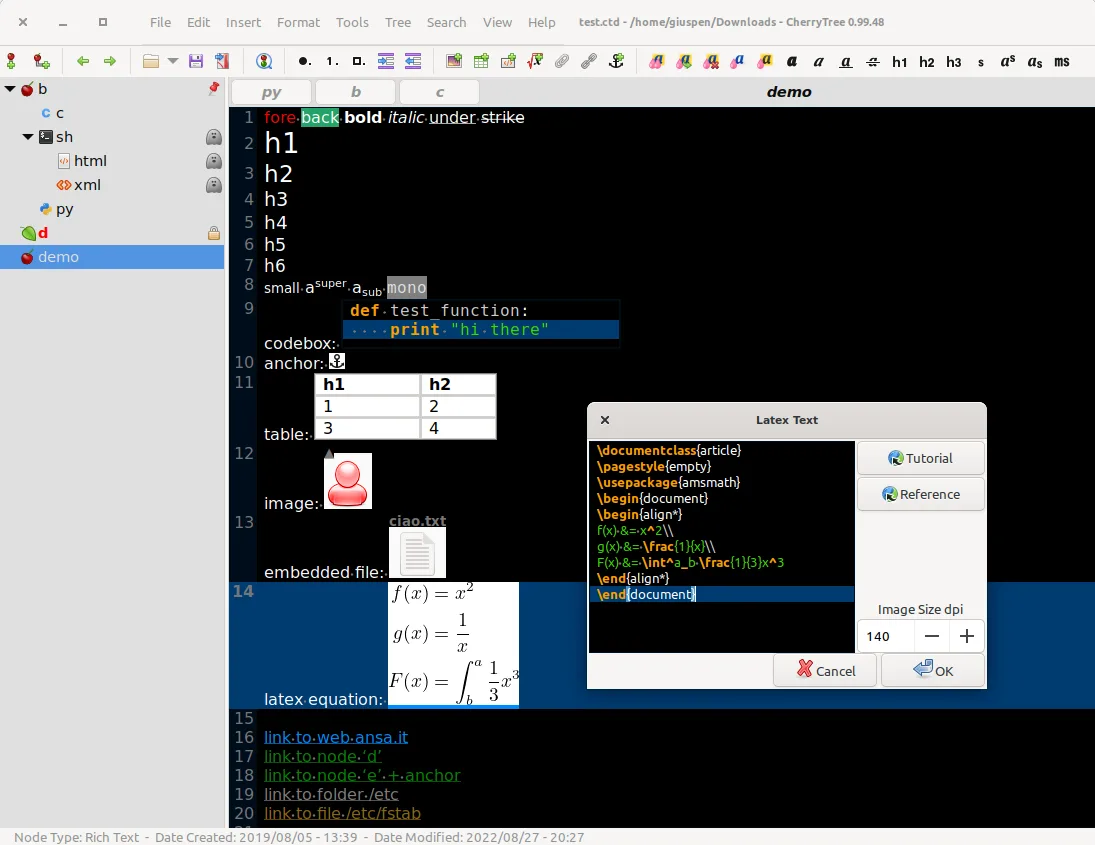
CherryTree is a solid replacement for Google Keep if you prioritize local control, rich content, and structured organization over cloud sync and collaboration. It excels at storing formatted notes, code snippets, images, and links in a hierarchical tree, making it ideal for personal knowledge management. However, it lacks built-in end-to-end encryption, real-time sharing, and mobile access. You’ll need third-party tools for cross-device sync. If you value privacy and deep note formatting over instant collaboration and mobility, CherryTree is a strong choice.
- Lizenz
- GPL-3.0+
- Preis
- Kostenlos
- Aktuelle Version
- b'1.7.2' (11. November 2011)
- Bewertung
- —
Was gleich funktioniert
- Supports text notes with formatting and to-do lists
- Allows tagging and color-coding of notes via node placement and labels
- Enables image attachment and basic organization
- Lets you set reminders indirectly via pinned nodes or text labels
- Includes search and find/replace functionality
Was anders ist
- No built-in sync or cloud integration — you must manage sync manually
- No native mobile apps; access on mobile requires workarounds
- No real-time collaboration or sharing features
- No OCR for text extraction from images
- Hierarchical tree structure replaces flat note list, changing workflow
Ihre Google Keep-Dateien öffnen
There is no direct way to import Google Keep notes into CherryTree, as Google Keep does not export in standard note formats. You can export Keep notes as text or HTML via Google Takeout, but these must be manually copied or scripted into CherryTree. No automated tools reliably convert Keep data to CherryTree’s format. Migration requires exporting notes from Google’s ecosystem and pasting them into the appropriate nodes.
Von Google Keep zu CherryTree wechseln – Schritt für Schritt
- Export your Google Keep notes using Google Takeout
- Convert exported HTML or text files into a readable format
- Launch CherryTree and create a new document
- Manually create parent nodes for categories or labels
- Copy and paste note contents into appropriate nodes
- Use formatting tools to replicate lists, images, and links
Wichtige Funktionen von CherryTree
- Hierarchische, baumartige Notizen
- Rich-Text mit Bildern, Tabellen und Listen
- Syntaxhervorhebung für Codeblöcke
- Passwortschutz für Knoten
- Export nach PDF, HTML und reinem Text
- Import aus anderen Notiz-Apps
- Rechtschreibprüfung und Suchen/Ersetzen
- Daten werden in XML oder SQLite gespeichert
CherryTree unter Linux installieren
flatpak install flathub net.giuspen.cherrytreesudo apt install cherrytreesudo apt install cherrytreesudo pacman -S cherrytreesudo zypper install cherrytreeHäufige Fragen
Can I sync CherryTree across devices like Google Keep?
Not natively. You can sync the data file using third-party services like Syncthing or Nextcloud, but ensure only one instance is open at a time to avoid corruption.
Is there a mobile version of CherryTree?
No. You can view or edit the file on mobile using a text or code editor if synced, but full functionality requires the desktop app.
Can CherryTree extract text from images like Google Keep?
No. CherryTree stores images but doesn’t include OCR. You’d need external tools like Tesseract to extract text and manually add it.
5 weitere Alternativen zu Google Keep
 JoplinJoplin ist eine quelloffene, plattformübergreifende Notiz- und To-do-App, die Daten in Markdown speichert.Open SourceKostenlosFlatpakJoplin vs. Google Keep
 Standard NotesStandard Notes ist eine plattformübergreifende, Ende-zu-Ende-verschlüsselte Notiz-App, die Ihre Daten sicher…Open SourceKostenlosFlatpakStandard Notes vs. Google Keep
 ZimZim ist ein Desktop-Wiki zur Erstellung und Organisation von Notizen in einfachen Textdateien.Open SourceKostenlosFlatpakZim vs. Google Keep
 ObsidianObsidian ist eine auf Markdown basierende Wissensdatenbank-App, die Notizen als reine Textdateien in einem…FlatpakObsidian vs. Google KeepNotejotNotejot ist eine leichte KDE-Sticky-Note-Anwendung, die Notizen auf Ihrem Desktop anheftet, um schnelle…Open SourceKostenlosNotejot vs. Google Keep