
 FreeFileSyncLinux
vs
Resilio SyncWindows
FreeFileSyncLinux
vs
Resilio SyncWindows
FreeFileSync als Linux-Alternative zu Resilio Sync
Aktualisiert am
Unser Fazit
FreeFileSync is not a direct replacement for Resilio Sync, but serves a different purpose. If you need real-time, peer-to-peer folder syncing across devices without central servers, FreeFileSync does not provide that. It's ideal for manual or scheduled one-time syncs between local or networked paths, not continuous background syncing. However, for users who prefer full control, transparency, and don't need automatic P2P sync, FreeFileSync is a solid choice. It excels in visual verification and precise file management, making it better suited for local backups than decentralized collaboration.
- Lizenz
- GPL-3.0
- Preis
- Kostenlos
- Aktuelle Version
- 14.13 (26. Oktober 2026)
- Bewertung
- —
Was gleich funktioniert
- Both synchronize folders to keep content consistent across locations
- Support bidirectional and one-way sync modes
- Can sync over network drives and shared folders
- Detect file changes, renames, and moves accurately
- Offer filtering options to include or exclude specific files
Was anders ist
- FreeFileSync lacks peer-to-peer networking; it doesn't sync directly between devices like Resilio Sync
- No built-in real-time syncing—requires external tools like cron for automation
- Does not use BitTorrent protocol or support sync keys/links for easy sharing
- Runs only when launched, not as a background service
- Missing encryption in transit and decentralized authentication features
Ihre Resilio Sync-Dateien öffnen
FreeFileSync does not use or recognize Resilio Sync's configuration files, metadata, or .sync folders. There is no import function for Resilio Sync setups. You cannot directly open or migrate Resilio Sync profiles into FreeFileSync. Sync relationships must be recreated manually by defining source and target folders. Any files already synced by Resilio Sync can be accessed normally since they’re standard files on disk, but the synchronization logic and history are not transferable.
Von Resilio Sync zu FreeFileSync wechseln – Schritt für Schritt
- Identify all active Resilio Sync folder pairs and their sync direction
- On each Linux machine, install FreeFileSync via your package manager or Flathub
- Create a new synchronization job in FreeFileSync for each Resilio Sync folder pair
- Set up filters and exclusions to match your previous Resilio Sync rules
- Save the job and schedule it using cron or systemd for recurring syncs
- Test manually first, then verify logs for accuracy before relying on automation
Wichtige Funktionen von FreeFileSync
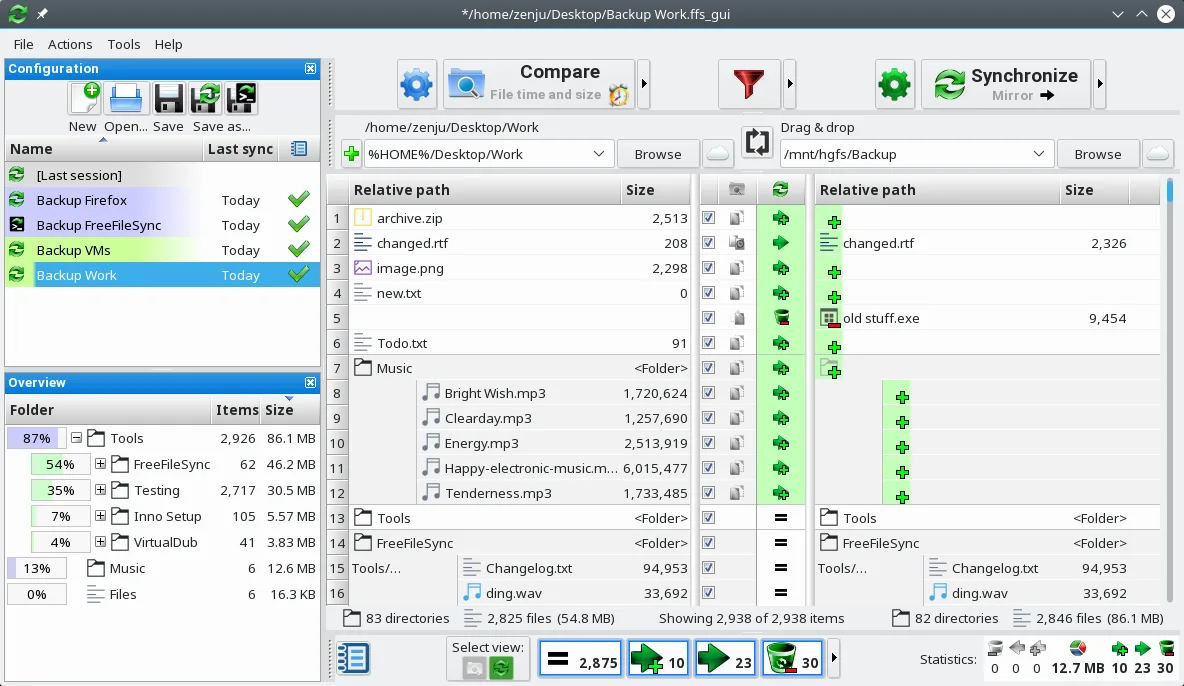
- Visueller, nebeneinander angeordneter Ordnervergleich
- Echtzeit- und Batch-Synchronisation
- Unterstützt lokale, Netzwerk- und externe Laufwerke
- Filter zum Ein- oder Ausschließen von Dateien
- Kann Batch-Jobs zur Automatisierung erstellen
- Erkennt verschobene und umbenannte Dateien
- Kann über externe Tools zeitgesteuert ausgeführt werden
- Erstellt detaillierte Synchronisationsprotokolle
FreeFileSync unter Linux installieren
flatpak install flathub org.freefilesync.FreeFileSyncsudo apt install freefilesyncsudo apt install freefilesyncsudo zypper install FreeFileSyncHäufige Fragen
Can FreeFileSync sync folders between two computers like Resilio Sync?
Not directly. FreeFileSync can sync over network shares (e.g., Samba), but requires both machines to be accessible. It doesn't do peer-to-peer syncing or work over the internet without shared storage.
Is real-time sync possible with FreeFileSync?
No, FreeFileSync has no built-in real-time monitoring. You must trigger syncs manually or schedule them using external tools like cron or inotify scripts.
Does FreeFileSync encrypt data during transfer?
No. FreeFileSync transfers files directly over mounted paths or network drives. Encryption depends on the underlying system, such as an encrypted SSHFS mount or VPN.
5 weitere Alternativen zu Resilio Sync
 SyncThingySyncThingy ist ein leichtgewichtiger Symbolleisten-Icon, der Syncthing steuert und es Ihnen ermöglicht, den…Open SourceKostenlosFlatpakSyncThingy vs. Resilio Sync
 Nextcloud Desktop ClientSynchronisiert Dateien zwischen Ihrem Linux-Desktop und einem Nextcloud-Server, sodass Dokumente und Fotos…Open SourceKostenlosFlatpakNextcloud Desktop Client vs. Resilio Syncrsyncrsync ist ein Befehlszeilen-Werkzeug zur effizienten Synchronisierung von Dateien und Verzeichnissen, lokal…Open SourceKostenlosrsync vs. Resilio Sync
 UnisonUnison ist ein plattformübergreifendes Dateisynchronisations‑Tool, das zwei Verzeichnisse auf verschiedenen…Open SourceKostenlosFlatpakUnison vs. Resilio SyncLsyncdLsyncd spiegelt Verzeichnisse lokal oder über Netzwerke mithilfe von rsync und eignet sich hervorragend für…Open SourceKostenlosLsyncd vs. Resilio Sync