
 Git ColaLinux
vs
GitHub DesktopWindows
Git ColaLinux
vs
GitHub DesktopWindows
Git Cola als Linux-Alternative zu GitHub Desktop
Aktualisiert am
Unser Fazit
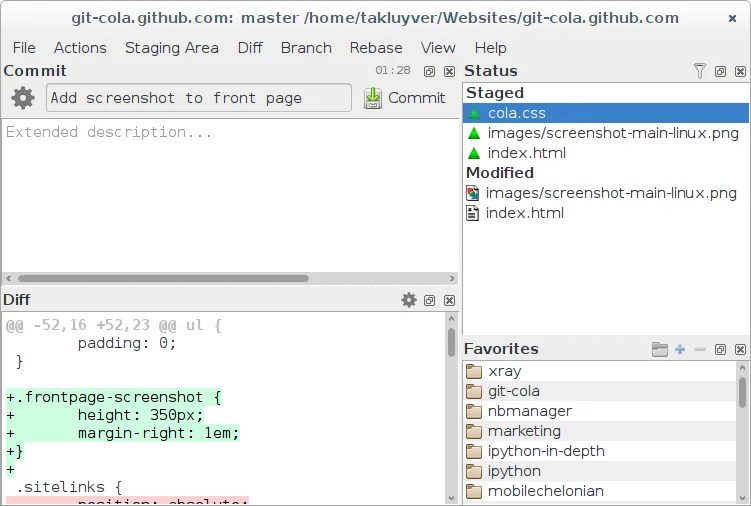
Git Cola can replace GitHub Desktop for users who are comfortable with a more traditional Git GUI and want a lightweight, highly configurable client. It covers cloning, branching, committing, pushing/pulling, viewing history, resolving conflicts, and even integrates with GitHub issues via the command line. It is best suited for developers who prefer a desktop tool that stays close to Git’s native workflow and for those who don’t need the built‑in GitHub‑specific features of GitHub Desktop.
- Lizenz
- GPL-2.0
- Preis
- Kostenlos
- Aktuelle Version
- 4.19.0 (12. Juli 2026)
- Bewertung
- —
Was gleich funktioniert
- Both allow cloning repositories from GitHub and managing branches (create, switch, delete).
- Both provide a graphical commit history and diff view for reviewing changes.
- Both support staging/unstaging changes, committing, and pushing/pulling to remotes.
- Both can resolve merge conflicts through a visual merge tool.
- Both integrate with GitHub issues and pull requests via external tools or command line.
Was anders ist
- Git Cola lacks a built‑in GitHub issue and PR browser; users must use external tools or the command line.
- Git Cola does not offer a native “GitHub Desktop” style sync panel; all actions are accessed through menus or shortcuts.
- Git Cola’s UI is more traditional and may feel less modern than GitHub Desktop’s polished design.
- Git Cola does not bundle a GitHub authentication flow; users need to set up SSH or HTTPS credentials manually.
- Git Cola’s configuration is file‑based and can be more complex for beginners.
Ihre GitHub Desktop-Dateien öffnen
GitHub Desktop stores its settings in a proprietary JSON format inside the user’s home directory; Git Cola does not read or write these files. Exporting a repository from GitHub Desktop simply means cloning the repo, which Git Cola can handle without issue. Importing a GitHub Desktop project is not supported directly, but cloning the same repo in Git Cola achieves the same result.
Von GitHub Desktop zu Git Cola wechseln – Schritt für Schritt
- Open GitHub Desktop and note the repository URLs you use.
- Launch Git Cola and choose File → Clone Repository.
- Paste the GitHub URL and select a local folder.
- Use Git Cola’s Branch menu to create or switch branches.
- Commit changes via the staging pane and push to the remote.
- If you use GitHub issues, open them in your browser or use the command line.
Wichtige Funktionen von Git Cola
- Visuelle Commit-Grafik und Verlaufsnavigation
- Integriertes Diff- und Merge-Tool
- Verwaltung von Branches, Tags und Stash
- Unterstützung für benutzerdefinierte Git-Befehle
- Durchsuchbarer Dateibaum und Änderungsliste
- Rückgängig/Wiederherstellen für Staging-Aktionen
- Konfigurierbare Tastenkürzel und Themen
- Exportieren von Patches und deren Anwendung
Git Cola unter Linux installieren
flatpak install flathub com.github.git_cola.git-colasudo apt install git-colasudo apt install git-colasudo dnf install git-colasudo zypper install git-colaHäufige Fragen
Does Git Cola support SSH authentication for GitHub?
Yes, Git Cola uses the system’s Git configuration, so any SSH keys set up for GitHub work automatically.
Can I use Git Cola to create pull requests?
Not directly; you’ll need to open GitHub in a browser or use the GitHub CLI to create PRs after pushing branches.
Is Git Cola suitable for beginners?
It is more feature‑rich and configurable than GitHub Desktop, so beginners may find it a bit overwhelming, but it offers a powerful workflow for users who want more control.
4 weitere Alternativen zu GitHub Desktop
 GitKrakenGitKraken ist ein plattformübergreifender Git-Client mit integriertem Issue-Tracking und Code-Editor.FlatpakGitKraken vs. GitHub DesktopLazygitEin schnelles und benutzerfreundliches Terminal‑UI für Git, das komplexe Workflows vereinfacht, ohne die…Open SourceKostenlosLazygit vs. GitHub Desktop
 gitgGitg ist eine leichte grafische Oberfläche für Git, die die Commit-Historie visualisiert und Repositories…Open SourceKostenlosFlatpakgitg vs. GitHub Desktop
 GitKrakenGitKraken ist ein plattformübergreifender Git-Client mit visueller Historie, integriertem Editor und…FlatpakGitKraken vs. GitHub Desktop