
 gitgLinux
vs
GitHub DesktopWindows
gitgLinux
vs
GitHub DesktopWindows
gitg als Linux-Alternative zu GitHub Desktop
Aktualisiert am
Unser Fazit
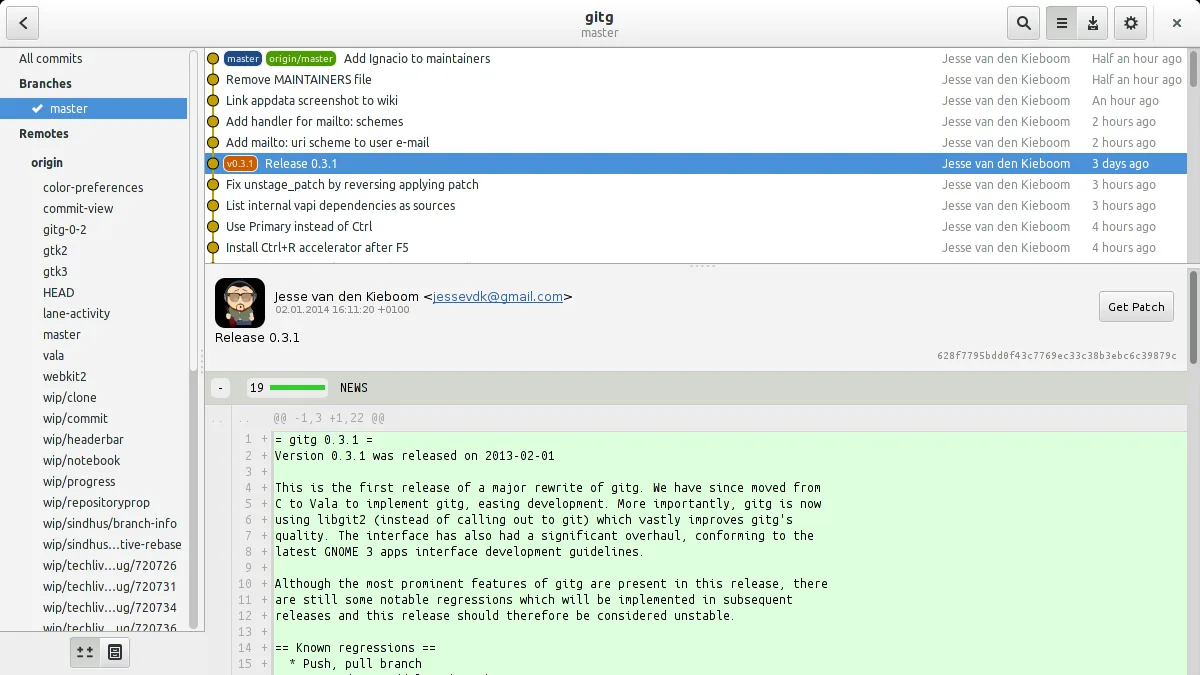
gitg can replace GitHub Desktop for users who only need basic Git operations and commit history visualization. It supports cloning, branching, committing, pulling, and pushing to GitHub, and shows diffs and merge conflicts. It lacks built‑in issue or pull‑request integration, so teams that rely on those features will find it lacking. For solo developers or those comfortable with GitHub’s web interface for issues, gitg is a solid, lightweight alternative.
- Lizenz
- GPL-2.0+
- Preis
- Kostenlos
- Aktuelle Version
- 50 (1. Juli 2026)
- Bewertung
- —
Was gleich funktioniert
- Clone repositories from URLs
- Create, switch, and delete branches
- Commit changes with a GUI
- View commit history and diffs
- Resolve merge conflicts
Was anders ist
- No integration with GitHub issues or pull requests
- No visual management of pull‑request reviews
- No built‑in web‑based code review tools
- No automatic credential caching for GitHub
- No direct link to GitHub web UI from the app
Ihre GitHub Desktop-Dateien öffnen
GitHub Desktop does not store its project data in a proprietary file format; it simply uses the underlying Git repository. Therefore, opening a repository in gitg is as simple as selecting the folder. Exporting or importing any GitHub Desktop‑specific settings is not applicable.
Von GitHub Desktop zu gitg wechseln – Schritt für Schritt
- 1. Install gitg from your distro’s package manager or Flathub.
- 2. Open gitg and choose "Clone" to fetch the GitHub repository URL.
- 3. Use the branch selector to create, switch, or delete branches.
- 4. Stage and commit changes via the "Commit" dialog.
- 5. Push or pull using the toolbar buttons or context menu.
- 6. Resolve merge conflicts with the built‑in conflict editor.
Wichtige Funktionen von gitg
- Lokale und entfernte Repositories durchsuchen
- Repositories von URLs klonen
- Commit-Historie und Branches visualisieren
- Diffs und Patches anzeigen
- Staged Änderungen committen
- Commits rückgängig machen
- Commit-Nachrichten durchsuchen
gitg unter Linux installieren
flatpak install flathub org.gnome.gitgsudo apt install gitgsudo apt install gitgsudo dnf install gitgsudo pacman -S gitgsudo zypper install gitgHäufige Fragen
Does gitg support GitHub pull requests?
No. gitg does not provide a GUI for creating or reviewing pull requests. You must use the GitHub web interface or a command‑line tool like gh.
Can I use gitg with other remote hosts?
Yes. gitg works with any Git remote, not just GitHub. It supports SSH, HTTPS, and other protocols.
Is gitg suitable for large repositories?
gitg is lightweight but may become slow with very large histories. For very large repos, consider using a more specialized tool or the command line.
4 weitere Alternativen zu GitHub Desktop
 GitKrakenGitKraken ist ein plattformübergreifender Git-Client mit integriertem Issue-Tracking und Code-Editor.FlatpakGitKraken vs. GitHub DesktopLazygitEin schnelles und benutzerfreundliches Terminal‑UI für Git, das komplexe Workflows vereinfacht, ohne die…Open SourceKostenlosLazygit vs. GitHub Desktop
 Git ColaGit Cola ist ein leichtgewichtiger, funktionsreicher grafischer Git-Client für Linux.Open SourceKostenlosFlatpakGit Cola vs. GitHub Desktop
 GitKrakenGitKraken ist ein plattformübergreifender Git-Client mit visueller Historie, integriertem Editor und…FlatpakGitKraken vs. GitHub Desktop