
 GNOME CommanderLinux
vs
GNOME CommanderLinux
vs
 Total CommanderWindows
GNOME Commander als Linux-Alternative zu Total Commander
Aktualisiert am
Unser Fazit
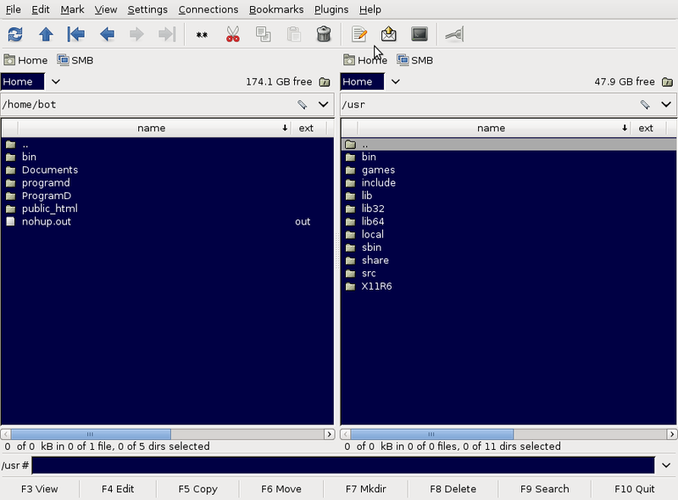
GNOME Commander is a solid Linux alternative for users who need a classic two‑pane file manager with tabs and keyboard‑driven navigation. It covers the core workflow of Total Commander—browsing two directories side by side, quick moves, and basic archive handling—so most power users will feel at home. However, it lacks some of the deeper integration Total Commander offers, such as built‑in FTP/SFTP panels, extensive plugin ecosystem, and the highly configurable file comparison tools. If you are comfortable with GNOME’s environment and don’t rely on those advanced extensions, GNOME Commander will serve you well.
Funktionsabdeckung
- Lizenz
- GPL-2.0-or-later
- Preis
- Kostenlos
- Aktuelle Version
- 2.0.3
- Bewertung
- —
Was gleich funktioniert
- Dual‑pane layout with independent navigation","Multiple tabs per pane","Keyboard‑centric shortcuts","Built‑in archive handling (zip, tar, etc.)","Search and filter capabilities
Was anders ist
- No native FTP/SFTP client pane; relies on external tools","No dedicated file comparison/synchronisation module","Plugin ecosystem is smaller and less Windows‑oriented","No built‑in viewer for many proprietary archive formats (e.g., RAR)","Terminal integration is internal rather than external"]
- file_compat
- :
- GNOME Commander can open and extract the same archive formats that Total Commander handles natively
- such as zip and tar. It will also read other common archives via GVfs
- but support for less common formats like RAR or 7z may require installing additional backend packages. Exporting files from GNOME Commander works like any Linux file manager—simply copy or move them to the target directory; there is no special
Wichtige Funktionen von GNOME Commander
- Dual‑Pane‑Layout
- Tastatur‑zentrierte Navigation
- Unterstützung für GVfs‑Mounts
- Eingebaute Terminal‑Integration
- Anpassbare Werkzeugleiste
- Mehrere Tab‑Unterstützung
- Such- und Filterfunktionen
- Plugin‑Architektur
GNOME Commander unter Linux installieren
Ubuntu / Mint
sudo apt install gnome-commanderDebian
sudo apt install gnome-commanderFedora
sudo dnf install gnome-commanderArch / Manjaro
sudo pacman -S gnome-commanderopenSUSE
sudo zypper install gnome-commander2 weitere Alternativen zu Total Commander
 Double CommanderDouble Commander ist ein kostenloser, plattformübergreifender Dual‑Pane-Dateimanager, der von Total Commander…Open SourceKostenlosDouble Commander vs. Total Commander
 KrusaderKrusader ist ein kostenloser, dual‑pane Dateimanager für KDE, der Norton/Total Commander mit erweiterten…Open SourceKostenlosKrusader vs. Total Commander
GNOME Commander bewerten
Als Erste(r) bewerten
Guter Ersatz für Total Commander?
9