
 ksnipLinux
vs
TechSmith SnagitWindows
ksnip als Linux-Alternative zu TechSmith Snagit
Aktualisiert am
Unser Fazit
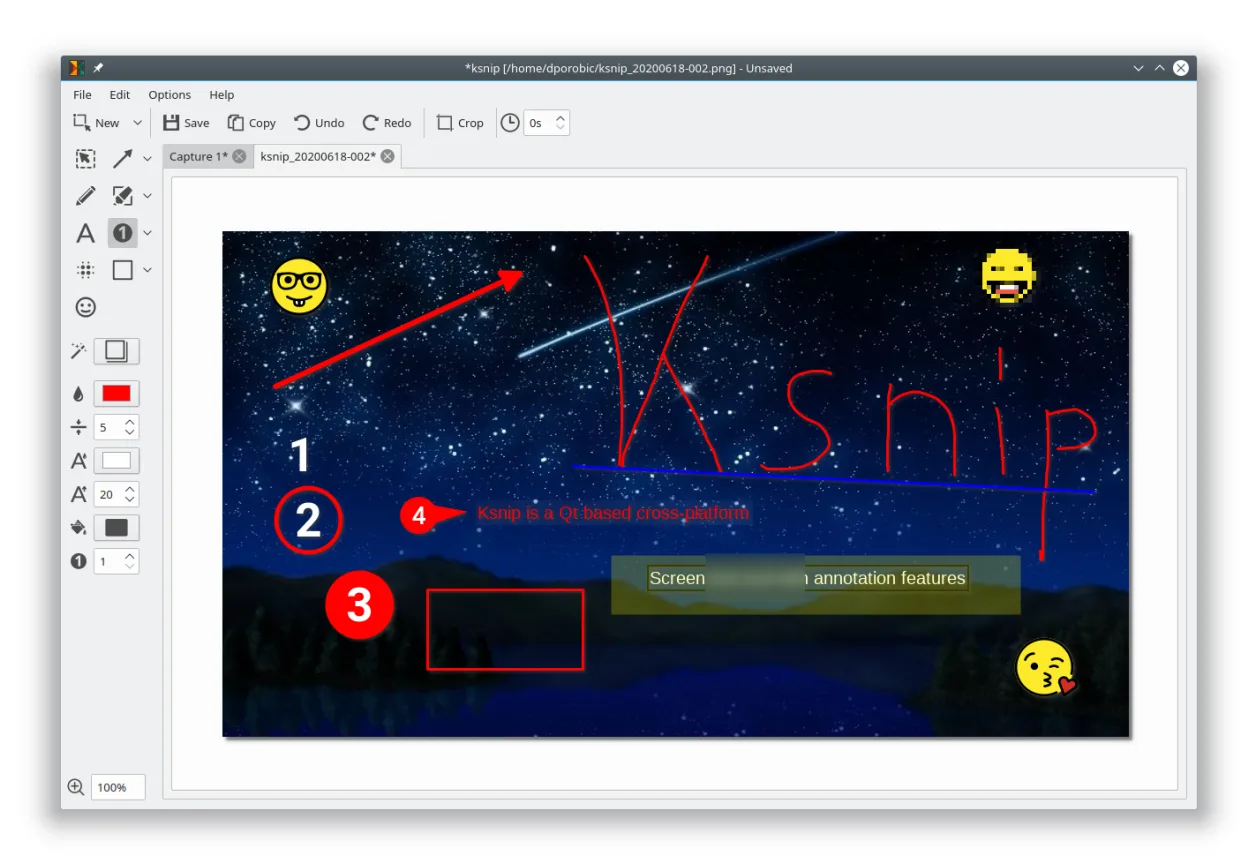
ksnip is a solid replacement for TechSmith Snagit on Linux, especially for users focused on screenshot capture and annotation. It covers core needs like region/window/full-screen captures, delay timers, and basic to intermediate editing with text, shapes, blur, and stickers. The tabbed interface and global hotkeys make workflow efficient. However, it lacks built-in screen recording, so users needing video capture must pair it with another tool like OBS. If your main use is annotated screenshots and lightweight editing, ksnip works well. For heavy video recording or advanced Snagit-only features, it falls short.
- Lizenz
- GPL-2.0+
- Preis
- Kostenlos
- Aktuelle Version
- 1.10.1 (15. März 2023)
- Bewertung
- —
Was gleich funktioniert
- Capture specific windows, regions, full screens, and monitor under cursor
- Annotate with text, arrows, shapes, blur, and pixelation
- Support for delay timers and global hotkeys (on X11 and Wayland via portal)
- Export to common image formats and PDF/PS
- Customizable filename templates with date wildcards ($Y, $M, etc.)
Was anders ist
- ksnip does not support screen recording to video — a key Snagit feature
- No built-in library or project organization like Snagit's tray/history panel
- Upload options are limited to Imgur or custom scripts, not cloud services like Google Drive or OneDrive
- No OCR or image extraction from screenshots
- Command-line automation exists but is less integrated than Snagit's scripting via TechSmith Fuse
Ihre TechSmith Snagit-Dateien öffnen
ksnip does not support opening Snagit's proprietary .snagproj or .snagx files. If you have existing Snagit projects with layered edits or recordings, they cannot be imported directly. However, exported images (PNG, JPG) and videos (MP4) from Snagit can be manually reused. ksnip saves annotated screenshots in standard formats like PNG, JPG, and PDF, which are universally accessible. For migration, you’ll need to treat old Snagit files as static media unless you reprocess them manually.
Von TechSmith Snagit zu ksnip wechseln – Schritt für Schritt
- Install ksnip via your package manager or Flathub: 'flatpak install flathub org.ksnip.ksnip'
- Set up global hotkeys in ksnip under Settings > Hotkeys to match your workflow
- Configure filename patterns using $Y, $M, $D, and # for auto-numbering
- Set default save location and format (PNG or JPG)
- For screen recordings, install a separate tool like OBS Studio and assign a hotkey
- Test capture types: region, window, full screen, with and without cursor
Wichtige Funktionen von ksnip
- Capture custom regions, windows, full screens, or under mouse cursor
- Annotate with pen, text, shapes, blur, pixelate, and stickers
- Upload directly to imgur or via custom scripts
- Supports filename templates with wildcards like $Y, $M, $D, $T
- Command-line interface for automation and scripting
- Print or export to PDF/PS, add watermarks and image effects
- Tabbed interface for managing multiple screenshots
- Global hotkeys (on X11 and Windows); delay timers for captures
ksnip unter Linux installieren
flatpak install flathub org.ksnip.ksnipsudo apt install ksnipsudo apt install ksnipsudo dnf install ksnipsudo pacman -S ksnipsudo zypper install ksnipHäufige Fragen
Can ksnip record video like Snagit?
No, ksnip only captures still images. For screen recording, use OBS Studio or another video capture tool alongside it.
Does ksnip work on Wayland?
Yes, it works on GNOME and Plasma Wayland via xdg-desktop-portal, though some features like global hotkeys depend on the desktop environment's support.
Can I use my own cloud storage for uploads?
Yes, via custom upload scripts. ksnip supports command-line scripts, so you can integrate with Dropbox, Nextcloud, or other services using curl or CLI tools.
4 weitere Alternativen zu TechSmith Snagit
 FlameshotFlameshot ist ein leichtgewichtiges Screenshot-Tool mit integrierten Annotations- und Upload-Funktionen.Open SourceKostenlosFlatpakFlameshot vs. TechSmith Snagit
 ShutterShutter ist ein leistungsstarkes, quelloffenes Screenshot-Tool für Linux mit integrierter Bearbeitung…Open SourceKostenlosShutter vs. TechSmith Snagit
 OBS StudioKostenlose, quelloffene Software zum Aufnehmen, Aufzeichnen und Live-Streaming von Video aus verschiedenen…Open SourceKostenlosFlatpakOBS Studio vs. TechSmith SnagitKazamKazam ist ein unkompliziertes Tool zur Bildschirmaufnahme und zum Erstellen von Screenshots für Linux, ideal…Open SourceKostenlosEingestelltKazam vs. TechSmith Snagit