
Linux · Sound & Video
Brasero Disc Burner
Brasero is a simple, GNOME-integrated application for burning data and audio CDs and DVDs, supporting multi-session and drag-and-drop workflows.
- Lizenz
- GPL-2.0-or-later
- Aktuelle Version
- 3.12.4 (28. September 2026)
- Entwickler
- The Brasero developers
- Installationen
- 4,039 (Flathub, 30 Tage)



Was ist Brasero Disc Burner?
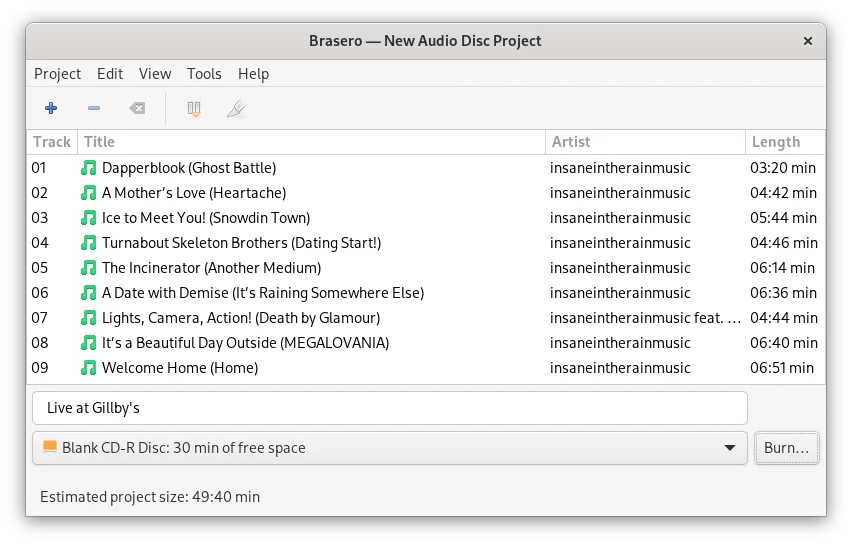
Brasero has been the default disc burning tool for the GNOME desktop environment for over a decade. It focuses on simplicity rather than feature bloat, handling standard CD and DVD operations without complex configuration. The software is mature and stable, with recent updates ensuring compatibility with modern Linux kernels and file systems. It supports standard formats like ISO 9660 and Joliet, making it reliable for everyday use.
This tool is best suited for users who need to burn data backups, create audio CDs, or copy discs without dealing with advanced settings. It is ideal for those who prefer a straightforward interface over the extensive menus found in professional burning suites. If you only burn discs occasionally or for basic tasks, Brasero provides everything you need without a steep learning curve or unnecessary complexity.
Compared to Windows tools like Nero or ImgBurn, Brasero feels much lighter and less intimidating. While Windows alternatives often offer advanced error correction, bootable ISO creation, and complex menu structures, Brasero strips these away in favor of a clean, drag-and-drop experience. You will not find the same level of granular control, but for standard burning tasks, the workflow is faster and more intuitive for most users.
Ideal für: Users who need a straightforward, no-frills tool to burn data or audio discs on a GNOME-based Linux system.
Wichtige Funktionen von Brasero Disc Burner
- Burn data and audio CDs/DVDs
- Copy existing discs
- Create and burn ISO images
- Support for CD-TEXT and Joliet extensions
- Multi-session disc support
- Drag-and-drop file selection
- Integration with GNOME desktop environment
- Support for remote shared drives
Vorteile
- Extremely simple and intuitive interface
- Native integration with GNOME file manager
- Low system resource usage
- Stable and reliable for standard tasks
- No ads or upsells
Nachteile
- Lacks advanced features like bootable ISO creation
- Limited control over burn speed and error correction
- Not suitable for complex or professional burning needs
- Interface may feel too basic for power users
Windows-Programme, die Brasero Disc Burner ersetzt
 Ashampoo Burning Studio
 ImgBurn
 ISO Recorder Power Toy
 Nero
NeroBrasero Disc Burner unter Linux installieren
flatpak install flathub org.gnome.BraseroTipps für Windows-Umsteiger
If you are coming from Nero or ImgBurn, expect a simpler workflow. Brasero does not offer detailed control over burn speeds or advanced file system options, so stick to standard settings. Drag and drop works directly from the file manager, eliminating the need to navigate through multiple menus. Note that Brasero does not create bootable ISOs or handle complex multi-layer DVD+RW scenarios as flexibly as some Windows tools. For basic data and audio burning, the transition is smooth, but for advanced tasks, you may need to look for alternative command-line tools or specialized software.
Neueste Versionen
- 3.12.4 —
Bugs fixed and enhancements: - Remove libegg multidrag treeview support for in-built 'GtkFileChooser' (sid) - cdrkit: Add better error message for "Unsupported sector size" errors (sid) - cdrdao: Add better error message for "Unsupported track mode" errors…
- 3.12.3 —
This release includes the following changes: - Blu-ray fixes (Bastien Nocera) - Support Tracker 3.0 (Carlos Garnacho) - Add CI (Bastien Nocera) - Transcode plugin gstreamer plugin improvement (Robert McQueen) - Fix crash with malformed URI (Geyslan) - Fix…
- 3.12.2 —
This release includes the following changes: - Build fixes - Support Tracker 2.0 - Translation updates
- 3.12.1 —
This release includes the following changes: - Add a symbolic app icon - Translation updates
Brasero Disc Burner: häufige Fragen
Can Brasero create bootable USB drives?
No, Brasero is designed for optical discs (CD/DVD) and does not support USB drive creation. Use tools like Etcher or dd for USB bootable media.
Does Brasero support Blu-ray discs?
Standard Brasero primarily supports CD and DVD formats. Blu-ray support is limited and not the primary focus of the application.
Why can't I see my disc drive in Brasero?
Ensure your user is part of the cdrom or optical group in your system settings. Restart Brasero after making permission changes.
Can I burn ISO files with Brasero?
Yes, you can select 'Write image to disc' and browse for your ISO file to burn it directly to a blank disc.
Aktualisiert am