

Linux · Internet
Evolution Mail
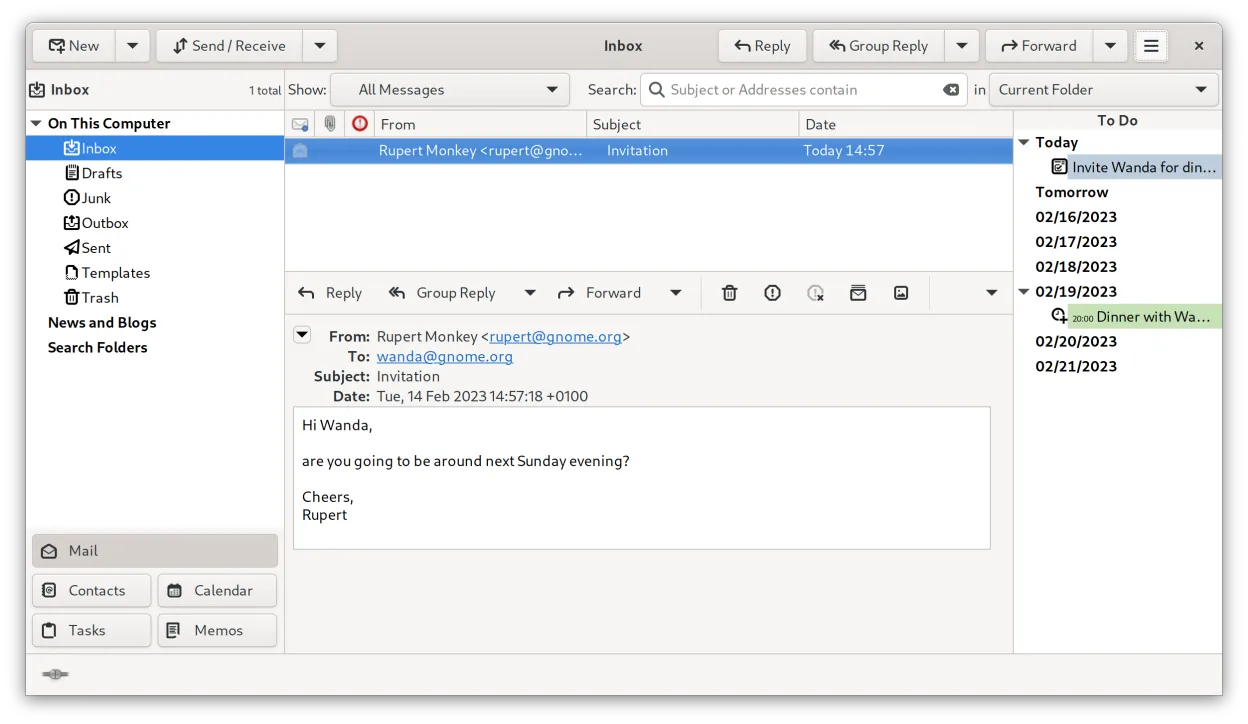
Evolution is GNOME’s integrated email, calendar, contacts, and task manager.
- Lizenz
- GPL-2.0+ and GFDL-1.3
- Aktuelle Version
- 3.62.0 (11. September 2026)
- Entwickler
- The Evolution Team
- Installationen
- 6,098 (Flathub, 30 Tage)


Was ist Evolution Mail?
Evolution has been part of GNOME since 2004 and is now at version 3.62.0. It grew out of the need for a full‑featured personal information manager on Linux, offering mail, address book, calendar, tasks and notes in one program. Its long history means it supports many standards, including IMAP, POP, LDAP and Microsoft Exchange via EWS.
The suite targets users who want a desktop‑class PIM similar to Microsoft Outlook, but prefer open‑source software. It works well for both personal use and small‑to‑medium teams that need shared calendars and contacts without buying a proprietary solution.
Compared with Becky!, Eudora, Forte Agent, Outlook or The Bat!, Evolution feels more like an all‑in‑one office tool rather than a lightweight mail client. The interface follows GNOME conventions, so it may feel heavier than a dedicated mailer, but the integration of mail, calendar and contacts saves the hassle of juggling separate programs.
Ideal für: Users who need a full‑featured Outlook‑like PIM on Linux.
Wichtige Funktionen von Evolution Mail
- IMAP, POP3 and SMTP email support
- Microsoft Exchange integration via EWS
- Integrated calendar with iCal and CalDAV support
- Address book with LDAP and CardDAV sync
- Task and note management
- PGP/GPG encryption and S/MIME signing
- Search across mail, contacts and events
- Extensible via plugins
Vorteile
- Handles email, calendar and contacts in one place
- Strong standards compliance and security
- Good Exchange support for corporate environments
- Mature codebase with regular updates
- Works well with GNOME desktop
Nachteile
- Interface can feel dated compared with newer mail clients
- Heavier resource usage than lightweight alternatives
- Configuration can be complex for beginners
Windows-Programme, die Evolution Mail ersetzt
 Becky!
 Eudora
 The Bat!
 Forte Agent
 Microsoft Outlook
Evolution Mail unter Linux installieren
flatpak install flathub org.gnome.EvolutionTipps für Windows-Umsteiger
Export your Outlook PST or The Bat! mail folders to mbox or Maildir, then import them via Evolution’s Import wizard. Contacts can be exported as vCard or CSV and imported similarly. Keyboard shortcuts differ – most actions use the standard GNOME shortcuts (Ctrl+N for new mail, Ctrl+Shift+K for new calendar event). Expect to manage mail, calendar and contacts from a single window rather than separate programs, which streamlines workflow after the initial setup.
Neueste Versionen
- 3.62.0 —
Evolution Bug Fixes: - I#3381 - Composer: De-duplicate inline images before send - I#3383 - junk-filters: Do not leak the child stdin pipe into concurrent spawns (Benjamin Herrenschmidt) - I#3386 - Default to not use read-only calendars for reminders and…
Evolution Mail: häufige Fragen
Can Evolution read Outlook PST files?
Evolution cannot open PST directly; you need to convert PST to mbox or Maildir using tools like readpst before importing.
How do I set up Exchange accounts in Evolution?
Use the “Microsoft Exchange” option in the account wizard and provide the EWS URL, username and password.
Is Evolution compatible with GNOME Wayland?
Yes, Evolution runs natively on Wayland and integrates with GNOME Shell.
Can I use Evolution with multiple email accounts?
Yes, you can add any number of IMAP, POP or Exchange accounts and switch between them in the UI.
Aktualisiert am