

Linux · Sound & Video
Hydrogen
Hydrogen is an open‑source drum machine and sequencer for creating and arranging drum patterns on Linux.
- Lizenz
- GPL-2.0-or-later
- Aktuelle Version
- 1.2.7 (2. Oktober 2026)
- Entwickler
- Hydrogen Developers
- Installationen
- 623 (Flathub, 30 Tage)


Was ist Hydrogen?
Hydrogen started as a hobby project in 2005 and has grown into a mature, actively maintained drum machine. The latest release (1.2.7) shows the developers keep adding features and fixing bugs, so it feels reliable for studio work. It targets musicians who need a dedicated drum sequencer without the overhead of a full DAW, from hobbyists to professional producers.
Unlike many Windows drum tools, Hydrogen focuses on pattern‑based programming and a clean, uncluttered UI. It offers deep MIDI integration, time‑stretching, and a large library of drumkits, making it a solid alternative to commercial packages like Addictive Drums. The learning curve is gentle, but the depth is there for advanced users.
In practice it feels responsive and lightweight, letting you sketch beats quickly or build complex arrangements. The workflow is driven by a grid view and a separate instrument editor, which differs from the more graphical, loop‑centric approach of many Windows drum plugins. If you’re used to dragging samples into a timeline, you’ll adapt quickly to Hydrogen’s pattern‑first mindset.
Ideal für: Musicians who need a dedicated, scriptable drum machine without buying a commercial Windows plugin.
Wichtige Funktionen von Hydrogen
- First‑class MIDI input and output
- Extensive library of built‑in drumkits
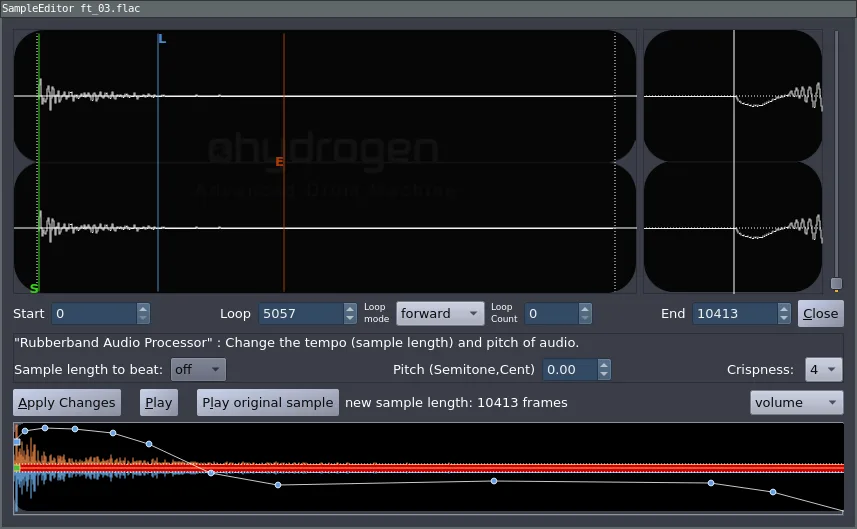
- Per‑instrument, sample, and note parameter editing
- High‑quality time‑stretching and pitch‑shifting
- OSC API for remote automation
- Customizable UI layout and skinning
- Pattern‑based sequencing with song mode
- Support for importing/exporting standard drum kit formats
Vorteile
- Free and open source
- Stable and performant on modest hardware
- Very flexible MIDI routing
- Large community and documentation
Nachteile
- Interface feels dated compared with modern commercial GUIs
- Limited built‑in effects; external processing often required
- No native VSTi host; needs a DAW for plugin integration
Windows-Programme, die Hydrogen ersetzt
 Addictive Drums
Hydrogen unter Linux installieren
flatpak install flathub org.hydrogenmusic.HydrogenTipps für Windows-Umsteiger
Hydrogen stores patterns as .h2song files and drumkits as .h2drumkit, both plain XML, so you can export your Addictive Drums MIDI tracks and import them as MIDI into Hydrogen. Keyboard shortcuts differ (e.g., Space toggles play, Ctrl+N creates a new pattern), so spend a few minutes mapping your favorite actions. Use the built‑in drumkit manager to load existing kits or copy your sample folders into ~/.hydrogen/data/drumkits for quick access.
Neueste Versionen
- 1.2.7 —
This patch release fixes minor bugs and improves forward compatibility with the upcoming 2.0 release.
- 1.2.6 —
This patch release fixes a bug introduced in 1.2.5 and other minor issues.
- 1.2.5 —
This patch release introduces Qt6 support, deprecates LASH support, and fixes a number of bugs and inconsistencies found since version 1.2.4
- 1.2.4 —
This patch release fixes a number of bugs and inconsistencies found since version 1.2.3
Hydrogen: häufige Fragen
Can Hydrogen be used as a VST plugin?
No, Hydrogen is a standalone application; you can route its audio or MIDI to a DAW, but it does not provide a VSTi.
How do I import my own samples?
Place WAV files in a new folder under ~/.hydrogen/data/drumkits and use the Drumkit Manager to add them to a kit.
Is there a Windows version of Hydrogen?
Hydrogen is primarily developed for Linux, though unofficial Windows builds exist; the Linux version is the most up‑to‑date.
Can I automate Hydrogen parameters from a DAW?
Yes, Hydrogen exposes an OSC API and MIDI CC messages that many DAWs can send for automation.
Aktualisiert am